
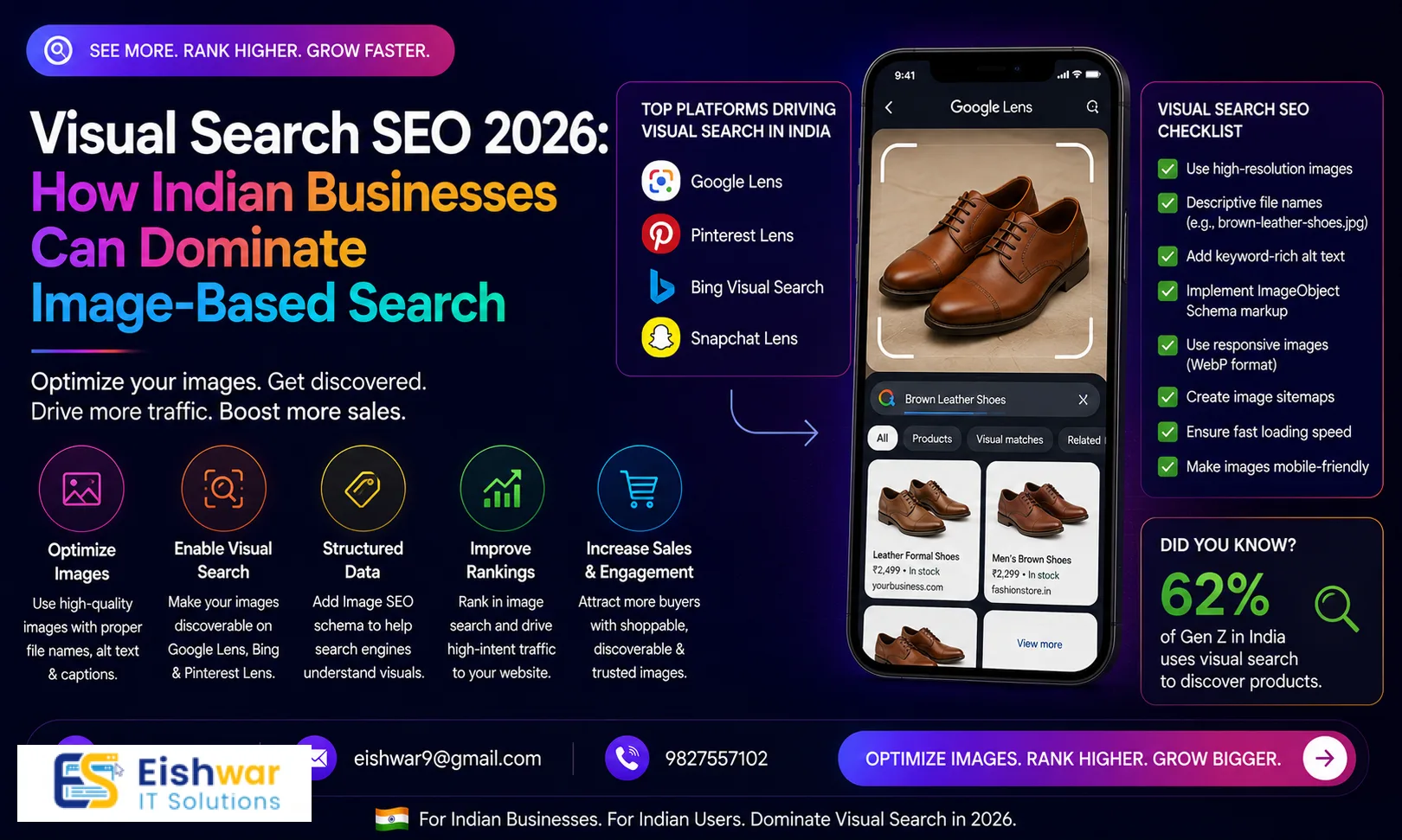
Visual Search SEO 2026: How Indian Businesses Can Dominate Image-Based
Published on: 29 Jun 2026
Visual Search SEO 2026: How Indian Businesses Can Dominate Image-Based Queries
Introduction
Imagine a customer in Mumbai snapping a photo of a saree they saw on the street and instantly finding where to buy it online. That's the power of visual search. In 2026, visual search is not a futuristic concept—it's a mainstream behavior, especially in India where smartphone penetration and mobile-first habits are high. Google Lens alone processes over 10 billion visual searches per month globally, and Indian users are among the top adopters, with a 40% year-over-year increase in usage according to Google's internal data. From a teenager in Delhi searching for a backpack they saw in a movie to a homemaker in Chennai looking for a specific kitchen appliance, visual search is becoming the default way to discover products and information.
Learn more about our Website services
For business owners, marketers, and professionals targeting the Indian market, ignoring visual search means leaving a massive chunk of potential traffic on the table. A recent study by Gartner predicts that by 2026, 30% of all search queries will be visual or voice-based, and early adopters in India are already seeing conversion rates 2-3x higher than traditional text search. This guide will walk you through everything you need to know about visual search optimization—from technical image SEO to content strategies that make your brand discoverable through images. Whether you run an e-commerce store, a local service, or a B2B firm, these tactics will help you capture leads and sales from visual queries.
Main Section 1: Understanding Visual Search and Its Importance for Indian Businesses
Visual search allows users to search using images instead of text. Platforms like Google Lens, Pinterest Lens, and Bing Visual Search let users take a photo or upload an image to find similar products, information, or places. In India, visual search is booming due to the popularity of smartphones with high-quality cameras and affordable data plans. The average Indian smartphone user spends over 4 hours per day on their device, and a significant portion of that time involves visual content consumption on platforms like Instagram, YouTube, and Pinterest.
Why Indian businesses should care:
- High mobile usage: Over 75% of internet users in India access the web via mobile, making visual search a natural fit. In fact, India has the second-largest smartphone user base in the world, with over 750 million users.
- E-commerce growth: Online shopping in India is expected to reach $350 billion by 2030. Visual search helps shoppers find products faster, reducing the time from discovery to purchase by up to 50%. For example, a user can snap a photo of a dress they like and instantly find it on an e-commerce platform, bypassing the need to type keywords.
- Local discovery: Users search for local businesses by snapping photos of storefronts or products. A recent survey found that 60% of Indian consumers have used visual search to find a local business, such as a restaurant, salon, or boutique.
- Zero-click searches: Visual search often leads to direct actions like visiting a website or calling a business. Google Lens, for instance, can display a business's contact information, reviews, and directions directly in the search results, making it easier for users to take action without clicking through.
For example, a restaurant in Delhi can optimize images of its dishes so that when someone takes a photo of a similar dish, the restaurant appears in search results. This drives foot traffic and orders. Similarly, a local florist in Bangalore can optimize images of their flower arrangements to appear when users snap photos of flowers they see elsewhere.
👉 Don't wait for the perfect moment; turn your vision into reality today.
Free ConsultationMain Section 2: Technical Optimization for Visual Search
To rank in visual search results, your images must be technically optimized. Here are the key factors, along with practical examples and tips:
Image File Names
Use descriptive, keyword-rich file names instead of generic ones like 'IMG_001.jpg'. For instance, 'red-silk-saree-mumbai.jpg' is better. Include relevant keywords that describe the image content, such as the product name, color, material, and location. For a local business, you might use 'mumbai-boutique-red-silk-saree.jpg'. This helps search engines understand the context of the image.
Tip: Use hyphens to separate words in file names, as search engines treat hyphens as word separators. Avoid underscores or spaces.
Alt Text
Alt text is crucial for accessibility and SEO. Describe the image accurately and include your target keyword naturally. Example: 'Red silk saree with golden border, traditional Indian wedding wear, draped on a mannequin.' Avoid keyword stuffing; instead, write a concise, descriptive sentence that a screen reader would find useful.
Practical example: For a product image on an e-commerce site, alt text could be 'Handcrafted silver earrings with peacock design, Jaipur jewelry, on a white background.'
Image Compression and Format
Large images slow down your site, hurting both user experience and rankings. Compress images using tools like TinyPNG, ImageOptim, or WebP format. Aim for file sizes under 100 KB for typical web images, and under 200 KB for high-resolution product images. Use modern formats like WebP, which offers 25-35% better compression than JPEG without quality loss.
Tip: Use lazy loading for images below the fold to improve initial page load time. This is especially important for mobile users in India, where network speeds can vary.
Structured Data (Schema Markup)
Implement schema markup for images, especially product schema for e-commerce. This helps search engines understand the context of your images. Use JSON-LD format for best results. For product images, include properties like 'image', 'name', 'brand', 'offers', and 'aggregateRating'.
Example:
{
  "@context": "https://schema.org/",
  "@type": "Product",
  "name": "Red Silk Saree",
  "image": "https://example.com/red-silk-saree.jpg",
  "brand": "SilkEmporium",
  "offers": {
    "@type": "Offer",
    "price": "2500",
    "priceCurrency": "INR"
  }
}
Responsive Images
Ensure images display correctly on all devices. Use srcset attributes to serve different sizes based on screen resolution. For example, serve a 400px wide image for mobile, 800px for tablet, and 1200px for desktop. This improves load times and user experience.
Tip: Use the
Tools like Google's PageSpeed Insights can help you identify image optimization opportunities. Aim for a score of 90+ on mobile and desktop.
👉 Free Website Audit
Get Free AuditMain Section 3: Content Strategies for Visual Search Success
Beyond technical tweaks, your content strategy should align with how users search visually. Here are actionable strategies with examples:
Create High-Quality, Original Images
Avoid stock photos. Use original images of your products, team, or location. High-resolution, well-lit images perform better. For example, a real estate agent in Bangalore should upload professional photos of properties, including interior and exterior shots. A fashion brand should use models of diverse body types to appeal to a wider audience.
Tip: Use a consistent style for your images, such as a specific background color or lighting setup, to build brand recognition.
Use Descriptive Captions and Context
Add captions to images that provide additional context. This helps search engines and users understand what's in the image. For example, a caption for a food image could be 'Our signature butter chicken, served with naan and rice, at our Delhi outlet.' Captions can also include calls-to-action, like 'Order now for delivery.'
Leverage User-Generated Content
Encourage customers to share photos of your products on social media with a branded hashtag. Repost them on your site with proper attribution. This builds trust and provides fresh, authentic visuals. For example, a travel agency in Goa can feature customer photos of their trips, which are more relatable than stock images.
Tip: Run a contest where customers submit photos using your product, and feature the winners on your website. This generates a steady stream of UGC.
Optimize for Google Lens
Google Lens often pulls images from Google Images and web pages. Ensure your images are indexed and have clear subject matter. Use Google's Search Console to monitor image performance. For local businesses, include location-specific keywords in image metadata, such as 'Mumbai street food vada pav.'
Practical example: A boutique in Jaipur can optimize images of their jewelry by including 'Jaipur jewelry' in the file name, alt text, and caption. This increases the chances of appearing when users snap photos of similar jewelry in Jaipur.
Integrate Visual Search on Your Website
Add a visual search feature to your site using tools like Syte, ViSenze, or Google's Cloud Vision API. This allows users to upload images to find products, enhancing user experience and increasing conversions. For example, a furniture store can let users upload a photo of a sofa they like, and the site will show similar products in stock.
Tip: Place the visual search button prominently on your homepage and product pages, and make it mobile-friendly.
Expert Tips
- Tip 1: Use descriptive URLs for image pages. Example: yoursite.com/products/red-silk-saree. Avoid generic URLs like yoursite.com/product?id=123.
- Tip 2: Submit an image sitemap to Google Search Console to ensure all images are indexed. Include the image URL, caption, and license information if applicable.
- Tip 3: Monitor visual search analytics in Google Search Console under 'Search results' > 'Image' to see which images drive traffic. Look for high click-through rates and impressions to identify top-performing images.
- Tip 4: Test your images using Google Lens on your phone to see how they appear in search results. If your image doesn't appear, review your optimization efforts.
- Tip 5: For local businesses, include geotags in image metadata to appear in local visual searches. Use tools like GeoImgr to add GPS coordinates to your images.
- Tip 6: Use A/B testing to compare different image styles (e.g., white background vs. lifestyle setting) to see which generates more visual search traffic.
Common Mistakes
- Ignoring alt text: Many businesses skip alt text, missing a key ranking factor. Always add alt text, even for decorative images (use empty alt text for decorative images to avoid clutter).
- Using low-resolution images: Blurry or pixelated images hurt credibility and rankings. Use images with a minimum resolution of 1200x800 pixels for product shots.
- Overlooking mobile optimization: Visual search is primarily mobile, so ensure images load quickly on phones. Use tools like Google's Mobile-Friendly Test to check.
- Not using structured data: Without schema, search engines may not understand your images' context. Implement product, recipe, or local business schema as applicable.
- Copying competitor images: Original images perform better and avoid copyright issues. Invest in professional photography or use AI tools to generate unique visuals.
- Ignoring image sitemaps: Without an image sitemap, search engines may miss indexing your images. Submit a sitemap specifically for images.
Future Trends
Visual search will continue to evolve. In 2026 and beyond, expect:
👉 Free Homepage Demo
Book Demo- AR integration: Augmented reality will let users visualize products in their environment before buying. For example, IKEA's AR app lets users see how furniture looks in their home. Indian furniture brands can adopt similar technology.
- Voice + visual search: Combining voice commands with image queries for seamless discovery. Users might say 'Show me red sarees' while snapping a photo of a saree they like.
- Shoppable images: Direct purchasing from visual search results. Google Lens already allows users to buy products directly from search results, and this will become more widespread.
- AI-generated images: Brands may use AI to create optimized visuals at scale, such as generating product images in different colors or styles based on user preferences.
- Personalized visual search: Search engines will use user behavior and preferences to tailor visual search results, making them more relevant.
Indian businesses that adopt visual search early will have a competitive edge as these technologies mature. For instance, a small business in Pune that starts optimizing images now will be well-positioned when AR shopping becomes mainstream.
FAQs
- What is visual search? Visual search is a technology that allows users to search using images instead of text. For example, taking a photo of a product to find where to buy it. It uses AI to analyze the image and match it with similar items in a database.
- How does visual search benefit Indian businesses? It helps businesses get discovered by users who prefer visual discovery, especially on mobile. It drives traffic, leads, and sales, particularly for e-commerce and local businesses. For example, a small business in Jaipur can appear in visual search results when someone snaps a photo of a similar product, increasing visibility without spending on ads.
- Do I need special software for visual search optimization? No, you can start with basic image SEO practices like alt text, file names, and compression. Advanced tools like Google Lens, visual search plugins (e.g., Syte, ViSenze), and image optimization tools (e.g., TinyPNG) can enhance results. For e-commerce, consider integrating a visual search API.
- Is visual search only for e-commerce? No, any business can benefit. For example, a restaurant can optimize images of its dishes, a hotel can showcase rooms, a real estate agent can list properties, and a service provider can share portfolio images. Even B2B companies can optimize images of their products or team.
- How long does it take to see results from visual search optimization? It varies, but with consistent efforts, you may see improvements in image traffic within a few weeks to months. Monitor Google Search Console for progress. Factors include the competitiveness of your industry, the quality of your images, and how quickly search engines index your content.
- Can visual search replace traditional text search? Not entirely, but it complements it. Users often combine both methods for a richer search experience. For example, a user might snap a photo of a product and then refine the search with text keywords like 'under 2000 rupees.'
- What are the best tools for visual search optimization? Tools like Google Lens for testing, Google Search Console for monitoring, TinyPNG for compression, and Schema.org for structured data. For e-commerce, consider Syte or ViSenze for on-site visual search.
Conclusion
Visual search is reshaping how Indian users discover brands and products online. By optimizing your images, implementing technical best practices, and aligning your content strategy, you can tap into this growing channel and stay ahead of competitors. Start small—fix alt text, compress images, and add structured data. Then expand with original visuals and user-generated content. The future of search is visual, and your business can lead the way. Remember, every image you upload is an opportunity to be discovered. Make it count.
CTA
Ready to dominate visual search in India? Contact EishwarITSolution today for a free visual search audit and personalized strategy. Let's make your brand discoverable through every image. Our team of experts will analyze your current image SEO, identify gaps, and create a tailored plan to boost your visual search presence. Don't let your competitors get ahead—act now.