
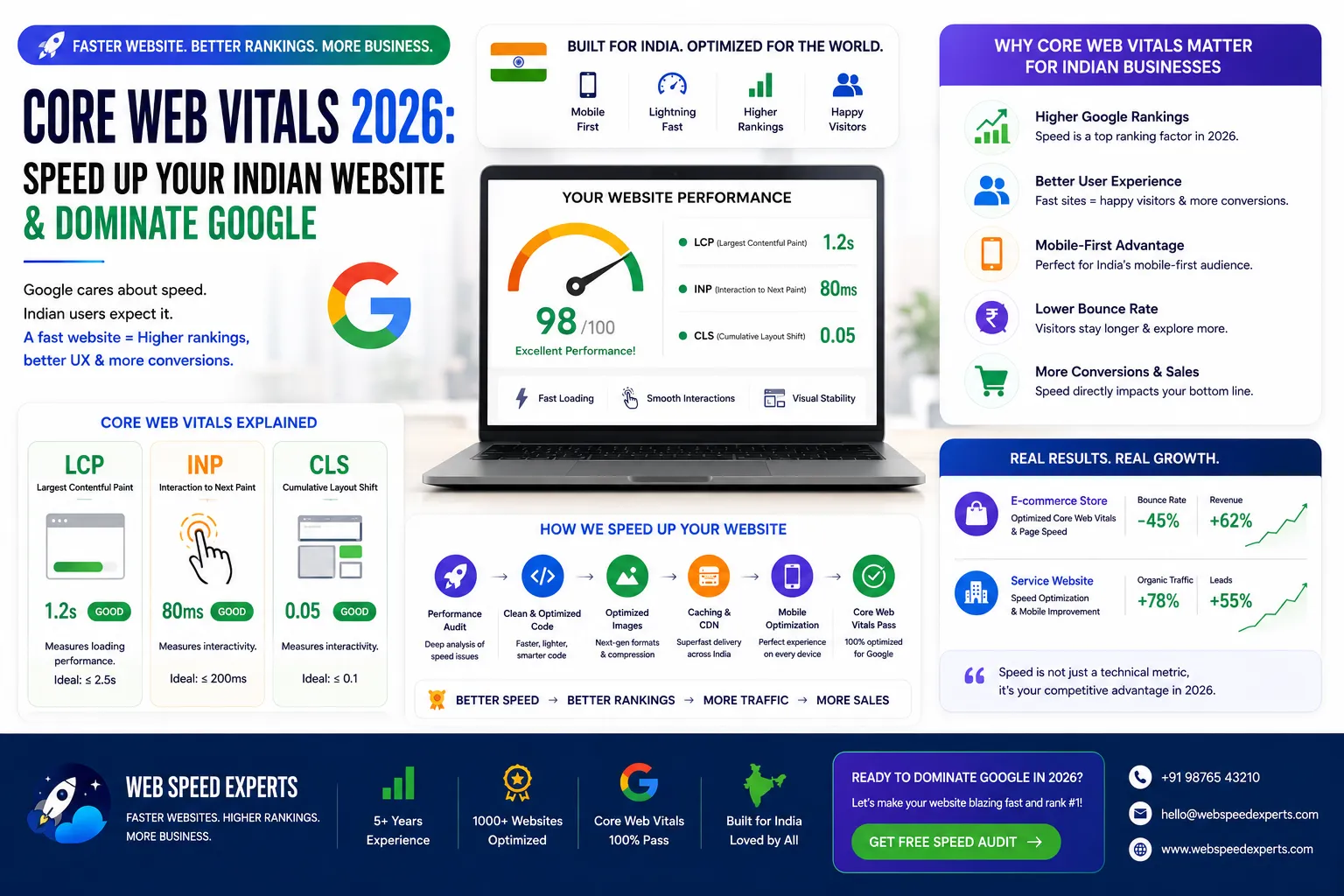
Core Web Vitals 2026: Speed Up Your Indian Website & Dominate Google
Published on: 16 Jun 2026
Core Web Vitals 2026: Speed Up Your Indian Website & Dominate Google
Introduction
Is your website loading slowly? In 2026, Google's Core Web Vitals are more critical than ever for Indian businesses. If your site takes more than 2.5 seconds to load its largest element (LCP), or if it has layout shifts (CLS) that frustrate visitors, you are losing traffic, leads, and revenue. This guide will show you exactly how to optimize Core Web Vitals for your Indian audience, improve user experience, and boost your search rankings. At EishwarITSolution, we help business owners like you turn slow sites into speed demons. Let's dive in.
Learn more about our Website services
Consider this: a typical e-commerce site in India loses nearly half its mobile visitors if the page takes more than 3 seconds to load. With over 700 million internet users in India, many on 4G or even 3G connections, every millisecond matters. Google's 2026 algorithm updates have made Core Web Vitals a cornerstone of ranking, especially for local searches like 'best restaurant in Mumbai' or 'plumber in Delhi'. If your site is slow, you're not just losing visitors—you're handing them to competitors who have optimized. This guide is tailored for Indian businesses, addressing unique challenges like variable network speeds, heavy multimedia content, and the need for mobile-first design. Let's get your site ready to dominate.
Main Section 1: What Are Core Web Vitals and Why Do They Matter in 2026?
Core Web Vitals are a set of real-world metrics that measure user experience on your website. Google uses them as ranking signals. In 2026, with mobile-first indexing and user expectations at an all-time high, ignoring these metrics is a direct hit to your SEO performance.
The three key metrics are:
- Largest Contentful Paint (LCP): How fast does the main content load? Target: under 2.5 seconds. For Indian sites, this often means optimizing hero images or product galleries that are heavy due to high-resolution photography.
- First Input Delay (FID): How quickly does your site respond to user clicks? Target: under 100 milliseconds. In 2026, Google is transitioning to Interaction to Next Paint (INP), which measures overall responsiveness. FID is still relevant but INP will soon replace it.
- Cumulative Layout Shift (CLS): How stable is your page layout? Target: less than 0.1. Indian websites with multiple ads, pop-ups, or dynamic content often suffer from high CLS, causing users to accidentally click on wrong links.
For Indian websites, factors like slow internet speeds, heavy images, and unoptimized code often cause poor scores. Fixing these not only improves rankings but also reduces bounce rates and increases conversions. A 1-second delay in load time can cost you 7% of conversions. That's real money. For example, an online clothing retailer in Jaipur reduced LCP from 4.2 seconds to 1.8 seconds and saw a 12% increase in sales within a month. The impact is tangible.
Moreover, Google's 2026 update emphasizes 'page experience' as a holistic signal, including Core Web Vitals, mobile-friendliness, safe browsing, HTTPS, and intrusive interstitial guidelines. Sites that excel in all areas get a boost in search results, especially for high-intent queries. For Indian businesses targeting local customers, this is a game-changer. A restaurant in Bangalore with a fast, stable site will outrank a slower competitor even if both have similar content and backlinks.
👉 Don't wait for the perfect moment; turn your vision into reality today.
Free ConsultationMain Section 2: How to Optimize LCP, FID, and CLS for Indian Audiences
Let's get practical. Here are actionable steps for each metric, with examples relevant to Indian websites.
Optimizing LCP (Largest Contentful Paint)
LCP is often the hero image, video, or large text block. To speed it up:
- Compress images using WebP format. For example, a 2MB JPEG can become 200KB without quality loss. Tools like TinyPNG or ShortPixel can batch-convert images. For a travel blog featuring high-res photos of Kerala backwaters, switching to WebP reduced page weight by 60%.
- Use a CDN with servers in India. Providers like Cloudflare, Fastly, or Akamai have Points of Presence (POPs) in Mumbai, Delhi, Bangalore, and Chennai. This reduces latency for users across the country. A Chennai-based SaaS company saw LCP drop from 3.1s to 1.9s after switching to a CDN with Indian POPs.
- Minimize server response time. Upgrade your hosting to a VPS or a cloud solution like AWS, Google Cloud, or DigitalOcean if you're on shared hosting. Shared hosting in India often has overcrowded servers; a VPS with SSD storage can cut TTFB (Time to First Byte) by half.
- Preload critical resources. Use
<link rel='preload'>for fonts and above-the-fold images. For example, preload your logo and main banner image so they load first. Avoid preloading everything—focus on what's visible initially. - Optimize text rendering. Use system fonts like Arial or Noto Sans for body text to avoid font loading delays. If you must use custom fonts, subset them to include only Indian language characters (e.g., Devanagari) and use font-display: swap.
Optimizing FID (First Input Delay)
FID is about interactivity. Long JavaScript tasks block the main thread. Fixes include:
- Defer non-critical JavaScript. Use the
deferorasyncattribute. For example, analytics scripts like Google Analytics or Facebook Pixel should be deferred so they don't block user interactions. - Break up long tasks. If a script takes 200ms, split it into chunks of 50ms using techniques like requestIdleCallback or web workers. For a WordPress site with many plugins, identify which scripts are heavy (e.g., slider plugins) and replace them with lighter alternatives.
- Use a lightweight JavaScript framework. Consider Alpine.js or vanilla JS instead of heavy libraries like jQuery or React for simple interactions. A news portal in Delhi reduced FID from 150ms to 45ms by replacing jQuery-based carousels with CSS-only animations.
- Minify and tree-shake JavaScript. Remove unused code. Tools like Webpack or PurgeCSS can eliminate dead code. For example, if you only use 10% of Bootstrap's JavaScript, remove the rest.
Optimizing CLS (Cumulative Layout Shift)
CLS happens when elements move unexpectedly. For Indian sites with many ads or dynamic content, this is common. Solutions:
- Set explicit width and height for images and videos. Use
width='600' height='400'in HTML. This prevents layout shifts when images load. For responsive images, use aspect-ratio in CSS:aspect-ratio: 3/2. - Reserve space for ads using fixed-size containers. Avoid loading ads that push content down. Use
min-heightfor ad slots. For example, a Google AdSense unit can be placed in a div with a fixed height of 250px. - Use system fonts or preloaded web fonts to avoid flash of invisible text (FOIT). Set
font-display: swapin your CSS so text appears immediately with a fallback font. - Load dynamic content (e.g., banners, pop-ups) after the main layout is stable. Use JavaScript to insert such elements after the page has painted, ensuring they don't cause shifts.
- Avoid inserting new content above existing content. For example, if you have a sticky header, ensure it doesn't push down the page content. Use position: sticky with a defined height.
Main Section 3: Tools to Measure and Monitor Core Web Vitals
You can't improve what you don't measure. Here are the best free and paid tools:
👉 Free Website Audit
Get Free Audit- Google PageSpeed Insights: Gives lab and field data. Perfect for initial diagnosis. Enter your URL, and it provides scores for mobile and desktop along with specific recommendations. For Indian sites, use the 'Origin' field data to see real user experiences from India.
- Google Search Console: Shows real-world Core Web Vitals reports for your entire site. It categorizes URLs as 'Good', 'Needs Improvement', or 'Poor'. Check this weekly to identify problem pages.
- Lighthouse (in Chrome DevTools): Detailed audits with actionable suggestions. Run it in incognito mode to avoid extension interference. It gives a performance score and highlights issues like 'Eliminate render-blocking resources'.
- WebPageTest: Advanced testing from multiple locations, including India (e.g., Mumbai, Bangalore). It provides waterfall charts, filmstrips, and detailed metrics. Use it to simulate 3G connections common in rural India.
- GTmetrix: Easy-to-read reports with waterfall charts. It also provides a 'Web Vitals' tab that shows LCP, FID, and CLS. The paid version offers historical data.
- CrUX (Chrome User Experience Report): A public dataset in BigQuery that shows real-user metrics for millions of websites. You can query it to see how your site performs for Indian users.
Pro tip: Run tests regularly, especially after adding new features or content. Aim for green scores across all metrics. Set up automated monitoring using tools like SpeedCurve or Calibre to get alerts when scores drop.
Expert Tips
Here are five insider tips from our SEO team at EishwarITSolution:
- Prioritize mobile optimization: Over 70% of Indian users browse on mobile. Test on real devices, not just emulators. Use Google's Mobile-Friendly Test and check for issues like tiny fonts or close tap targets. For example, ensure buttons are at least 48x48 pixels.
- Use lazy loading wisely: Lazy load below-the-fold images, but ensure LCP elements are loaded immediately. Use native lazy loading (
loading='lazy') for images and iframes. Avoid lazy loading hero images or above-the-fold content. - Leverage browser caching: Set cache headers for static assets (images, CSS, JS) to reduce repeat load times. For example, cache images for 30 days and CSS/JS for 7 days. Use a plugin like W3 Total Cache for WordPress.
- Optimize your WordPress site: Use caching plugins like WP Rocket or W3 Total Cache, and choose a lightweight theme like GeneratePress or Astra. Avoid page builders like Elementor if they add bloat. Use a child theme for customizations.
- Monitor third-party scripts: Analytics, chat widgets, and ads can slow down your site. Audit them quarterly. For example, if you have a live chat widget, load it asynchronously or only on pages where it's needed. Consider using a tag manager like Google Tag Manager to control script loading.
Common Mistakes
Avoid these pitfalls that many Indian website owners make:
👉 Free Homepage Demo
Book Demo- Ignoring CLS: Many focus only on speed but forget layout shifts. This hurts user experience and rankings. For example, a news site that loads ads without reserved space can cause text to jump, frustrating readers.
- Over-optimizing images: Compressing too much can degrade quality. Find a balance between size and clarity. Use tools like ImageOptim to visually compare compressed vs. original. For product images, aim for 80-100KB per image.
- Using too many plugins: Each plugin adds code. Keep only essential plugins on your site. For example, a WooCommerce store with 50 plugins will be slow. Audit and remove unused plugins.
- Not testing from India: A fast server in the US may be slow in India. Use a CDN with Indian POPs. Test using WebPageTest from Mumbai location.
- Neglecting Core Web Vitals after launch: Optimization is an ongoing process. Set monthly checks. Use Google Search Console to monitor changes over time.
Future Trends
Core Web Vitals will evolve. Here's what to expect in 2026 and beyond:
- New metrics: Google may introduce Interaction to Next Paint (INP) as a replacement for FID. Start preparing now by optimizing for overall responsiveness. INP measures the time from user interaction to the next visual update. Aim for under 200ms.
- AI-driven optimization: Tools will automatically adjust images, scripts, and layouts in real-time. For example, AI-based CDNs can compress images on the fly based on user device and network.
- 5G and edge computing: Faster networks will raise user expectations. Sites must be near-instant. Edge computing can process requests closer to users, reducing latency. For Indian cities with 5G rollout, this is crucial.
- Voice and visual search: Optimizing for these will require even faster load times. Voice search queries often expect immediate answers. Ensure your site's structured data is optimized for rich results.
- Privacy-friendly analytics: Use tools like Google Analytics 4 with minimal impact on performance. Consider server-side tracking to reduce client-side JavaScript.
FAQs
1. What is a good Core Web Vitals score?
For LCP: under 2.5 seconds. For FID: under 100 ms. For CLS: under 0.1. Green status in Google Search Console means you're good. For INP (upcoming), aim for under 200 ms.
2. How do I check Core Web Vitals for my site?
Use Google PageSpeed Insights, Google Search Console, or Lighthouse. These tools provide both lab and field data. For real-user data, use the CrUX report in PageSpeed Insights.
3. Can Core Web Vitals alone improve my rankings?
They are a ranking factor but not the only one. Combine with quality content, backlinks, and technical SEO for best results. In competitive niches like e-commerce or local services, Core Web Vitals can be a tie-breaker.
4. How often should I monitor Core Web Vitals?
At least once a month. After major site updates, check immediately. Use automated tools like Google Search Console for continuous monitoring. Set up alerts for score drops.
5. Are Core Web Vitals different for mobile and desktop?
Yes. Google uses mobile metrics for mobile search results and desktop metrics for desktop. Optimize both, but prioritize mobile since over 70% of Indian users browse on mobile.
6. What is the biggest challenge for Indian websites?
Slow server response times and heavy images due to limited bandwidth. CDN and image compression are key solutions. Also, many Indian sites use shared hosting, which can be slow.
7. Do I need a developer to fix Core Web Vitals?
Some fixes (like image optimization) are easy. Others (like JavaScript minification) may need technical help. EishwarITSolution offers expert support for complex issues like server optimization or code refactoring.
8. How does Core Web Vitals affect local SEO in India?
Google uses page experience as a ranking factor for local search. A fast, stable site can help you appear in the local pack (map results) for queries like 'dentist in Pune'.
9. Can I use a plugin to fix Core Web Vitals on WordPress?
Yes, plugins like WP Rocket, Perfmatters, or Flying Press can help with caching, minification, and lazy loading. However, they may not fix all issues, especially server-related ones.
10. What is the impact of Core Web Vitals on conversion rates for Indian e-commerce sites?
Significant. A 1-second delay can reduce conversions by 7%. For a site with 100,000 monthly visitors and a 2% conversion rate, that's 140 lost sales per month.
Conclusion
Core Web Vitals are not just a technical checkbox—they are a direct reflection of your user experience. In 2026, Indian websites that prioritize speed and stability will outrank competitors, keep visitors engaged, and drive more conversions. Start by measuring your current scores, then implement the fixes we've discussed. Remember, every millisecond counts. If you need expert help, EishwarITSolution is here to guide you. The Indian digital landscape is growing rapidly, and those who invest in performance today will reap the rewards tomorrow. Don't let a slow site hold you back.
CTA
Ready to supercharge your website speed and crush your Core Web Vitals? Contact EishwarITSolution today for a free performance audit. Let's make your site lightning-fast and SEO-optimized for 2026. Get in touch now. Our team of experts will analyze your site, provide a detailed report, and help you implement the changes needed to dominate Google search results. Don't wait—your competitors are already optimizing.