
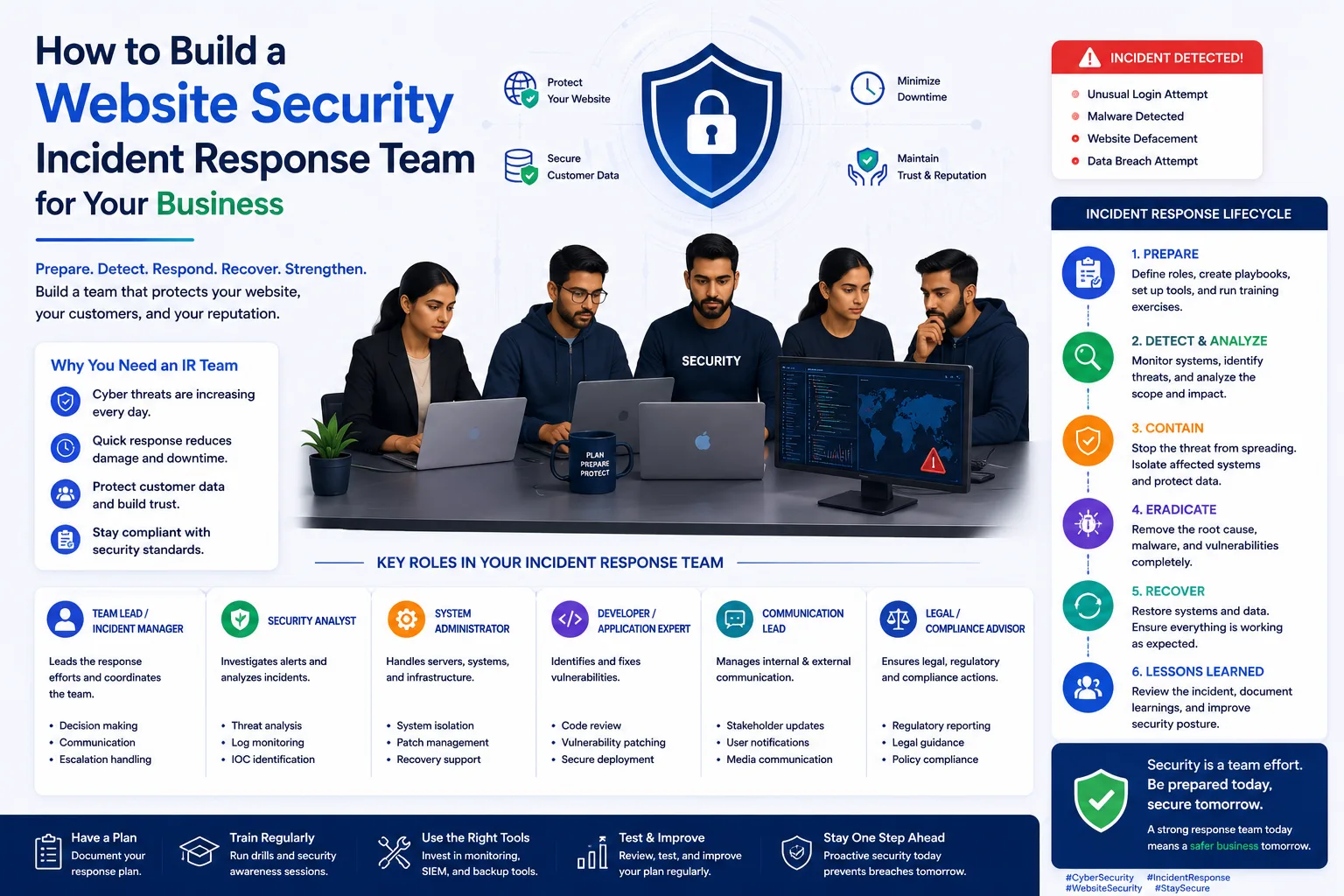
How to Build a Website Security Incident Response Team for Your Busine
Published on: 13 Jun 2026
How to Build a Website Security Incident Response Team for Your Business
Introduction
In today's digital landscape, website security is no longer optional—it's a business necessity. Cyber threats are evolving rapidly, and even the most robust security measures can fail. When a security incident occurs, how you respond can make the difference between a minor disruption and a catastrophic data breach. That's where a Website Security Incident Response Team (WSIRT) comes in.
Learn more about our Website services
For business owners, marketers, and professionals in India, having a dedicated team to handle security incidents is a proactive step that protects your reputation, customer trust, and bottom line. This guide will walk you through everything you need to know about setting up an effective WSIRT for your business, from defining roles to creating response playbooks. We'll cover practical examples, tools, and expert tips to ensure you're prepared for any eventuality.
Main Section 1: Why Your Business Needs a Website Security Incident Response Team
A website security incident response team is a group of individuals responsible for preparing for, detecting, responding to, and recovering from security incidents. Without such a team, your business may face delayed response times, inconsistent actions, and increased damage. The stakes are high: according to a 2023 report by IBM, the average cost of a data breach in India was ₹17.9 crore, with a response time of over 200 days. A WSIRT can drastically reduce both the financial and reputational impact.
Consider this real-world example: a small Indian e-commerce site suffered a data breach exposing customer payment details. Without a response team, the owner spent days figuring out what happened, while customers lost trust and the site got blacklisted by search engines. A well-prepared WSIRT could have minimized the damage and restored operations quickly, potentially saving the business from closure.
Key benefits include:
- Faster response: A team with clear roles can act immediately, reducing the window of vulnerability from hours to minutes.
- Reduced financial loss: Quick containment prevents prolonged downtime, data loss, and potential legal costs. For example, a retail site hit by ransomware could lose ₹50,000 per hour of downtime.
- Better compliance: Many regulations (like India's IT Act and upcoming Digital Personal Data Protection Act) require documented incident response plans and timely breach reporting.
- Enhanced reputation: Customers appreciate transparency and swift action during crises. A 2022 survey found that 65% of Indian consumers would stop using a brand after a data breach if not handled properly.
In essence, a WSIRT is not just about technology—it's about business continuity and trust.
Main Section 2: Steps to Build Your Website Security Incident Response Team
Building a WSIRT doesn't require a huge budget. Even small businesses can create an effective team with the right structure. Follow these steps:
Step 1: Define Team Roles and Responsibilities
Assign clear roles based on your team size. Typical roles include:
- Team Lead: Oversees the entire response process, makes critical decisions, and communicates with stakeholders. This person should have authority to allocate resources and escalate issues.
- Technical Analysts: IT or web developers who investigate the incident, preserve evidence, and implement fixes. They need skills in log analysis, malware removal, and system restoration.
- Communications Lead: Handles internal and external communications, including customers, media, and law enforcement. This role is crucial for managing public perception.
- Legal Advisor: Ensures compliance with data protection laws and advises on legal obligations. For Indian businesses, this includes understanding the IT Act, 2000, and sector-specific regulations like RBI guidelines for fintech.
For a small business, one person may wear multiple hats. The key is to document who does what before an incident occurs. For instance, in a team of two, one person can handle technical aspects while the other manages communication and legal issues. Create a RACI matrix (Responsible, Accountable, Consulted, Informed) to avoid confusion.
👉 Don't wait for the perfect moment; turn your vision into reality today.
Free ConsultationStep 2: Develop an Incident Response Plan
Your plan should outline the end-to-end process for handling incidents. Use the NIST framework as a guide: Preparation, Detection & Analysis, Containment & Eradication, Recovery, and Post-Incident Activity. Break down each phase into actionable steps:
- Preparation: Set up monitoring tools, define escalation paths, and create a contact list for internal and external resources (e.g., hosting provider, legal counsel).
- Detection & Analysis: Use tools like Wazuh or OSSEC to detect anomalies. For example, if a sudden spike in failed login attempts occurs, your team should investigate immediately.
- Containment & Eradication: Isolate affected systems (e.g., take the website offline), remove malware, and patch vulnerabilities. For a WordPress site, this might involve disabling plugins and restoring a clean backup.
- Recovery: Restore systems from verified backups, test functionality, and monitor for any signs of reinfection.
- Post-Incident Activity: Conduct a root cause analysis, update playbooks, and report to relevant authorities if required.
Create playbooks for common scenarios like malware infection, DDoS attack, or data breach. Each playbook should include step-by-step actions, tools to use, and communication templates. For example, a data breach playbook might include a template for notifying affected customers and a checklist for preserving forensic evidence.
Step 3: Set Up Communication Channels
Establish secure communication methods for your team during an incident. Use encrypted messaging apps like Signal or a dedicated Slack channel with end-to-end encryption. Also, define escalation paths—when should you involve senior management or external experts? For instance, if a breach involves sensitive customer data, the legal advisor should be notified within 30 minutes.
Create a communication tree that lists who to contact and in what order. Include external contacts like your hosting provider's security team, a local cybersecurity firm (e.g., for Indian businesses, consider firms like K7 Security or Seqrite), and law enforcement (e.g., Indian Cyber Crime Coordination Centre).
Step 4: Train Your Team Regularly
Conduct tabletop exercises and simulated attacks to test your team's readiness. For example, simulate a phishing email that leads to a compromised admin account. Evaluate how your team detects, contains, and recovers. Update your plan based on lessons learned. Aim for quarterly drills, but also run ad-hoc tests after major system changes.
Practical tip: Use free tools like Cyberbit or RangeForce for simulation exercises. For Indian businesses, consider partnering with local cybersecurity training providers like EC-Council India for customized workshops.
👉 Free Website Audit
Get Free AuditMain Section 3: Tools and Technologies to Empower Your Team
Equip your WSIRT with the right tools to streamline investigations and response. Here are essential categories:
- Monitoring and Detection: Use tools like OSSEC, Wazuh, or cloud-based SIEM solutions (e.g., Splunk, Azure Sentinel) to detect anomalies in real time. For small businesses, free tools like OSSEC can monitor logs and send alerts.
- Forensics and Analysis: Tools like Autopsy or FTK Imager help analyze compromised systems without altering evidence. For example, if a server is hacked, use Autopsy to examine disk images for malware artifacts.
- Communication and Collaboration: A dedicated incident response platform like TheHive or even a shared Google Drive with templates can improve coordination. TheHive allows you to create cases, assign tasks, and track progress.
- Backup and Recovery: Automated backup solutions (e.g., UpdraftPlus for WordPress, Veeam for servers) ensure you can restore clean versions quickly. Test backups monthly to ensure they work.
For Indian businesses, consider tools that offer local support and comply with Indian data sovereignty laws. For example, use cloud services from Indian providers like Tata Communications or Netmagic for hosting sensitive data.
Expert Tips
Here are actionable tips from cybersecurity professionals:
- Start small: Even a two-person team can be effective if roles are clear. Document everything, including login credentials (stored securely), server configurations, and backup locations.
- Use a ticketing system: Track incidents with tools like Jira Service Management or even a simple Trello board to ensure nothing falls through the cracks. Assign priority levels (e.g., P1 for critical breaches, P3 for minor issues).
- Practice with tabletop exercises: Run through scenarios quarterly. For example, 'What if our payment gateway is compromised?' Walk through the steps: isolate the gateway, notify the payment processor, and inform customers.
- Build relationships in advance: Identify external incident response firms or legal experts you can call on during a major breach. Have their contact details in your runbook.
- Keep a 'runbook': A simple document with contact numbers, server access details, and step-by-step actions can save precious time. Store it in a secure, offline location (e.g., a password-protected PDF on a local drive).
- Leverage free resources: Use open-source tools like Snort for intrusion detection or ClamAV for malware scanning. Many Indian cybersecurity communities offer free resources, such as the CERT-In advisories.
Common Mistakes
Avoid these pitfalls when setting up your WSIRT:
- No clear ownership: Without a designated team lead, confusion delays response. For example, during a DDoS attack, if no one is assigned to contact the hosting provider, the attack may continue for hours.
- Overcomplicating the plan: A 50-page document is useless in a crisis. Keep it concise and actionable. Use bullet points and checklists. Aim for a 10-page maximum.
- Neglecting communication: Failing to inform customers or partners promptly can worsen reputation damage. For instance, if a breach occurs and you don't notify customers within 72 hours (as per GDPR-like norms), you may face legal penalties and loss of trust.
- Skipping post-incident reviews: Not analyzing what went wrong means you'll repeat mistakes. After every incident, hold a debrief meeting and update your playbooks.
- Ignoring legal requirements: In India, failure to report data breaches under the IT Act can lead to penalties. For example, the Reserve Bank of India mandates that banks report cyber incidents within 2-6 hours.
- Not testing backups: Many businesses discover their backups are corrupted only when they need them. Test backups monthly by restoring a sample file.
Future Trends
The landscape of incident response is evolving. Here's what to watch for:
👉 Free Homepage Demo
Book Demo- AI-driven response: Machine learning tools can automatically contain threats, reducing human response time. For example, AI-based systems like Darktrace can detect and isolate compromised devices in real time.
- Cloud-native incident response: As more businesses move to cloud platforms, response teams need skills in AWS, Azure, or Google Cloud security. For instance, using AWS GuardDuty for threat detection and AWS Lambda for automated response.
- Ransomware-specific playbooks: With ransomware attacks rising in India (a 2023 report noted a 200% increase), teams must have dedicated strategies for negotiation, decryption, and recovery. Consider pre-negotiation guidelines and backup strategies like the 3-2-1 rule (three copies, two media, one offsite).
- Remote team collaboration: Distributed teams require robust remote incident response protocols and secure communication. Use VPNs for secure access and tools like Mattermost for encrypted messaging.
- Regulatory changes: The Digital Personal Data Protection Act, 2023, will impose stricter breach notification requirements. Stay updated with CERT-In advisories and legal changes.
FAQs
What is a website security incident response team?
A website security incident response team (WSIRT) is a group of individuals responsible for handling security incidents affecting a website. They prepare, detect, respond, and recover from incidents like hacks, data breaches, or malware infections. The team ensures a coordinated and efficient response to minimize damage.
How many people do I need for a WSIRT?
Even a team of two can work effectively if roles are clearly defined. For small businesses, consider having a technical lead and a communications lead. As you grow, expand with dedicated analysts and legal advisors. The key is to document responsibilities and ensure everyone knows their role during an incident.
What are the key phases of incident response?
The common phases are: Preparation, Detection & Analysis, Containment & Eradication, Recovery, and Post-Incident Activity. This framework, based on NIST, helps ensure a structured and effective response. Each phase has specific actions, such as setting up monitoring tools in preparation and conducting root cause analysis post-incident.
Do I need special tools for incident response?
While not mandatory, tools like monitoring systems (Wazuh), forensics tools (Autopsy), and communication platforms (Slack) can significantly improve response efficiency. Start with free or open-source tools if budget is a concern. For example, use OSSEC for monitoring and Google Drive for sharing templates.
How often should I test my incident response plan?
At least quarterly. Regular tabletop exercises and simulated attacks help identify gaps and keep the team prepared. Update the plan after each test or after any major change in your website infrastructure, such as migrating to a new hosting provider or adding new features.
What should I do immediately after detecting a security incident?
First, contain the incident by isolating affected systems (e.g., take the website offline). Then, preserve evidence by taking disk images and logs. Notify your WSIRT team lead and legal advisor. Finally, follow your incident response playbook for the specific type of incident, such as a data breach or malware infection.
How can I ensure compliance with Indian data protection laws during an incident?
Work with a legal advisor who understands the IT Act, 2000, and the Digital Personal Data Protection Act, 2023. Document all actions taken, including timestamps and evidence preservation. Report breaches to CERT-In within 6 hours for critical incidents, and notify affected customers as required. Maintain a breach register for audits.
Conclusion
Building a website security incident response team is one of the most important investments you can make for your business's digital safety. It ensures that when the unexpected happens, you're not scrambling—you're executing a plan. Start small, define roles, create playbooks, and practice regularly. Your customers and your reputation will thank you. Remember, a well-prepared team can turn a potential disaster into a manageable event, protecting your business's future.
CTA
Ready to protect your business with a robust incident response plan? Contact EishwarITSolution today for a free consultation on setting up your website security incident response team. Don't wait for a breach—be prepared. Our experts will help you assess your current readiness, define roles, and create a customized plan that fits your budget and industry.