
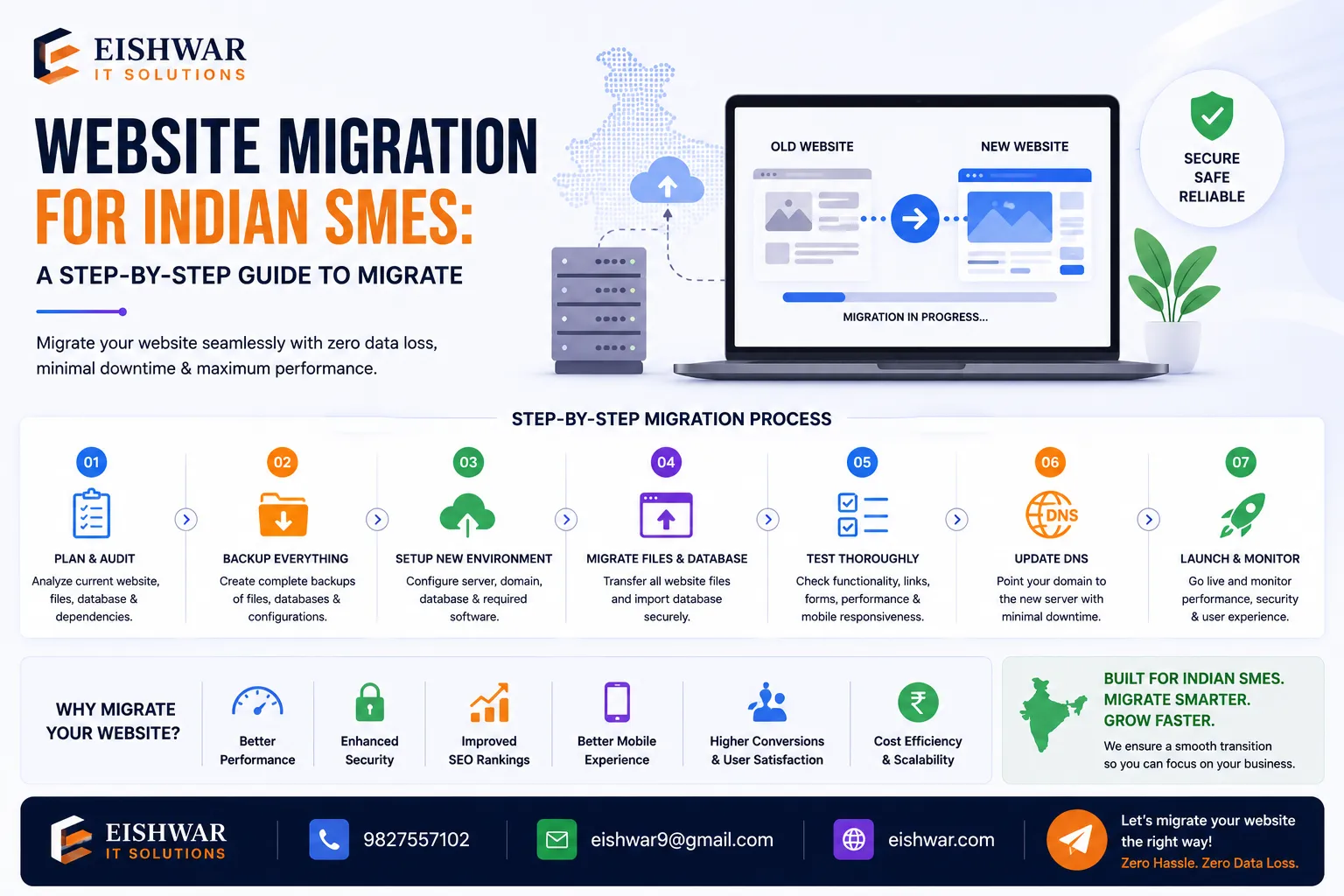
Website Migration for Indian SMEs: A Step-by-Step Guide to Migrate Wit
Published on: 15 Jun 2026
Website Migration for Indian SMEs: A Step-by-Step Guide to Migrate Without Losing SEO or Revenue
Introduction
Imagine your website as the digital storefront of your business. For Indian SMEs, this storefront is often the first point of contact for potential customers—whether they're searching for a local service in Mumbai, browsing products in Delhi, or comparing vendors in Bengaluru. But what happens when you need to move it to a new server, change your domain, or completely revamp your site? A website migration can feel like performing open-heart surgery on your online presence. One wrong move, and you could lose traffic, rankings, and revenue—sometimes overnight. However, with the right strategy, you can migrate smoothly and even improve your SEO performance. In this guide, we'll walk you through every step of a successful website migration tailored for Indian SMEs, ensuring you keep your customers and search engines happy. We'll cover practical examples, common pitfalls, and actionable tips that address the unique challenges faced by small and medium businesses in India, such as budget constraints, limited technical expertise, and the critical importance of local search.
Learn more about our Website services
Main Section 1: Planning Your Migration – The Foundation of Success
Before you touch a single line of code, meticulous planning is essential. Rushing into a migration is the number one reason businesses see a drop in SEO. Start by defining your goals: Are you moving to a faster host? Upgrading your CMS? Changing your domain? Each goal demands a different approach. For instance, a domain change is far riskier than a hosting switch because it affects all your backlinks and brand recognition.
Create a detailed checklist. This should include:
- Audit Your Current Site: Use tools like Google Analytics, Google Search Console, and Screaming Frog to document your current URLs, traffic sources, top-performing pages, and backlinks. This is your baseline. Pay special attention to pages that drive the most revenue—these are your golden geese. For example, if your product page for "best cotton sarees" brings in 40% of your traffic, you need to ensure it's migrated perfectly.
- Set Up a Staging Environment: Never migrate directly on your live site. Build a clone of your site in a staging environment to test everything. This is where you can break things without consequences. Use a subdomain like
staging.yourwebsite.comand password-protect it to avoid accidental indexing. - Backup Everything: Download a full backup of your files, database, and emails. Store it in a secure, off-server location—preferably on a cloud service like Google Drive or Dropbox, plus a local hard drive. In India, where internet disruptions can happen, having multiple backups is a lifesaver.
- Communicate with Your Team: Ensure everyone from marketing to IT knows the timeline and their responsibilities. Create a shared document with the migration schedule, rollback plan, and contact details. For small teams, even a simple WhatsApp group can keep everyone aligned.
Practical Example: A Mumbai-based e-commerce store planned to move from WooCommerce to Shopify. They spent two weeks auditing their 500 product pages, noting which ones drove 80% of their traffic. This allowed them to prioritize those pages during migration and set up 301 redirects immediately. They also discovered that 20% of their URLs had duplicate content issues, which they fixed in the new site, resulting in a 15% traffic boost post-migration.
👉 Don't wait for the perfect moment; turn your vision into reality today.
Free ConsultationMain Section 2: Executing the Migration – Step by Step
Once planning is complete, it's time for execution. Follow these steps in order to minimize risk:
Step 1: Set Up 301 Redirects
This is the most critical SEO step. Map every old URL to its new equivalent. Use 301 redirects (permanent) to pass link equity. Tools like Redirection plugin (for WordPress) or server-level redirects can help. Avoid redirect chains (e.g., A -> B -> C). Keep them direct. For example, if your old URL was example.com/products/blue-shirt and the new one is example.com/shop/shirts/blue, set a 301 redirect from the old to the new. Test each redirect manually after setup.
Step 2: Update Internal Links
Search through your content and update internal links to point to the new URLs. This prevents broken links and helps search engines crawl your new site efficiently. Use a tool like Broken Link Checker to identify any missed links. For large sites, consider a database search-and-replace, but be careful not to alter serialized data—use a plugin like Better Search Replace for WordPress.
Step 3: Update Your Sitemap and Robots.txt
Generate a new XML sitemap and submit it to Google Search Console and Bing Webmaster Tools. Update your robots.txt to allow crawling of the new site and block any staging or temporary URLs. Also, ensure your canonical tags point to the correct new URLs to avoid duplicate content issues.
Step 4: Monitor Performance
After going live, monitor your site's performance daily for at least two weeks. Check for 404 errors, slow page load times, and changes in traffic patterns. Use tools like Google Analytics and Search Console to compare with your baseline. Set up custom alerts in Google Analytics for sudden traffic drops. For example, if your blog traffic drops by 50% in a day, you'll know immediately to investigate.
Actionable Tip: Schedule the migration during a low-traffic period, such as a weekend or late evening. This gives you a buffer to fix issues before peak hours. For Indian SMEs, Sunday mornings often work well because traffic is lower, and you have the rest of the day to troubleshoot.
Main Section 3: Post-Migration Optimization – Recovering and Growing
Even with perfect execution, you may see a temporary dip in rankings. This is normal. The key is to respond quickly and strategically.
Recover Lost Traffic: If you notice a specific page has dropped, check its redirect. Maybe it's a 302 (temporary) instead of 301, or there's a redirect loop. Fix it immediately. Also, consider re-indexing your site by requesting a crawl in Search Console. For pages that still don't recover, consider creating fresh content that targets the same keywords.
Enhance User Experience: Use the migration as an opportunity to improve your site. Optimize images, minify CSS/JS, and implement lazy loading. A faster site improves both user experience and SEO. For Indian audiences, where mobile data speeds can vary, every millisecond counts. Use tools like Google PageSpeed Insights to identify bottlenecks.
👉 Free Website Audit
Get Free AuditBuild New Backlinks: Reach out to your existing backlink sources and ask them to update their links to your new URLs. Also, create fresh, high-quality content to attract new backlinks. For example, publish a case study about your migration experience—it's unique content that other sites might link to.
Practical Example: After migrating, a Delhi-based service company noticed their blog traffic dropped by 30%. They discovered that their new site had slower load times because of unoptimized images. After compressing images and enabling caching, traffic recovered within three weeks and eventually surpassed old levels by 10%. They also found that their contact form was broken, which they fixed within hours, preventing lead loss.
Expert Tips
- Keep the Old Site Live: For at least 30 days post-migration, keep your old site accessible (with a notice that it's moved). This helps users and search engines find you. You can redirect all traffic to the new site after 30 days.
- Use a Migration Tool: Plugins like WP Migrate DB (for WordPress) or tools like CMS2CMS can automate many technical steps, reducing human error. For Indian SMEs, these tools are cost-effective and save time.
- Test on Mobile First: Over 70% of Indian users browse on mobile. Ensure your new site is mobile-responsive and passes Google's Mobile-Friendly Test. Also, test on different devices and browsers common in India, like Chrome and UC Browser.
- Monitor Log Files: Check server log files for 404 errors and fix them promptly. This is a direct indicator of broken links. Many hosting providers offer log file access through cPanel.
- Have a Rollback Plan: If something goes catastrophically wrong, know exactly how to restore your old site. Practice this in staging. Document the steps in a simple checklist so you can execute under pressure.
Common Mistakes
- Neglecting 301 Redirects: The most common and costly mistake. Without proper redirects, you lose all your link equity. Always double-check your redirect map before going live.
- Changing URL Structure Unnecessarily: If your old URLs are working, keep them. Changing them for aesthetic reasons often causes more harm than good. For example, changing
/product?id=123to/product/blue-shirtmight look cleaner, but it requires extensive redirects and can confuse users. - Ignoring Local SEO: For Indian SMEs, local search is vital. Update your Google Business Profile with the new website URL and ensure NAP (Name, Address, Phone) consistency across directories like Justdial, Sulekha, and IndiaMART. A mismatch can hurt your local rankings.
- Forgetting to Update Social Media Links: Update your website URL on all social profiles, email signatures, and business cards. This seems obvious, but many businesses forget, leading to broken links and lost traffic.
- Not Testing Forms and Checkout: Broken contact forms or payment gateways can cost you leads and sales. Test everything thoroughly—including email notifications for form submissions. For e-commerce, run a test transaction to ensure the entire flow works.
Future Trends
The landscape of website migration is evolving. Here are trends Indian SMEs should watch:
👉 Free Homepage Demo
Book Demo- AI-Assisted Migrations: AI tools can now analyze your current site and automatically generate redirect maps, identify broken links, and even suggest content optimizations. For example, tools like Ryte or Sitebulb use AI to predict migration risks.
- Headless CMS Migrations: More businesses are moving to headless architectures (like Contentful or Strapi) for better performance and flexibility. This requires specialized migration strategies, especially for dynamic content.
- Core Web Vitals: Google's Core Web Vitals (LCP, FID, CLS) are now ranking factors. Ensure your new site scores well on these metrics. Use tools like Lighthouse to test and optimize.
- Serverless Hosting: Platforms like Vercel or Netlify offer zero-downtime deployments and automatic scaling, making migrations smoother. They're especially useful for SMEs with fluctuating traffic.
FAQs
1. What is a website migration?
2. How long does a website migration take?
3. Will I lose my SEO rankings after migration?
4. What is a 301 redirect and why is it important?
5. Should I hire a professional for website migration?
6. How do I know if my migration was successful?
7. What should I do if my traffic drops after migration?
8. Can I migrate my website without any technical skills?
Conclusion
Website migration doesn't have to be a nightmare. With careful planning, precise execution, and diligent post-migration monitoring, Indian SMEs can move to a better platform without sacrificing SEO or revenue. Remember, the goal is not just to survive the migration but to thrive afterward. Use this guide as your roadmap, and you'll be well on your way to a successful transition. The key is to stay patient, test everything, and always have a backup plan. Your digital storefront is worth the effort.
CTA
Ready to migrate your website without the headache? Contact EishwarITSolution today for a free consultation. Our team of experts will help you plan and execute a seamless migration that protects your SEO and boosts your bottom line. Don't leave your digital presence to chance—let's make your move a success. Whether you're a small business in Pune or a growing enterprise in Chennai, we have the experience to guide you through every step.