
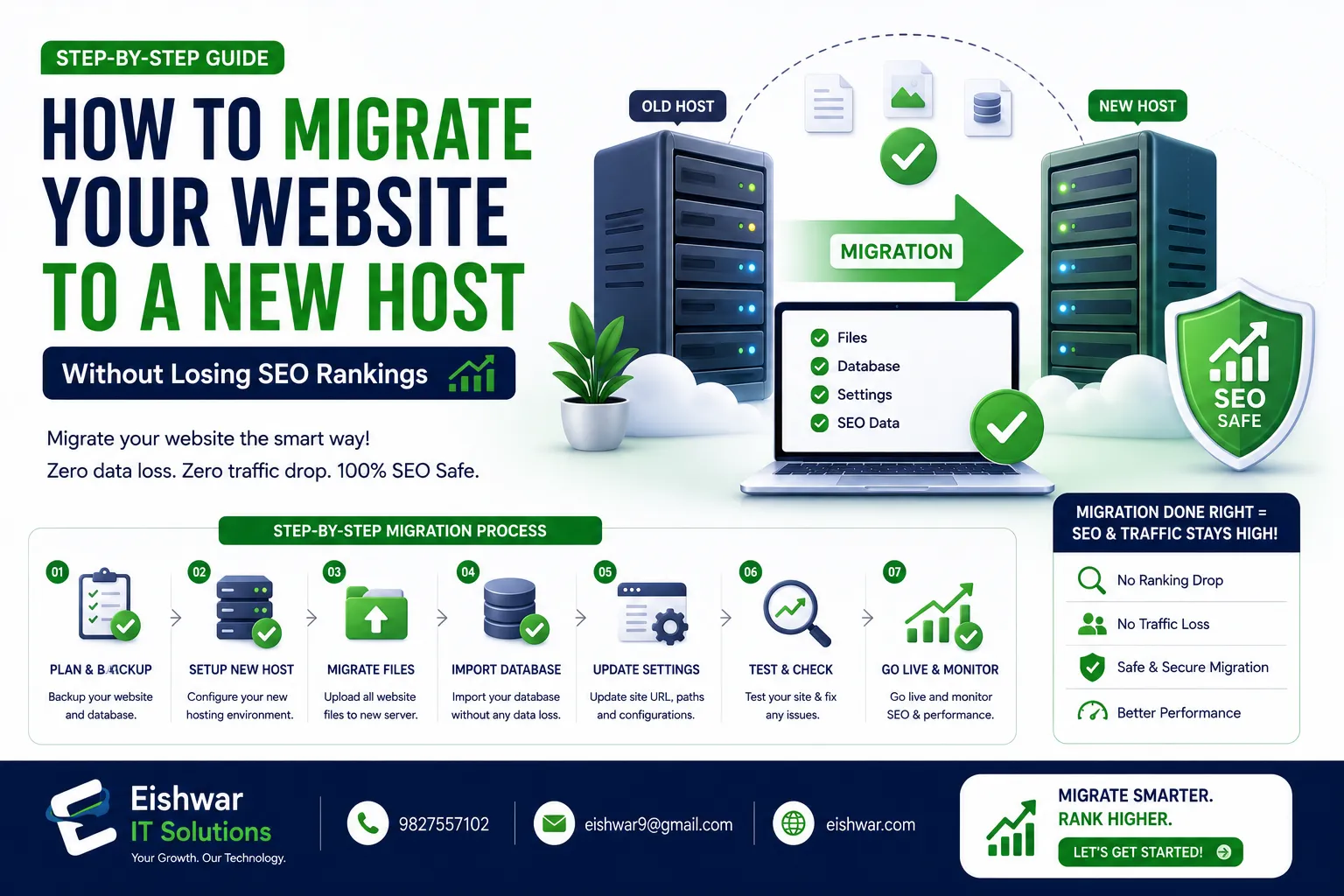
How to Migrate Your Website to a New Host Without Losing SEO Rankings
Published on: 16 Jun 2026
How to Migrate Your Website to a New Host Without Losing SEO Rankings
Introduction
Moving your website to a new hosting provider can feel like a high-stakes gamble. One wrong move, and your search engine rankings, traffic, and revenue could take a nosedive. But with the right strategy, you can migrate seamlessly and even improve your site's performance. In this guide, we'll walk you through every step to ensure your website migration doesn't hurt your SEO rankings. Whether you're a small business owner in Mumbai or a marketer in Delhi, these tips are tailored for the Indian audience, where internet speeds and user behavior vary widely. For example, a local e-commerce store in Bangalore might see a 30% drop in traffic if the migration causes even a few hours of downtime. We'll cover everything from pre-migration audits to post-migration monitoring, so you can make the switch with confidence.
Learn more about our Website services
Main Section 1: Pre-Migration Preparation
Before you touch a single file, preparation is key. Start by auditing your current site's performance. Use tools like Google Search Console and Google Analytics to benchmark your current traffic, top-performing pages, and keyword rankings. This data will be your safety net. For instance, if you notice that your 'Contact Us' page gets 500 visits a month, you'll want to ensure it remains accessible after the move. Document your current page load times, bounce rates, and conversion rates. A practical tip: export your top 50 landing pages and their rankings from Google Search Console. This gives you a baseline to compare against post-migration.
Next, ensure your new host is reliable. For Indian businesses, choose a provider with servers in India or nearby regions like Singapore to reduce latency. Check for features like free SSL certificates, daily backups, and 24/7 support. A slow or unreliable host can undo all your migration efforts. For example, a hosting provider with servers in Mumbai can cut load times by 40% for users in Delhi compared to a US-based server. Look for hosts that offer a 99.9% uptime guarantee and have positive reviews on platforms like Trustpilot or HostAdvice. Don't just go for the cheapest option; prioritize performance and support.
Create a complete backup of your website files and database. Most hosts offer backup tools, but also download a copy to your local drive. This is your insurance policy. For WordPress sites, use plugins like UpdraftPlus to schedule backups. For custom sites, use cPanel's backup wizard or command-line tools like rsync. A real-world example: a Delhi-based travel agency lost all their booking data during a migration because they relied solely on the old host's backup, which failed. Always have a local copy and test that it can be restored. Finally, set up a staging environment on the new host to test everything before going live. This mirrors your live site and lets you catch issues like broken forms or missing images without affecting users.
Main Section 2: The Migration Process
Now, let's move your site. Start by transferring all files via FTP or your host's migration tool. For WordPress sites, plugins like All-in-One WP Migration can simplify the process. Don't forget to export and import your database. If you're using a custom CMS, ensure your database connection strings are updated. A common mistake is forgetting to update the 'wp-config.php' file with the new database credentials. For large sites, consider using a tool like FileZilla for FTP transfers, and compress files into a ZIP archive to speed up the process. For example, a 2GB site can take hours over a slow connection, so use a wired network or a VPS with high bandwidth.
👉 Don't wait for the perfect moment; turn your vision into reality today.
Free ConsultationNext, update your DNS settings. Point your domain to the new host's nameservers. DNS propagation can take up to 48 hours, so plan accordingly. To minimize downtime, lower the TTL (Time to Live) value to 300 seconds a few days before the migration. This ensures that changes propagate faster. For instance, if your TTL was 86400 seconds (24 hours), reducing it to 300 means DNS records update within 5 minutes. However, remember to reset it to a higher value after migration to reduce server load. Communicate with your users via email or social media about potential downtime. A practical tip: schedule the migration during off-peak hours, like late night or early morning, to minimize impact on Indian users who might be browsing during the day.
After the DNS changes, test your site thoroughly. Check all pages, forms, and links. Use tools like Screaming Frog to crawl your site and identify any broken links or missing pages. Ensure your SSL certificate is active and working. For example, if you're using Let's Encrypt, verify that the certificate is installed correctly on the new server. Test your site on different devices and browsers, especially mobile, since a large portion of Indian traffic comes from smartphones. Don't forget to check email functionality if your hosting includes email services. A broken contact form or missing images can frustrate users and hurt your SEO indirectly through increased bounce rates.
Main Section 3: Post-Migration SEO Recovery
Once your site is live on the new host, your focus should shift to SEO recovery. Start by monitoring Google Search Console for any crawl errors or manual actions. Submit a new sitemap to Google and Bing to speed up indexing. For example, if you see a spike in 404 errors, investigate immediately. Use the URL Inspection tool to request indexing for critical pages like your homepage and product pages. A practical tip: create a custom 404 page that guides users back to your main content, and monitor it via Google Analytics to see if users are landing there.
Check your redirects. If your URL structure changed, set up 301 redirects from old URLs to new ones. Use a redirect plugin or edit your .htaccess file. This preserves link equity and prevents 404 errors. For instance, if your old blog post at '/blog/old-post' moved to '/new-post', add a 301 redirect. Tools like Redirection plugin for WordPress can help manage bulk redirects. Test each redirect manually using a browser or a tool like Redirect Checker. A common mistake is forgetting to redirect image URLs, which can break backlinks from other sites. For example, if an external site links to your old image, a 301 redirect ensures that link juice passes to the new URL.
👉 Free Website Audit
Get Free AuditMonitor your rankings daily using tools like Ahrefs or SEMrush. Expect some fluctuations in the first few weeks, but if you see a sharp drop, investigate immediately. Common issues include missing meta tags, slow page speed, or broken internal links. For example, if your homepage drops from position 3 to 10, check if your meta description is still intact or if the page load time increased. Use Google PageSpeed Insights to identify performance bottlenecks. A practical tip: set up alerts in Google Search Console for critical errors like 'Server error (5xx)' or 'Soft 404'. Also, monitor your backlink profile to ensure no links are lost during the migration. Tools like Majestic can help track this.
Expert Tips
1. Use a migration checklist: Create a detailed list of every step, from backup to DNS changes, and check off each one. For example, include items like 'Verify SSL installation', 'Test contact form', and 'Check Google Analytics tracking code'. This reduces the risk of missing critical steps.
2. Test on a staging site: Simulate the migration in a staging environment to catch errors early. For instance, clone your live site to a subdomain like 'staging.yoursite.com' and run a full crawl. This helps identify issues like missing CSS files or broken database connections.
3. Keep your old host active: Don't cancel your old hosting plan until you're confident the new site is stable. This allows you to roll back if something goes wrong. For example, if you notice a critical bug after 24 hours, you can switch back to the old host without losing data.
4. Monitor page speed: Use Google PageSpeed Insights to ensure your new host doesn't slow down your site. For Indian users, aim for a load time under 3 seconds on 4G networks. Consider using a CDN like Cloudflare to cache static content and reduce latency.
5. Inform Google: Use the Change of Address tool in Google Search Console if you're moving to a new domain (not just a new host). This helps Google understand the change and transfer your SEO authority. For example, if you're rebranding from 'oldbrand.com' to 'newbrand.com', this tool is essential.
Common Mistakes
1. Not backing up: Many businesses skip backups and lose everything. Always backup before migrating. For example, a Mumbai-based startup lost their entire product catalog because they assumed the host would handle backups. Don't take that risk.
2. Ignoring DNS propagation: Rushing DNS changes can cause downtime. Be patient and plan for 48 hours. For instance, if you change DNS and then immediately cancel the old host, users might see a blank page for hours. Use a low TTL to speed things up, but don't rush.
3. Forgetting to update internal links: If your URL structure changes, update all internal links to avoid 404 errors. For example, if you change your blog URL from '/blog' to '/articles', update all links in your navigation, footer, and content. Use a tool like Broken Link Checker to find and fix them.
👉 Free Homepage Demo
Book Demo4. Neglecting mobile optimization: Ensure your new host provides fast mobile loading times, especially for Indian users on 4G/5G. For example, test your site on a mobile device using Google's Mobile-Friendly Test. A slow mobile site can hurt your rankings, as Google uses mobile-first indexing.
5. Skipping post-migration audit: Failing to monitor rankings post-migration can lead to unnoticed SEO damage. For instance, a drop in rankings might be due to a missing canonical tag or a slow server response. Schedule a weekly audit for the first month to catch issues early.
Future Trends
As we move into 2026, website migration will become even more critical with the rise of Core Web Vitals and AI-driven search algorithms. Indian businesses will need to prioritize mobile-first design and fast loading times. Expect more hosts to offer automated migration tools with built-in SEO checks. Also, consider using CDN services like Cloudflare to further boost performance. For example, with the rollout of 5G in India, users will expect near-instantaneous load times. A migration that improves your Largest Contentful Paint (LCP) from 4 seconds to 2 seconds can significantly boost your rankings. Additionally, AI tools like Google's RankBrain will penalize sites with poor user experience, so ensure your migration doesn't introduce issues like layout shifts or slow interactivity. Stay ahead by testing your site with Lighthouse and optimizing for Core Web Vitals before and after the move.
FAQs
Will migrating to a new host affect my SEO?
Yes, it can if not done correctly. However, with proper planning, backups, and monitoring, you can migrate without losing rankings. For example, a well-executed migration can even improve SEO by reducing page load times.
How long does DNS propagation take?
Typically, 24-48 hours, but it can vary. Lowering your TTL before migration can speed this up. For instance, setting TTL to 300 seconds means changes propagate within 5 minutes, but full global propagation may still take hours.
What is a 301 redirect and why do I need it?
A 301 redirect permanently points an old URL to a new one. It preserves SEO value and prevents broken links. For example, if you change your blog URL structure, use 301 redirects to ensure users and search engines find the new pages.
Should I use a plugin for migration?
For WordPress sites, plugins like All-in-One WP Migration or Duplicator can simplify the process. For custom sites, manual migration is safer. For example, a plugin can handle database exports automatically, but for a custom PHP site, you'll need to manually export and import the database.
How do I check if my migration was successful?
Run a full site crawl, check Google Search Console for errors, and monitor your rankings for a few weeks. For instance, use Screaming Frog to crawl your site and look for 404 errors, then compare your rankings in Ahrefs to pre-migration data.
Can I migrate during peak traffic hours?
It's not recommended. Schedule migrations during off-peak hours, like late night or early morning, to minimize impact on users. For example, an e-commerce site in India might see peak traffic between 7 PM and 10 PM, so plan the migration for 2 AM.
What should I do if my rankings drop after migration?
First, check for technical issues like broken links, slow page speed, or missing meta tags. Use Google Search Console to identify errors. If the drop is severe, consider rolling back to your old host and re-evaluating your migration plan. For example, a 50% drop in traffic might indicate a critical issue like a missing sitemap.
Conclusion
Migrating your website to a new host doesn't have to be a nightmare. With careful planning, thorough testing, and post-migration monitoring, you can make the switch without losing your hard-earned SEO rankings. Remember, the key is to be patient and methodical. For Indian businesses, this is an opportunity to improve site speed and user experience, which can even boost your rankings in the long run. By following the steps outlined in this guide, you'll not only preserve your SEO but also set the stage for better performance and growth. Don't rush the process—each phase, from pre-migration audits to post-migration monitoring, is crucial for success.
CTA
Ready to migrate your website without the stress? Contact EishwarITSolution today for expert website migration services tailored for Indian businesses. Let's make your move seamless and SEO-friendly. Get in touch now.