Web Accessibility in India: Why Your Business Website Must Be Inclusiv
Published on: 13 Jun 2026
Web Accessibility in India: Why Your Business Website Must Be Inclusive by 2026
Introduction
Imagine landing on a website that is completely unusable because you can't read the text, navigate with a keyboard, or hear the video content. For millions of Indians with disabilities, this is a daily reality. As we approach 2026, web accessibility is not just a legal checkbox—it's a competitive advantage. At EishwarITSolution, we believe that the web should work for everyone. In this guide, we'll explore why web accessibility matters for Indian businesses, how to implement it, and what trends will shape the future of inclusive design. The digital divide in India is stark: while internet penetration is booming, many websites remain inaccessible, locking out a significant portion of the population. By 2026, inclusive design will be a baseline expectation, not a differentiator. Let's dive into how you can prepare your business for this shift.
Learn more about our Website services
Main Section 1: What Is Web Accessibility and Why Does It Matter for Indian Businesses?
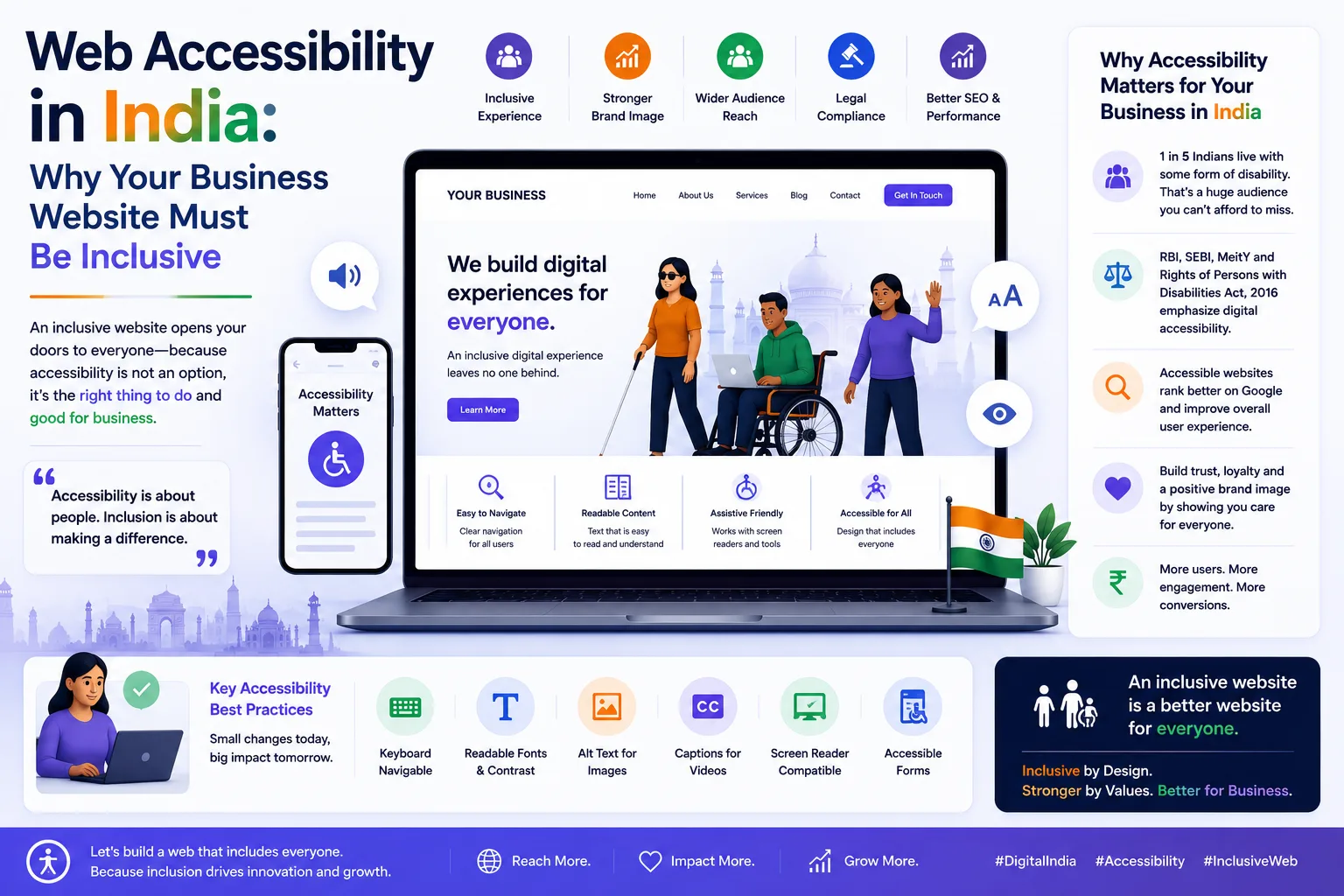
Web accessibility means designing and developing websites that people with disabilities can use effectively. This includes individuals with visual, auditory, motor, or cognitive impairments. In India, over 26 million people live with some form of disability, according to the Census 2011. Yet, most Indian websites fail basic accessibility standards. For instance, a study by the Centre for Internet and Society found that over 70% of Indian government websites had critical accessibility issues, such as missing alt text and poor keyboard navigation. This isn't just a social issue—it's a business problem.
Why does this matter for your business? First, it expands your audience. An accessible website welcomes more users, including the elderly and those with temporary disabilities (like a broken arm). Consider this: India's elderly population is growing rapidly, with over 138 million people aged 60 and above. Many of them experience age-related impairments like reduced vision or hearing. An accessible site ensures they can engage with your content. Second, it improves SEO. Search engines favor sites with clear structure, alt text, and proper headings. For example, adding descriptive alt text to images helps Google understand your content, boosting your rankings. Third, it reduces legal risk. While India's Rights of Persons with Disabilities Act (RPwD) 2016 mandates accessibility, enforcement is growing. Globally, lawsuits under the ADA in the US and similar laws in Europe are rising. Indian businesses targeting international clients must comply. In 2024, a US-based company sued an Indian e-commerce platform for inaccessible checkout processes, highlighting the global reach of accessibility laws.
For example, a leading Indian e-commerce platform saw a 15% increase in conversions after making their site accessible. They added keyboard navigation, screen reader compatibility, and high-contrast modes. The result? Better user experience for everyone. Another example: a popular Indian travel booking site reported a 20% drop in bounce rates after implementing accessible forms with clear error messages. These aren't just numbers—they represent real revenue and customer loyalty.
Main Section 2: Key Accessibility Principles and How to Implement Them
The Web Content Accessibility Guidelines (WCAG) 2.2 provide a framework. Focus on these four principles: Perceivable, Operable, Understandable, and Robust (POUR). Let's break each down with practical examples.
👉 Don't wait for the perfect moment; turn your vision into reality today.
Free Consultation1. Perceivable
Ensure all content can be perceived by multiple senses. Add alt text to images, captions to videos, and transcripts for audio. Use proper color contrast—at least 4.5:1 for normal text. Tools like the WebAIM contrast checker help. For example, if you have a product image, don't just write "image of product"; describe it meaningfully, like "Red cotton kurta with embroidery on the collar." This helps screen reader users understand the context. For videos, always include captions. A simple tool like YouTube's auto-captioning can be a starting point, but always review for accuracy. Pro tip: Use a contrast ratio of 7:1 for large text (18pt or 14pt bold) to ensure readability for users with low vision.
2. Operable
Make your site navigable by keyboard alone. Avoid mouse-only interactions. Provide skip navigation links so users can jump to main content. Ensure all interactive elements (buttons, forms) are focusable. For instance, when a user tabs through a form, the focus should move logically from field to field. Test this by unplugging your mouse and navigating your site using only the Tab, Enter, and arrow keys. Common issues include dropdown menus that don't open with keyboard commands or modals that trap focus. A practical fix: use ARIA attributes like aria-expanded to indicate menu states. Also, ensure that all functionality is available via keyboard, including sliders and carousels. For example, a carousel should allow users to pause, play, and navigate slides using keyboard shortcuts.
3. Understandable
Use clear, simple language. Avoid jargon. Make your navigation consistent across pages. Provide error messages that explain how to fix issues. For example, instead of "Error 404," say "Page not found. Please use the menu to find what you need." For forms, use inline validation that explains errors in plain language, like "Please enter a valid email address (e.g., name@example.com)." Also, ensure that your site's language is set correctly in the HTML (lang="en" or lang="hi") so screen readers pronounce text correctly. Another tip: avoid auto-playing videos or audio, as this can disorient users with cognitive disabilities. If you must use auto-play, provide a prominent pause button.
4. Robust
Use semantic HTML (like <nav>, <main>, <h1>) to help assistive technologies interpret your content. Test with screen readers like NVDA or JAWS. For example, use <button> for clickable actions instead of <div> with JavaScript, as buttons are natively focusable and accessible. Also, ensure that your site works with different browsers and assistive technologies. A robust site degrades gracefully—if a user's screen reader doesn't support a particular ARIA attribute, the content should still be understandable. Practical tip: Start with an accessibility audit using free tools like Lighthouse (Chrome DevTools) or WAVE. Fix high-priority issues first—like missing alt text or poor contrast. Then, move to more nuanced issues like keyboard traps or confusing navigation.
Main Section 3: Legal Landscape in India and Global Best Practices
India's Rights of Persons with Disabilities Act 2016 mandates that all public and private websites must be accessible within a 'reasonable timeframe.' However, enforcement has been slow. The Ministry of Electronics and Information Technology (MeitY) has issued guidelines based on WCAG 2.0. By 2026, we expect stricter compliance checks, especially for government and financial services. For instance, the Reserve Bank of India has already issued circulars requiring banks to make their digital platforms accessible. Non-compliance could lead to penalties or loss of licenses. Additionally, the upcoming Digital India Act may include specific accessibility provisions, making compliance mandatory for all businesses.
👉 Free Website Audit
Get Free AuditGlobally, the European Accessibility Act (EAA) comes into full effect in 2025, requiring accessible products and services. Indian companies exporting to Europe must comply. Similarly, the US Department of Justice has reaffirmed that websites are covered under the ADA. In 2024, over 4,000 ADA web accessibility lawsuits were filed in the US, a number that continues to rise. Indian businesses with US customers should take note. For example, a small Indian SaaS company that sells to European clients recently had to overhaul its dashboard to meet EAA standards, costing them ₹2 lakh but opening up a new market segment.
Case in point: In 2023, a popular Indian news website faced a public backlash when its accessibility features failed during a live event. They quickly implemented a high-contrast mode and screen reader support, regaining user trust. Proactive compliance is cheaper than reactive fixes. Another example: a leading Indian bank invested ₹50 lakh in accessibility improvements, including voice navigation and simplified forms, resulting in a 30% increase in mobile banking adoption among elderly users. These examples show that accessibility isn't just a cost—it's an investment with tangible returns.
Expert Tips
- Start with an accessibility statement: Publish a page explaining your commitment to accessibility and how users can request accommodations. Include a contact email or phone number for feedback. For example, "We are committed to making our website accessible to all users. If you encounter any barriers, please contact us at accessibility@eishwar.com." This builds trust and provides a channel for improvement.
- Involve real users: Conduct usability testing with people who have disabilities. Their feedback is invaluable. For instance, partner with local disability organizations like the National Association for the Blind or the Indian Sign Language Research and Training Centre. They can provide insights that automated tools miss.
- Use ARIA landmarks: Add ARIA roles (like
role="banner",role="navigation") to improve screen reader navigation. For example, userole="search"for your search bar so users can jump directly to it. However, don't overuse ARIA—semantic HTML is preferred when available. - Train your team: Educate developers, designers, and content creators on accessibility basics. Conduct workshops on WCAG principles and provide resources like the WebAIM checklist. For example, train content writers to write descriptive alt text and use clear language.
- Monitor regularly: Set up automated checks with tools like Axe or SiteImprove. Schedule monthly audits and track progress over time. Use a dashboard to visualize issues and prioritize fixes. Also, monitor user feedback and analytics to identify pain points.
Common Mistakes
- Over-relying on automated tools: They catch only 30% of issues. Manual testing is essential. For example, automated tools can't detect if a video lacks captions or if a form's error message is confusing. Always combine automated scans with manual testing using keyboard and screen readers.
- Ignoring mobile accessibility: Most Indians access the web via smartphones. Ensure touch targets are large (at least 44x44 pixels). For instance, buttons should be easy to tap without accidental clicks. Also, ensure that mobile menus are accessible with screen readers and that pinch-to-zoom is not disabled.
- Using inaccessible PDFs: Provide HTML versions of documents. If using PDFs, tag them properly. For example, a downloadable report should have a tagged PDF with headings, alt text for images, and a logical reading order. Better yet, offer the content as a web page.
- Forgetting about cognitive disabilities: Avoid flashing animations that can trigger seizures. Use simple layouts. For example, avoid auto-playing carousels or pop-ups that require quick reactions. Provide clear instructions and consistent navigation.
- Treating accessibility as a one-time project: It's an ongoing process. Update your site as standards evolve. For example, when WCAG 2.2 was released in 2023, it introduced new success criteria like focus appearance and accessible authentication. Regularly review your site against the latest guidelines.
Future Trends
- AI-powered accessibility: Tools like screen readers are becoming smarter. Expect real-time captioning and personalized user interfaces. For example, AI can automatically generate alt text for images or adjust contrast based on user preferences. However, human oversight is still needed to ensure accuracy.
- Voice navigation: With the rise of voice assistants, optimizing for voice commands will be key. For instance, users should be able to say "Go to checkout" or "Search for red shoes" and have the site respond. This requires integrating with voice APIs and ensuring that all functionality is voice-accessible.
- Inclusive design systems: Companies will adopt component libraries that are accessible by default. For example, a design system might include pre-built accessible buttons, forms, and modals that meet WCAG standards. This reduces the effort for developers and ensures consistency.
- Regulatory tightening: India may introduce fines for non-compliance, similar to GDPR. For instance, the proposed Digital India Act could impose penalties of up to ₹10 lakh for accessibility violations. Businesses should start preparing now to avoid future costs.
- Accessibility as a ranking factor: Google already rewards fast, mobile-friendly sites. Accessibility could become a direct ranking signal. For example, sites with good contrast and proper heading structure may rank higher. This makes accessibility a key part of SEO strategy.
FAQs
What is web accessibility and why is it important for my business?
Web accessibility ensures that people with disabilities can use your website effectively. It's important because it expands your audience, improves SEO, reduces legal risk, and enhances brand reputation. For example, an accessible site can attract the over 26 million Indians with disabilities and the growing elderly population, leading to increased traffic and conversions.
👉 Free Homepage Demo
Book DemoIs web accessibility mandatory in India?
Yes, under the Rights of Persons with Disabilities Act 2016, websites must be accessible. While enforcement is still evolving, it's best to comply proactively to avoid future penalties. The MeitY guidelines also require government websites to meet WCAG 2.0 standards, and private businesses are encouraged to follow suit.
How much does it cost to make a website accessible?
Costs vary. For a new site, building accessibility from the start adds minimal cost—often less than 5% of the total development budget. Retrofitting an existing site can range from ₹50,000 to ₹5,00,000 depending on complexity, such as the number of pages and the severity of issues. The ROI from increased traffic and conversions often outweighs the investment. For example, a small e-commerce site might see a 10-15% boost in sales after accessibility improvements.
What are the most common accessibility issues on Indian websites?
Common issues include missing alt text, poor color contrast, lack of keyboard navigation, inaccessible forms, and videos without captions. For instance, many Indian websites use low-contrast text on light backgrounds, making it hard for users with low vision to read. Another issue is using CAPTCHAs that are not audio-friendly, blocking users with visual impairments.
How can I test my website for accessibility?
Use free tools like WAVE, Lighthouse, or Axe to get started. Also, manually test with keyboard only and screen readers like NVDA (free) or JAWS (paid). For a thorough audit, consider hiring an accessibility consultant who can provide a detailed report with prioritized fixes. Regular testing should be part of your development cycle.
Does web accessibility help with SEO?
Absolutely. Many accessibility practices—like proper heading structure, alt text, and fast load times—also improve SEO. Google's algorithms favor user-friendly sites. For example, using descriptive alt text helps your images appear in image search results, driving additional traffic. Similarly, clear navigation and semantic HTML help search engines understand your content, boosting rankings.
What is the timeline for compliance in India?
While the RPwD Act 2016 does not specify a strict deadline, MeitY guidelines recommend compliance within a reasonable timeframe. By 2026, we expect stricter enforcement, especially for government and financial sectors. Businesses should aim to be fully compliant by 2025 to avoid legal risks and stay ahead of competitors.
Can small businesses afford web accessibility?
Yes, small businesses can start with low-cost changes like adding alt text, improving contrast, and using free testing tools. Many accessibility fixes are inexpensive, such as using semantic HTML or providing transcripts for videos. For a basic site, costs can be as low as ₹10,000-₹20,000. The key is to prioritize high-impact issues first and gradually improve over time.
Conclusion
Web accessibility is a journey, not a destination. By making your website inclusive, you not only comply with laws but also open doors to millions of potential customers. The benefits are clear: expanded audience, better SEO, reduced legal risk, and enhanced brand reputation. As we approach 2026, the web is becoming more inclusive, and businesses that adapt will thrive. At EishwarITSolution, we help Indian businesses create websites that are fast, beautiful, and accessible to all. Don't wait for a lawsuit or a missed opportunity—start your accessibility journey today. Whether you're a startup or an enterprise, the time to act is now. Remember, an accessible web is a better web for everyone.
CTA
Ready to make your website accessible and future-proof? Contact EishwarITSolution today for a free accessibility audit and consultation. Let's build a web that works for everyone. Our team of experts will guide you through the process, from initial audit to implementation and ongoing monitoring. Don't let your website be a barrier—make it a bridge to opportunity.