Top Prototyping and Wireframing Tools for Indian Web Designers in 2026
Published on: 16 Jun 2026
Top Prototyping and Wireframing Tools for Indian Web Designers in 2026
Introduction
In the fast-paced world of web design, prototyping and wireframing are the blueprints of success. For Indian business owners, marketers, and professionals, choosing the right tool can mean the difference between a project that flows smoothly and one that gets bogged down in revisions. As we step into 2026, the landscape of UI/UX tools has evolved, offering powerful features tailored to collaboration, speed, and user-centric design. Whether you're a freelancer in Bilaspur or a digital agency in Bangalore, this guide will help you select the best prototyping and wireframing tools to elevate your web design projects. With the rise of remote work and the increasing demand for seamless digital experiences, Indian designers must stay ahead of the curve. This comprehensive guide dives deep into the top tools, practical strategies, and future trends to ensure your projects succeed in 2026 and beyond.
Learn more about our Website services
Main Section 1: Why Prototyping and Wireframing Matter for Indian Businesses
Before diving into tools, let's understand why these processes are critical. Wireframing creates the skeletal structure of a website, focusing on layout and functionality without visual distractions. Prototyping adds interactivity, allowing stakeholders to experience the flow before development begins. For Indian businesses, this approach reduces costly rework, aligns team expectations, and speeds up time-to-market. A well-executed prototype can also impress clients and secure buy-in, especially in competitive markets like Raipur or Mumbai. Consider a scenario: a startup in Pune wants to launch an e-commerce platform. Without wireframing, the team might spend weeks on visual design only to realize the checkout flow is confusing. A simple wireframe could have caught this early, saving time and money. Similarly, a prototype that simulates the user journey can help investors visualize the product, making funding pitches more compelling. In a country where digital adoption is skyrocketing, especially in tier-2 and tier-3 cities, prototyping ensures that websites are intuitive for diverse user groups, including those with varying levels of tech literacy.
Main Section 2: The Top 5 Prototyping and Wireframing Tools for 2026
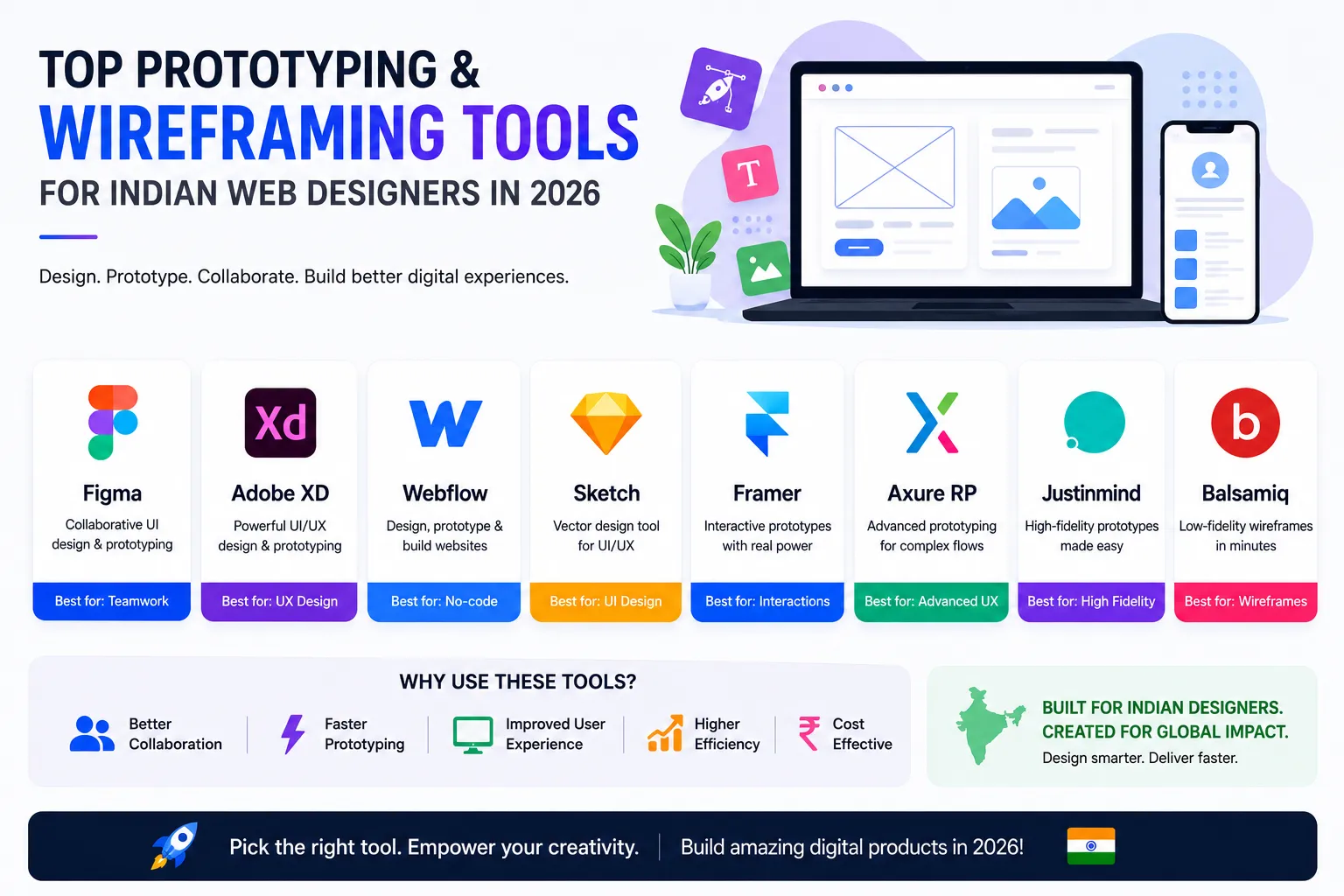
1. Figma – The Collaboration King
Figma remains the gold standard for collaborative design. Its cloud-based platform allows multiple team members to work on the same file in real-time, making it ideal for remote teams across India. With robust prototyping features, auto-layout, and a vast plugin ecosystem, Figma is perfect for everything from low-fidelity wireframes to high-fidelity interactive prototypes. For example, a designer in Delhi can share a prototype link with a client in Chennai, who can leave comments directly on the design. Figma's component library also enables consistency across projects—useful for agencies managing multiple clients. Pricing: Free tier available (up to 3 projects and unlimited viewers); Professional plan at $12/month per editor. Tip: Use Figma's 'Interactive Components' to create hover states and dropdown menus without complex coding. For Indian designers, Figma's support for regional fonts like Noto Sans Devanagari ensures your designs cater to local audiences.
2. Balsamiq – Quick and Simple Wireframing
Balsamiq excels at rapid, low-fidelity wireframing. Its hand-drawn style encourages focus on structure over aesthetics, perfect for early brainstorming sessions. Indian startups and agencies love its simplicity and drag-and-drop interface. For instance, a freelancer in Nagpur can whip up a wireframe for a local restaurant's website in under an hour, focusing on menu layout and contact forms. Balsamiq's 'Quick Add' feature lets you type UI elements (e.g., 'button', 'image') and instantly place them. Pricing: $9/month per project (with unlimited collaborators). Pro tip: Use Balsamiq for initial client workshops—its sketch-like appearance invites feedback without clients getting hung up on colors or fonts. However, note that Balsamiq is not ideal for high-fidelity prototyping; pair it with a tool like Figma for later stages.
👉 Don't wait for the perfect moment; turn your vision into reality today.
Free Consultation3. Axure RP – Advanced Prototyping for Complex Projects
For intricate interactions and conditional logic, Axure RP is unmatched. It supports dynamic content, adaptive views, and team collaboration. Ideal for large-scale e-commerce or enterprise websites, Axure is a favorite among experienced designers in India. For example, a digital agency in Bangalore designing a banking portal can use Axure to simulate login flows, error states, and multi-step transactions with real data. Axure's 'Repeater' widget allows you to create dynamic lists (e.g., product catalogs) that update based on user input. Pricing: $25/month per user (Pro plan). Learning curve is steep, but Axure offers extensive tutorials and a supportive community. For Indian designers working on government portals or complex SaaS products, Axure's ability to generate functional specifications (via 'Specs' feature) is invaluable for developer handoff.
4. Sketch – Mac-Focused Powerhouse (Still Relevant)
While Sketch has lost some ground to Figma, it remains a strong choice for Mac users. Its vector-based interface and extensive plugin library (e.g., Anima for prototyping) make it efficient for UI design. Note: Prototyping requires third-party plugins or the Sketch Cloud. For example, a designer in Hyderabad using Sketch can leverage the 'Symbols' feature to create reusable components like buttons and headers, then use Anima to add interactions like hover effects and scroll animations. Pricing: $10/month per editor (Standard plan). Sketch's offline capability is a plus for designers with unstable internet connections. However, collaboration is limited compared to Figma—team members need Macs and the app installed. For Indian agencies with a Mac-only workflow, Sketch remains a viable option, especially for icon design and vector illustrations.
5. Adobe XD – Integrated with Creative Cloud
Adobe XD offers a seamless experience for users already in the Adobe ecosystem. Its prototyping features include voice interactions, auto-animate, and repeat grids. The integration with Photoshop and Illustrator is a major plus for designers who rely on those tools. For instance, a marketer in Mumbai can import a logo from Illustrator into XD, then create a prototype for a landing page with auto-animate transitions. XD's 'Repeat Grid' is perfect for designing product grids or blog lists quickly. Pricing: $9.99/month as part of a Creative Cloud plan (or free starter plan with limited features). Tip: Use XD's 'Voice Prototyping' to design voice-enabled interfaces—a growing trend for Indian users who prefer voice search in local languages. However, XD's plugin ecosystem is smaller than Figma's, so check if your preferred plugins (e.g., for user testing) are available.
👉 Free Website Audit
Get Free AuditMain Section 3: How to Choose the Right Tool for Your Project
Selecting the right tool depends on your project's complexity, team size, and budget. For small businesses in Durg or Bhilai, Balsamiq or Figma's free tier may be sufficient. Agencies handling multiple clients can benefit from Figma's collaboration features. For complex interactions, Axure RP is worth the investment. Always consider the learning curve and support for Indian languages if needed. Test a few tools with a trial project before committing. For example, if you're designing a simple brochure website, start with Balsamiq for wireframes and Figma for prototypes. For a mobile app with intricate gestures, Axure or Figma with advanced plugins might be better. Also, factor in team expertise—if your team is already proficient in Adobe tools, XD is a natural fit. For freelancers, cost is critical: Figma's free tier and Balsamiq's low monthly fee are budget-friendly. Remember, the best tool is the one that fits your workflow, not the one with the most features.
Expert Tips
- Start with a clear goal: Define what you want to test—navigation, user flow, or visual design—before wireframing. For example, if you're redesigning a checkout page, focus on the step-by-step flow rather than the entire site.
- Use components and libraries: Create reusable UI elements to speed up design and maintain consistency. In Figma, build a design system with color styles, text styles, and components. This is especially useful for agencies with multiple projects.
- Involve developers early: Share prototypes with your development team to catch feasibility issues early. For instance, a complex animation in Axure might require custom coding; developers can flag this before final design.
- Conduct usability testing: Use tools like Maze or UserTesting to validate prototypes with real users. For Indian audiences, test with users from different regions to account for language and cultural differences.
- Keep it simple: Avoid over-engineering wireframes; focus on clarity and functionality. A wireframe should communicate layout and hierarchy, not pixel-perfect design. Use grayscale and placeholder text to keep stakeholders focused on structure.
- Leverage community resources: Join Indian UX groups on LinkedIn or Slack to share tips and get feedback. Many tools have local user groups (e.g., Figma India Community) that offer region-specific advice.
Common Mistakes
- Skipping wireframing: Jumping straight to high-fidelity designs can lead to misaligned expectations. Always start with low-fidelity wireframes to validate layout and flow.
- Overcomplicating prototypes: Adding too many interactions can confuse stakeholders and slow down feedback. Focus on key user journeys—e.g., sign-up, product search, checkout.
- Ignoring mobile-first design: With India's mobile-first audience, always prototype for smaller screens first. Use responsive design features in Figma or XD to ensure your prototype works on mobile devices.
- Not testing with real users: Relying solely on internal feedback can miss critical usability issues. For example, a prototype might look great to the team but confuse users with low digital literacy.
- Using too many tools: Stick to one or two tools to avoid workflow fragmentation. Switching between Balsamiq, Figma, and Axure for the same project can lead to version control issues.
- Neglecting accessibility: Ensure your prototypes consider color contrast, font sizes, and screen reader compatibility. This is crucial for inclusive design in India's diverse user base.
Future Trends
In 2026, expect AI-powered prototyping tools that generate wireframes from text prompts, deeper integration with development platforms like Webflow, and enhanced real-time collaboration features. Voice and gesture-based interactions will become more common in prototypes, especially for Indian users who prefer voice search. Tools will also offer better support for regional languages, making them more accessible to Indian designers. For example, AI tools like Uizard already allow you to convert hand-drawn sketches into digital wireframes—a boon for rapid ideation. Additionally, expect more tools to integrate with project management platforms like Jira and Asana, streamlining the design-to-development handoff. As AR/VR gains traction in Indian e-commerce, prototyping tools will likely add 3D and spatial design capabilities. Staying updated with these trends will give Indian designers a competitive edge.
👉 Free Homepage Demo
Book DemoFAQs
1. What is the difference between wireframing and prototyping?
Wireframing focuses on the layout and structure of a web page, while prototyping adds interactivity and simulates user flows. Wireframes are static, prototypes are dynamic. For example, a wireframe might show where a button is placed, while a prototype lets you click that button to see what happens next.
2. Which tool is best for beginners in India?
Figma is highly recommended for beginners due to its intuitive interface, free tier, and extensive community resources. Balsamiq is also great for learning wireframing basics. For Indian beginners, Figma's tutorials in Hindi and English make it accessible.
3. Are these tools suitable for Indian languages?
Most tools support Unicode, allowing you to design with Hindi, Tamil, or other Indian scripts. However, check font licensing and rendering quality for specific languages. For example, Figma supports Google Fonts like Noto Sans Devanagari, but some regional fonts may require manual installation.
4. Can I use these tools for mobile app design?
Yes, all listed tools support mobile app design with specific templates and device presets. Figma and Adobe XD are particularly strong for mobile prototyping, offering gesture-based interactions and device frames.
5. How do I share prototypes with clients who don't have design tools?
Most tools generate shareable links that work in any web browser. Clients can view and comment without creating an account. For example, Figma's 'Share' feature lets you set permissions (view only, comment, or edit) and send a link via email or WhatsApp.
6. What is the best tool for team collaboration in India?
Figma is the top choice for real-time collaboration, especially for remote teams. Its cloud-based nature allows designers, developers, and stakeholders to work together seamlessly. For Indian teams with varied internet speeds, Figma's offline mode (via desktop app) is a plus.
7. Are there any free prototyping tools for Indian startups?
Yes, Figma's free tier is excellent for startups, offering up to 3 projects and unlimited viewers. Balsamiq's free trial (30 days) is also useful for initial projects. Additionally, tools like Mockplus and Marvel offer free plans with limited features.
Conclusion
Choosing the right prototyping and wireframing tool can transform your web design workflow, saving time and improving client satisfaction. Whether you opt for Figma's collaboration, Balsamiq's simplicity, or Axure's power, the key is to match the tool to your project's needs. Start experimenting today and see how these tools can help you build better websites for Indian businesses. Remember, the goal is not just to create beautiful designs but to deliver functional, user-friendly experiences that drive results. With the right approach and tools, you can elevate your web design projects and stay ahead in 2026.
CTA
Ready to take your web design to the next level? Contact EishwarITSolution for expert guidance on choosing and implementing the best design tools for your business. Let's build something amazing together!