
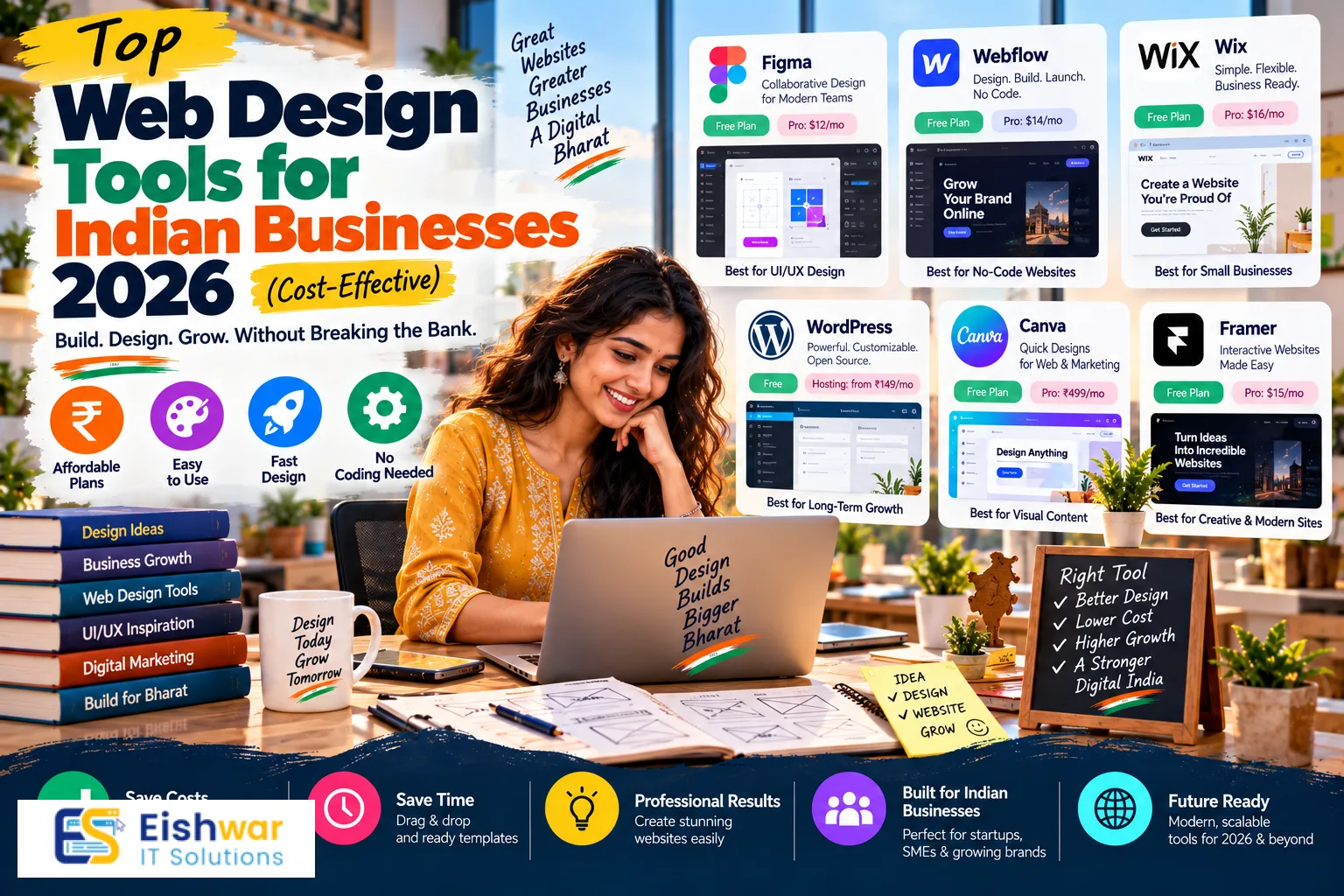
Top Web Design Tools for Indian Businesses 2026 (Cost-Effective)
Published on: 14 Aug 2026
Top Web Design Tools for Indian Businesses 2026 (Cost-Effective)
Introduction
In 2026, having a strong online presence is non-negotiable for Indian businesses. Whether you're a startup in Bengaluru, a retail store in Delhi, or a service provider in Mumbai, your website is your digital storefront. However, many business owners assume that professional web design requires a hefty budget. The good news? A plethora of cost-effective web design tools are available today that empower even non-tech-savvy entrepreneurs to build stunning, high-performing websites.
Learn more about our Website services
This guide dives deep into the best web design tools for Indian businesses in 2026, focusing on affordability, ease of use, and scalability. We'll cover everything from website builders and design platforms to collaboration and prototyping tools. By the end, you'll know exactly which tools to choose based on your business needs and budget.
Main Section 1: Why Cost-Effective Web Design Tools Matter for Indian Businesses
India is a price-sensitive market, and small businesses often operate on tight budgets. Traditional web design agencies can charge anywhere from ₹20,000 to ₹1,00,000 or more for a basic website. With cost-effective tools, you can cut that cost by up to 80% while maintaining professional quality.
Moreover, these tools offer flexibility—you can update content, add products, and tweak designs without waiting for a developer. This agility is crucial in a fast-paced digital economy where first impressions matter. Tools like Wix, Squarespace, and Figma have democratized design, making it accessible to everyone.
Additionally, many tools offer free tiers or one-time payments, which is ideal for bootstrapped startups. For example, Canva offers a generous free plan, and WordPress with a premium theme can cost as little as ₹2,000 per year. This cost-effectiveness doesn't mean compromising on quality; it means smart allocation of resources.
Consider the example of a small business owner in Jaipur who runs a handicraft store. With a budget of just ₹10,000, they can purchase a domain, hosting, and a premium WordPress theme, and still have money left for professional stock photography. In contrast, hiring an agency for a custom site would likely cost five times that amount. The savings can be reinvested in digital marketing, which is often the lifeline for small businesses in tier-2 and tier-3 cities.
Another advantage is the learning curve. Many tools are designed with the non-technical user in mind. For instance, Wix's AI builder asks you a few questions about your business type and style preferences, then generates a personalized site in minutes. This is a game-changer for entrepreneurs who lack the time or technical expertise to code from scratch.
Finally, cost-effective tools often come with built-in scalability. As your business grows, you can upgrade your plan or add features without migrating to a new platform. This flexibility ensures that your initial investment continues to pay off in the long run.
Main Section 2: Top Web Design Tools for Indian Businesses in 2026
1. Wix – Best All-in-One Website Builder
Wix remains a top choice for Indian businesses due to its drag-and-drop interface and AI-powered design. With hundreds of templates tailored to various industries, you can launch a professional site in hours. The free plan includes Wix branding, but premium plans start at around ₹200/month, which is negligible compared to custom development.
👉 Don't wait for the perfect moment; turn your vision into reality today.
Free ConsultationKey features: AI site builder, app market, SEO tools, and e-commerce integration. For Indian businesses, Wix supports local payment gateways like Razorpay and Instamojo.
Practical tip: When using Wix, take advantage of its App Market to add features like live chat, booking systems, and social media feeds. For example, a salon in Pune can integrate a booking app that allows clients to schedule appointments directly from the website, improving customer experience and reducing no-shows.
Wix also offers a free SSL certificate on all premium plans, which is essential for building trust with your visitors. Additionally, its SEO Wizard guides you through optimizing your site for search engines, a feature that is particularly useful for small business owners who are not familiar with SEO best practices.
2. WordPress – The Most Flexible CMS
WordPress powers over 40% of all websites, and for good reason. It's open-source, free to use, and offers thousands of themes and plugins. With a domain (₹500/year) and hosting (₹3,000/year), you can create a fully customizable website. The learning curve is steeper, but the flexibility is unmatched.
For Indian businesses, WordPress integrates seamlessly with WooCommerce for e-commerce, and there are countless India-specific themes. You can also hire freelancers for customization at affordable rates.
Practical tip: Start with a lightweight theme like Astra or GeneratePress, which are optimized for speed and compatibility with page builders. Pair it with a caching plugin like WP Rocket to ensure your site loads quickly even on slower connections. For a local restaurant in Chennai, this could mean the difference between a potential customer waiting 3 seconds versus 10 seconds—a critical factor in user retention.
WordPress also offers robust multilingual support, which is a boon for businesses targeting diverse linguistic audiences in India. Plugins like WPML or Polylang allow you to create content in multiple languages, helping you reach a wider customer base.
3. Figma – Collaborative Design Tool
If you're working with a design team or freelancers, Figma is a must-have. It's a cloud-based UI/UX design tool that allows real-time collaboration. The free plan is perfect for small teams, offering unlimited files and viewers. Figma is ideal for creating website mockups, wireframes, and prototypes before development.
Indian designers love Figma for its intuitive interface and robust community resources. You can find free UI kits and templates tailored to Indian aesthetics.
Practical tip: Use Figma's commenting feature to gather feedback from stakeholders directly on the design. For instance, if you're designing an e-commerce site for a fashion brand in Mumbai, you can invite the marketing team to review the homepage layout and leave comments. This streamlines the revision process and ensures everyone is on the same page before development begins.
Figma also integrates with tools like Zeplin and Avocode, which help developers extract code snippets and assets easily. This reduces the handoff time between design and development, accelerating your time-to-market.
4. Canva – For Non-Designers
Canva isn't just for social media graphics—it's also a great tool for designing website elements like banners, logos, and infographics. The free version includes thousands of templates, and the Pro version (₹1,500/year) offers advanced features like background remover and brand kits. Canva simplifies visual content creation, ensuring your website looks polished.
👉 Free Website Audit
Get Free AuditPractical tip: Use Canva to create a cohesive brand kit with your logo, color palette, and fonts. This ensures consistency across your website and social media channels. For example, a boutique in Delhi can design a set of promotional banners for festive sales, then upload them directly to their website's homepage slider.
Canva also offers a print service in India, allowing you to order business cards, flyers, and brochures that match your website's design. This integrated approach helps maintain a professional image across all touchpoints.
5. Elementor – Page Builder for WordPress
Elementor is a drag-and-drop page builder that works with WordPress. The free version is surprisingly powerful, allowing you to create custom layouts without code. Pro version starts at ₹3,500/year and adds theme builder, popup builder, and more. Elementor is perfect for Indian business owners who want full control over their site's look.
Practical tip: Use Elementor's theme builder to customize your site's header, footer, and single post templates. This eliminates the need for multiple plugins and gives your site a unique appearance. For instance, a real estate agency in Gurgaon can create a custom property listing layout that highlights images and key details, making it easier for potential buyers to browse.
Elementor also includes a popup builder, which is great for capturing email leads. You can design a discount offer popup for first-time visitors, helping you grow your mailing list and nurture potential customers.
6. Bootstrap – Front-End Framework
For those who know a bit of coding, Bootstrap is a free CSS framework that accelerates responsive design. It's mobile-first, ensuring your site looks great on smartphones—crucial for India's mobile-first audience. With Bootstrap, you can create custom designs without reinventing the wheel.
Practical tip: Use Bootstrap's grid system to create responsive layouts that adapt to different screen sizes. For example, a tech startup in Hyderabad can build a landing page with a hero section, feature cards, and a pricing table, all of which stack neatly on mobile devices. Bootstrap also includes pre-built components like navigation bars, modals, and carousels, saving you development time.
While Bootstrap requires some coding knowledge, there are plenty of free tutorials and templates available online. You can also use Bootstrap Studio, a visual editor that generates clean Bootstrap code, making it accessible to non-coders.
7. Google Web Designer – Free Tool for Interactive Content
Google Web Designer is a free tool for creating HTML5 animations and interactive content. It's excellent for creating engaging banners and ads that can be embedded into your website. Since it's free, it's a cost-effective way to add visual flair to your site.
Practical tip: Use Google Web Designer to create animated banners for your website's promotional campaigns. For example, a travel agency in Goa can design a banner that showcases different destinations with smooth transitions, capturing the attention of visitors and encouraging them to explore more.
👉 Free Homepage Demo
Book DemoThe tool also supports integration with Google Ads, allowing you to create and export ad creatives directly. This is particularly useful for businesses running online advertising campaigns, as it streamlines the creative process.
Main Section 3: How to Choose the Right Tool for Your Business
Selecting the right tool depends on your technical skill, budget, and business goals. Here's a simple decision matrix:
- If you're a beginner with no coding skills: Go for Wix or Squarespace. They offer intuitive interfaces and all-in-one solutions.
- If you want scalability and control: Choose WordPress with Elementor. It's a bit more complex but offers unlimited possibilities.
- If you're a designer or working with a team: Use Figma for design and prototyping, then export to a platform like WordPress.
- If you're on a shoestring budget: Leverage free tools like Canva, Google Web Designer, and WordPress with free themes.
Remember, the best tool is one that you'll actually use. Start with a free trial or plan, and upgrade as your business grows.
To make an informed decision, consider your long-term goals. If you plan to expand your online store, ensure the tool you choose supports robust e-commerce features and can handle increased traffic. If you're a service-based business, look for tools that offer booking systems and customer relationship management (CRM) integrations.
Also, think about the level of customization you need. Wix and Squarespace are excellent for quick launches, but they have limitations when it comes to advanced customization. WordPress, on the other hand, gives you complete control over every aspect of your site, but requires more time and effort to maintain.
Expert Tips
1. Prioritize Mobile Responsiveness
Over 70% of Indian internet users access the web via mobile. Ensure your chosen tool produces mobile-friendly designs. Test your site on various devices before launching.
Use Google's Mobile-Friendly Test tool to check if your pages are optimized for mobile. Additionally, consider implementing Accelerated Mobile Pages (AMP) for your content pages to improve loading speed on mobile devices.
2. Optimize for Local SEO
Use tools that allow easy SEO customization. Add local keywords, Google Maps integration, and local business schema to rank higher in local searches.
For example, if you run a dental clinic in Indore, include phrases like "best dentist in Indore" in your meta tags and content. Embed a Google Map on your contact page to help patients find you easily. Also, claim your Google Business Profile listing to appear in local search results and Google Maps.
3. Leverage Free Resources
Explore free templates, stock photos (Unsplash, Pexels), and design assets from sites like Freepik. These can significantly reduce design costs.
When using stock photos, choose images that reflect the diversity and vibrancy of India. This helps your website resonate with local audiences. For instance, a food delivery service in Kolkata can use images of local cuisine to connect with customers.
4. Use Analytics Early
Integrate Google Analytics from day one. This helps you understand user behavior and make data-driven improvements.
Set up goals and conversion tracking to measure the effectiveness of your website. For example, if your goal is to get more phone calls, track clicks on your phone number. This data will guide your marketing strategies and website optimization efforts.
Common Mistakes
1. Overloading with Plugins
Especially with WordPress, too many plugins can slow down your site and create security vulnerabilities. Stick to essential plugins only.
Regularly audit your plugins and delete any that are not in use. Also, keep them updated to ensure compatibility and security. A good rule of thumb is to have no more than 10-15 active plugins on a standard business site.
2. Ignoring User Experience (UX)
A beautiful design without intuitive navigation frustrates users. Ensure your site is easy to navigate, with clear calls-to-action.
Conduct user testing with friends or colleagues to identify any pain points. Use heatmaps and session recordings (tools like Hotjar) to see how visitors interact with your site. This will help you make informed decisions about design changes.
3. Not Testing on Multiple Browsers
Your site should work seamlessly on Chrome, Firefox, Safari, and Edge. Use tools like BrowserStack for cross-browser testing.
Different browsers may render your site differently, so it's crucial to test and fix any inconsistencies. BrowserStack offers free trials and is widely used by developers to ensure cross-browser compatibility.
4. Neglecting Speed
Site speed is critical for both user experience and SEO. Use tools like Google PageSpeed Insights to identify and fix speed issues.
Optimize images by compressing them, leverage browser caching, and use a content delivery network (CDN) to serve your site faster to users across India. A slow website can lead to high bounce rates and lost revenue.
Future Trends
1. AI-Powered Design Tools
AI is already transforming web design. Tools like Wix ADI and Bookmark's AIDA use AI to create personalized websites in minutes. Expect more advanced AI features that automate design decisions.
In the near future, AI might be able to generate entire websites based on voice commands or natural language descriptions. This will further lower the barrier to entry for small businesses.
2. Voice Search Optimization
With the rise of voice assistants, websites need to be optimized for voice search. This means using natural language and conversational keywords.
To prepare, focus on long-tail keywords and frequently asked questions. Create content that answers common queries directly, as voice search often pulls featured snippets.
3. Motion UI and Micro-Interactions
Subtle animations and interactive elements enhance user engagement. Tools like Framer are making it easier to add these without heavy coding.
When used sparingly, micro-interactions can guide users and provide feedback. For example, a button that changes color when hovered over can improve the user experience.
4. Sustainability in Web Design
Eco-friendly web design, such as optimizing images and reducing server load, is gaining traction. This reduces carbon footprint and improves performance.
Consider using green hosting providers that rely on renewable energy. Also, minimize the use of heavy scripts and animations that consume more energy.
FAQs
1. What is the cheapest way to build a professional website in India?
The cheapest way is to use a free website builder like Wix or WordPress with a free theme. You'll only need to pay for a domain (₹500/year) and hosting (₹3,000/year). This totals under ₹5,000 for a basic professional site.
2. Do I need coding knowledge to use these tools?
No, most tools like Wix, Canva, and Elementor are drag-and-drop and require no coding. For WordPress, basic knowledge is helpful but not mandatory.
3. Can these tools handle e-commerce websites?
Yes, Wix and WordPress (with WooCommerce) both support e-commerce. They offer payment gateway integrations that work in India, such as Razorpay and PayU.
4. Are free web design tools safe to use?
Yes, reputable free tools like WordPress, Canva, and Google Web Designer are safe. However, ensure you download from official sources and keep everything updated.
5. How often should I update my website design?
It's recommended to refresh your website design every 2-3 years to stay current with trends and technology. However, minor updates like new images or content can be done monthly.
6. What is the best tool for a small business with no budget?
For a zero-budget approach, combine WordPress (free) with a free theme like Astra or OceanWP, and use Canva for graphics. You'll only need to pay for domain and hosting, which can be as low as ₹3,500 per year.
7. Can I migrate my website from one builder to another later?
Yes, but the ease of migration depends on the platforms. For example, moving from Wix to WordPress is possible but may require manual recreation of content. It's best to choose a scalable platform from the start to avoid migration hassles.
Conclusion
In 2026, Indian businesses have no excuse for not having a professional website. With a plethora of cost-effective web design tools, you can create a site that rivals those built by expensive agencies. From all-in-one builders like Wix to flexible platforms like WordPress, there's a tool for every skill level and budget. The key is to choose the right tool, avoid common pitfalls, and keep an eye on future trends. Start building today and watch your online presence soar.
CTA
Ready to elevate your online presence? Explore our web design services at EishwarITSolution. Our experts can help you choose the right tools and build a website that drives results. Contact us for a free consultation!