
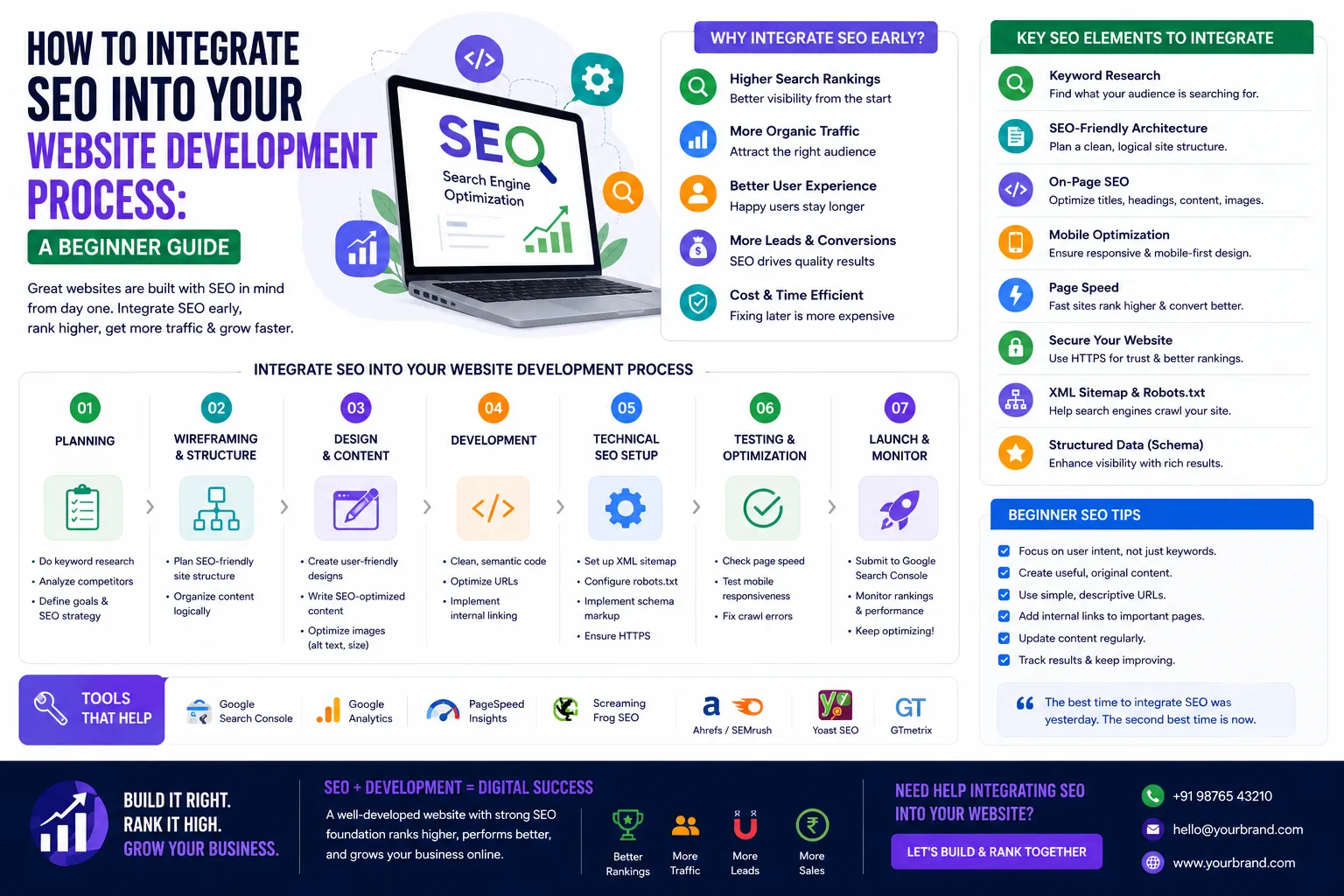
How to Integrate SEO into Your Website Development Process: A Beginner
Published on: 16 Jun 2026
How to Integrate SEO into Your Website Development Process: A Beginner’s Guide
Introduction
Building a website without SEO is like opening a shop in a hidden alley. Your development process is the perfect time to lay a strong SEO foundation. This guide walks you through integrating SEO from planning to launch, helping your business rank higher on Google and attract the right audience in India. By weaving SEO into every stage—from wireframes to deployment—you avoid costly retrofits and set your site up for sustainable growth. Whether you’re a freelancer, a small business owner, or a developer, these practical steps will ensure your site is discoverable, user-friendly, and competitive.
Learn more about our Website services
Main Section 1: Planning Your Website with SEO in Mind
Keyword Research Before Code
Start with keyword research to understand what your target audience searches for. Use tools like Google Keyword Planner or Ubersuggest to find relevant terms. For example, if you offer web development services in Mumbai, target "web development company Mumbai" or "affordable website design India." Don’t just guess—analyze search volume, competition, and user intent. For instance, a term like "cheap website design" might attract bargain hunters, while "professional web development services" draws serious buyers. Create a list of 10-20 primary and long-tail keywords, then map them to specific pages. Tip: Use Google’s "People also ask" section to uncover related queries. This research informs your content strategy and helps you avoid targeting overly broad terms that are hard to rank for.
Define Your Site Structure
Plan a logical hierarchy: Homepage > Category Pages > Subcategory Pages > Individual Pages. This helps search engines crawl your site efficiently. Use descriptive URLs like eishwar.com/services/web-development instead of eishwar.com/page123. A flat structure (fewer clicks to reach any page) is ideal. For example, an e-commerce site might have: Home > Electronics > Laptops > Gaming Laptops. Each level should have a clear purpose and keyword focus. Use a sitemap tool like GlooMaps to visualize your structure before development. Avoid deep nesting (more than 3-4 levels), as it dilutes authority and confuses crawlers. Also, plan for breadcrumb navigation—it improves UX and provides internal links.
Choose SEO-Friendly Platform
Select a platform that supports SEO out-of-the-box. WordPress, for instance, offers plugins like Yoast SEO. For custom development, ensure your CMS allows meta tags, alt text, and sitemap generation. Platforms like Shopify or Wix have built-in SEO features but may limit customization. If you’re building from scratch, use frameworks like Laravel or Django with SEO libraries. Key features to look for: editable title tags, meta descriptions, clean URL structures, schema markup support, and easy integration with analytics tools. For example, EishwarITSolution often recommends WordPress for small businesses due to its flexibility and vast plugin ecosystem. However, for large-scale projects, a custom CMS with SEO modules might be better. Test your platform’s mobile responsiveness and page speed capabilities before committing.
Main Section 2: Technical SEO During Development
Mobile-First Design
Google uses mobile-first indexing. Your site must be responsive. Test on various devices and use Google’s Mobile-Friendly Test tool. For example, EishwarITSolution ensures all client sites are mobile-optimized for India’s growing smartphone users. This means touch-friendly buttons, readable fonts without zoom, and fast loading on 3G/4G networks. Consider using a mobile-first CSS framework like Bootstrap or Tailwind. Also, test with real devices—emulators can miss issues like button spacing or text overflow. A practical tip: Use Chrome DevTools to simulate mobile views and check for layout breaks. Remember, over 70% of Indian users browse on mobile, so a poor mobile experience directly impacts rankings and conversions.
👉 Don't wait for the perfect moment; turn your vision into reality today.
Free ConsultationPage Speed Optimization
Compress images, minify CSS/JS, and leverage browser caching. Use tools like GTmetrix. A fast site improves user experience and rankings. Aim for under 3 seconds load time. Start by optimizing images: use WebP format, resize to actual display dimensions, and lazy-load below-the-fold images. For code, minify HTML, CSS, and JavaScript using tools like UglifyJS or CSSNano. Enable compression (Gzip or Brotli) on your server. Use a Content Delivery Network (CDN) like Cloudflare to serve static assets from servers closer to users. For example, a Mumbai-based business can use a CDN with Indian edge nodes to reduce latency. Also, reduce server response time by optimizing database queries and using caching plugins like W3 Total Cache. Test regularly—page speed can fluctuate with content updates.
Clean URL Structure
Use short, keyword-rich URLs. Avoid underscores; use hyphens. For example, eishwar.com/seo-tips is better than eishwar.com/index.php?id=123. URLs should be readable and descriptive. Include primary keywords naturally, but avoid keyword stuffing. For instance, a blog post about SEO tips could be eishwar.com/blog/seo-tips-beginners. Use lowercase letters and separate words with hyphens. Avoid dynamic parameters like ?page=1 unless necessary. If you must use them, ensure they are handled with canonical tags. Also, set up 301 redirects for old URLs to maintain link equity. A clean URL structure not only helps search engines but also improves click-through rates when displayed in search results.
XML Sitemap and Robots.txt
Generate an XML sitemap and submit it to Google Search Console. Configure robots.txt to guide crawlers. This ensures important pages are indexed. Your sitemap should list all canonical URLs, with last modified dates and change frequencies. Use tools like Yoast SEO or Screaming Frog to generate it. For robots.txt, allow access to essential directories (e.g., /css/, /js/) and disallow admin areas or duplicate content. For example, a typical robots.txt might include: User-agent: * Disallow: /wp-admin/ Allow: /. Test your robots.txt using Google’s robots.txt tester. Also, include a link to your sitemap in robots.txt: Sitemap: https://eishwar.com/sitemap.xml. This helps crawlers discover all pages quickly.
Main Section 3: On-Page SEO During Content Creation
Title Tags and Meta Descriptions
Write unique title tags (under 60 chars) and meta descriptions (under 160 chars) for each page. Include primary keywords naturally. Example: "Web Development Services Mumbai | EishwarITSolution" with meta description "Get affordable, SEO-friendly websites from EishwarITSolution. Serving businesses across India." Avoid duplicate titles—each page should have a distinct value. Use action-oriented language in meta descriptions to encourage clicks, like "Learn how to boost your online presence with our expert web development services." For product pages, include unique selling points. Tip: Use Google’s SERP preview tool to see how your title and description appear. Also, consider adding your brand name at the end of the title for consistency.
👉 Free Website Audit
Get Free AuditHeading Tags (H1, H2, H3)
Use one H1 per page (usually the title), then H2s for main sections, and H3s for subsections. This helps readability and SEO. For instance, this article uses H1 for the title and H2 for main sections. Headings should be descriptive and include keywords where relevant. For example, if your page is about "Web Development Services," your H1 could be "Professional Web Development Services in Mumbai." H2s might include "Custom Website Design" and "E-commerce Solutions." Avoid skipping heading levels (e.g., going from H1 to H3). Use headings to structure content logically—search engines use them to understand page hierarchy. Also, ensure headings are not just styled text; use actual HTML heading tags.
Image Optimization
Use descriptive file names (e.g., "web-development-india.jpg") and alt text. Compress images without losing quality. This helps in image search and accessibility. Alt text should describe the image content and include keywords if natural. For example, "A team of developers working on a responsive website for a Mumbai-based client." Avoid keyword stuffing—alt text is primarily for accessibility. Also, use responsive images with srcset to serve different sizes for different devices. For performance, consider next-gen formats like WebP with a fallback to JPEG/PNG. Tools like TinyPNG or ImageOptim can reduce file size by up to 70% without visible quality loss. Remember, images can drive significant traffic from Google Images, so optimize them thoroughly.
Internal Linking
Link to other relevant pages within your site. For example, from this guide, link to your services page. Internal links distribute page authority and help navigation. Use descriptive anchor text (e.g., "our web development services") instead of "click here." Create a content hub where pillar pages link to cluster pages. For instance, a pillar page on "Web Development" could link to detailed posts on "Frontend Development" and "Backend Development." Ensure every page has at least 2-3 internal links pointing to it. Use tools like Link Whisper to find linking opportunities. Also, avoid broken links—check regularly with tools like Screaming Frog. Internal linking not only boosts SEO but also reduces bounce rate by encouraging users to explore more.
Expert Tips
- Start SEO Early: Don’t wait until after launch. Integrate SEO from wireframing stage. For example, plan your URL structure and heading hierarchy before writing a single line of code.
- Use Schema Markup: Add structured data for reviews, FAQs, and local business to enhance search snippets. Use Google’s Structured Data Markup Helper to generate JSON-LD code.
- Test with Real Users: Conduct usability tests to ensure navigation is intuitive. Use tools like Hotjar to track user behavior and identify friction points.
- Monitor with Google Search Console: Track performance, fix errors, and submit sitemaps. Set up email alerts for critical issues like crawl errors or manual actions.
- Keep Content Fresh: Update your blog and pages regularly to signal relevance. Aim for at least one new post per week and refresh old content with new data.
- Leverage Local SEO: For businesses targeting specific cities, create location-specific pages and claim your Google My Business listing. Include local keywords in titles and meta descriptions.
- Use Canonical Tags: Prevent duplicate content issues by specifying the preferred version of a page. This is crucial for e-commerce sites with similar product pages.
Common Mistakes
- Ignoring Mobile Optimization: Over 70% of Indian users browse on mobile. A non-responsive site loses traffic. Test on multiple devices and use Google’s Mobile-Friendly Test.
- Keyword Stuffing: Using too many keywords harms readability and can get penalized. Focus on natural language and user intent.
- Slow Load Time: Large images and unoptimized code drive visitors away. Use tools like PageSpeed Insights to identify bottlenecks.
- Duplicate Content: Avoid copying from other sites; use original content. Even within your site, ensure each page has unique value.
- Neglecting Local SEO: For local businesses, ensure NAP (Name, Address, Phone) consistency and Google My Business listing. Inconsistent NAP data confuses search engines.
- Overlooking Analytics: Not setting up Google Analytics from day one means missing valuable data. Track user behavior to refine your SEO strategy.
- Ignoring HTTPS: Google considers HTTPS a ranking signal. Use SSL certificates to secure your site and build trust.
Future Trends
Voice search and AI are shaping SEO. Optimize for conversational queries like "best web development company near me." Core Web Vitals will become even more critical. Also, video content and featured snippets will dominate. Stay ahead by investing in quality content and technical excellence. For example, create FAQ pages that target voice search queries. Use structured data for how-to guides and recipes. As AI-generated content becomes common, focus on E-E-A-T (Experience, Expertise, Authoritativeness, Trustworthiness) to stand out. Additionally, consider visual search optimization—use high-quality images with descriptive alt text. The future of SEO is about providing the best user experience across all devices and formats.
👉 Free Homepage Demo
Book DemoFAQs
What is SEO in website development?
SEO in website development means optimizing your site's structure, code, and content to rank higher in search engines. It includes technical aspects like page speed, mobile-friendliness, and on-page elements like meta tags. For example, using clean URLs and proper heading tags helps search engines understand your content.
When should I start SEO for my website?
Start SEO during the planning phase. Choose an SEO-friendly platform, plan your site structure, and do keyword research before writing any code. This prevents costly redesigns later. For instance, decide on your URL structure and heading hierarchy before development begins.
Do I need technical skills for SEO?
Basic understanding helps, but you can use tools like Yoast SEO or hire an expert. For beginners, focus on keywords, content, and mobile optimization. Technical skills become important for advanced tasks like schema markup or server optimization. Consider taking online courses to build foundational knowledge.
How long does SEO take to show results?
Typically 3-6 months to see significant improvements. It depends on competition, content quality, and technical optimization. For new websites, it may take longer. Consistent effort in content creation and link building can accelerate results. Monitor your progress with Google Search Console.
Can I do SEO myself as a business owner?
Yes, for basic SEO. Use guides like this one, leverage free tools, and consider hiring an expert for advanced technical SEO. Start with keyword research and on-page optimization. As your site grows, you may need professional help for competitive keywords or technical audits.
What is the difference between on-page and off-page SEO?
On-page SEO involves optimizing elements on your website, like content, meta tags, and images. Off-page SEO refers to external factors like backlinks and social signals. Both are important for ranking. For example, on-page SEO ensures your page is relevant, while off-page SEO builds authority through links from other sites.
How do I choose the right keywords for my website?
Use tools like Google Keyword Planner or Ahrefs to find keywords with high search volume and low competition. Focus on long-tail keywords (e.g., "affordable web development services in Mumbai") as they are easier to rank for. Consider user intent—are they looking for information, products, or services? Create content that matches their needs.
Conclusion
Integrating SEO into your website development process saves time, money, and effort. By planning ahead, optimizing technically, and creating quality content, you set your business up for long-term success. Start today and watch your online presence grow. Remember, SEO is not a one-time task but an ongoing process. Regularly audit your site, update content, and adapt to algorithm changes. With the right approach, your website can become a powerful tool for attracting and retaining customers in India’s competitive digital landscape.
CTA
Ready to build an SEO-optimized website? Contact EishwarITSolution for expert guidance tailored to your business. Let’s rank higher together! Whether you need a new site or an SEO audit, our team can help you achieve your goals. Don’t let your website get lost in the crowd—take the first step today.