
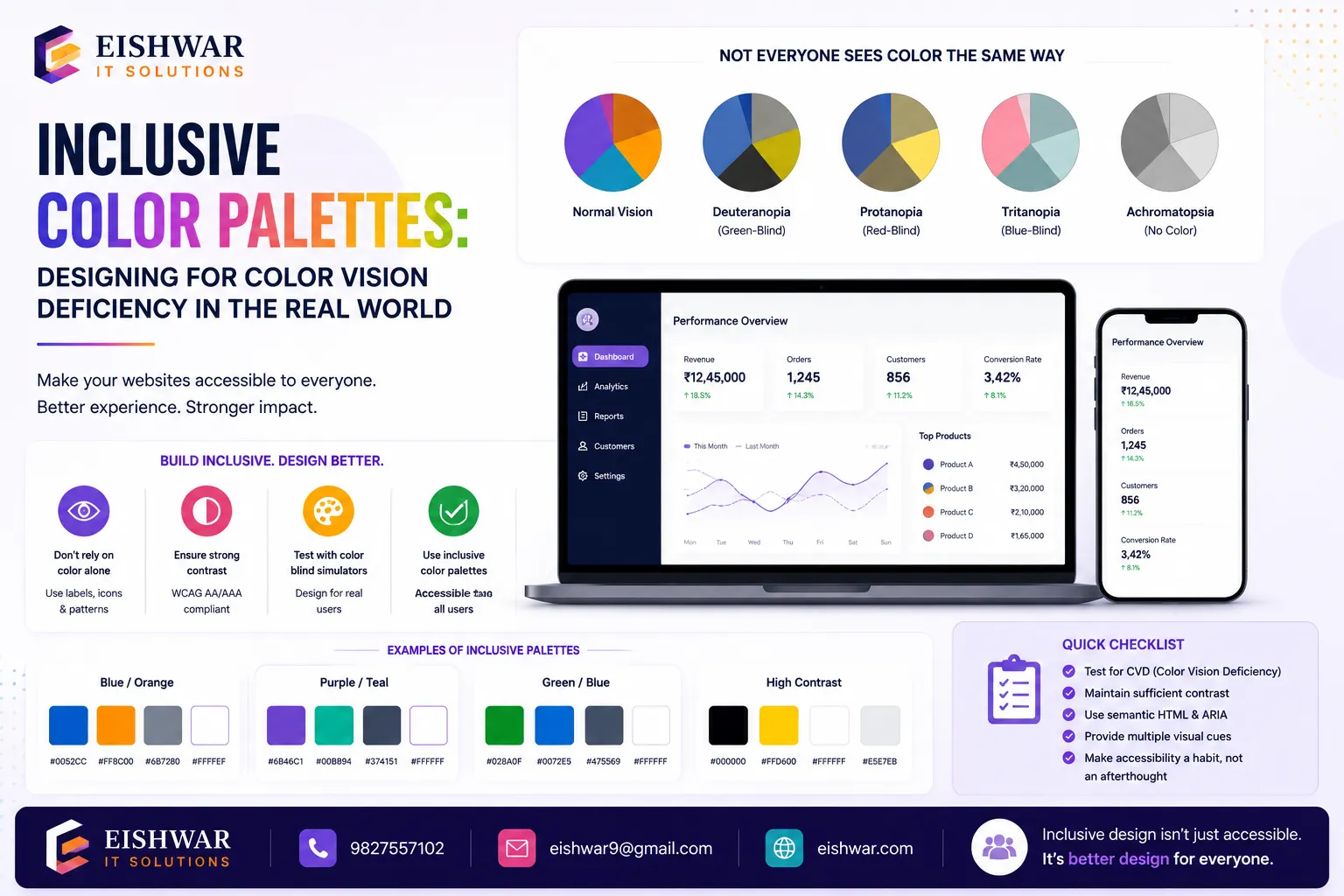
Inclusive Color Palettes: Designing for Color Vision Deficiency in the
Published on: 15 Jun 2026
Inclusive Color Palettes: Designing for Color Vision Deficiency in the Indian Market
Introduction
Imagine trying to book a flight online, but the 'Book Now' button blends into the background because you can't distinguish red from green. For millions of Indians with color vision deficiency (CVD)—commonly called color blindness—this is a daily reality. With over 8% of the male population and 0.5% of females affected globally, CVD impacts a significant portion of your potential customers. Yet, many Indian websites still rely heavily on color cues alone, alienating users and hurting conversions.
Learn more about our Website services
Inclusive color palettes are not just about compliance—they are about creating a seamless experience for everyone. In a diverse market like India, where mobile-first usage is skyrocketing, accessible design directly translates to better engagement, lower bounce rates, and increased customer loyalty. This guide will show you how to design color palettes that work for all, with practical, India-specific examples.
Main Section 1: Understanding Color Vision Deficiency (CVD) in the Indian Context
What is Color Vision Deficiency?
CVD affects the ability to perceive color differences. The most common form is red-green deficiency (deuteranopia and protanopia), followed by blue-yellow (tritanopia) and total color blindness (achromatopsia). In India, awareness is low—many people don't even know they have it. This makes inclusive design even more critical because users won't report issues they don't understand. For instance, a user might repeatedly fail to notice a red 'error' message on a form, assuming the page is broken, when in reality the color contrast is invisible to them.
Why India Needs Special Attention
India's digital landscape is exploding—over 700 million internet users, with diverse languages, literacy levels, and device types. Color plays a huge role in branding (think of the green of IRCTC or the red of MakeMyTrip). But if your brand's primary color is indistinguishable to 8% of men, you're excluding a massive audience. Additionally, Indian sunlight conditions (glare, low screen brightness) can exacerbate color perception issues. For example, a user in a brightly lit auto-rickshaw might struggle to see low-contrast text, even without CVD.
Real-World Impact
Consider an e-commerce site that uses red to indicate 'Out of Stock' and green for 'In Stock'. A user with red-green deficiency sees both as similar shades of gray. Result: frustration, confusion, and a lost sale. Inclusive color palettes prevent such scenarios. Another example: a banking app that uses color-coded transaction categories (e.g., green for credits, red for debits) without text labels can lead to financial errors for users with CVD.
Main Section 2: How to Build Inclusive Color Palettes
Principle 1: Don't Rely on Color Alone
Always pair color with text, icons, or patterns. For example, in a form, use an asterisk (*) and red outline for required fields, not just red. In charts, use dashed lines or different shapes alongside colors. A practical tip: when designing a status dashboard, use icons like a checkmark for 'Success' and an exclamation mark for 'Warning', in addition to color coding.
Principle 2: Use High Contrast
WCAG 2.1 AA requires a contrast ratio of at least 4.5:1 for normal text and 3:1 for large text. Tools like the WebAIM Contrast Checker help. For Indian brands, avoid pastels on white—they fail contrast tests. Instead, use deep blues, rich greens, and dark grays. For example, a light blue on white might have a ratio of 2.5:1, while a dark navy on white achieves 8:1. Test your brand colors against these standards.
👉 Don't wait for the perfect moment; turn your vision into reality today.
Free ConsultationPrinciple 3: Choose CVD-Safe Color Combinations
Avoid red-green, green-brown, blue-purple, and green-blue combos. Safe alternatives include:
- Blue and orange
- Dark blue and yellow
- Black and white (always safe)
For example, instead of red/green status indicators, use blue/orange. Or add icons: a checkmark for 'Success' and an X for 'Error'. A real-world example: the Indian railway booking site IRCTC could replace its green 'Book Now' button with a blue one, which is distinguishable by all users.
Principle 4: Test with Simulation Tools
Use free tools like Colorblindly (browser extension) or Stark (Figma plugin) to simulate how your site looks to users with CVD. Test on real devices under different lighting conditions. For instance, simulate deuteranopia on your checkout page to ensure the 'Pay Now' button stands out. Also, test on low-cost Android phones common in India, which may have less accurate color displays.
Main Section 3: Practical Implementation for Indian Businesses
Step 1: Audit Your Current Palette
Review your website's color scheme. Identify places where color is the only differentiator—links, buttons, error messages, charts. Document each instance. Use a spreadsheet to list each UI element, its current color, and whether it relies solely on color. For example, a 'Submit' button that is green without text is a red flag.
Step 2: Redesign with Inclusive Tools
Use accessible color palette generators like Coolors with accessibility mode or Adobe Color's accessibility tools. Create a palette of 3-5 primary colors that meet contrast and CVD-safe requirements. For instance, a fintech app could use a palette of dark blue (#003366), orange (#FF6600), and white (#FFFFFF), ensuring all combinations pass WCAG AA.
Step 3: Update UI Components
For buttons: ensure text has sufficient contrast and add icons if needed. For navigation: use underlines or bold for active states, not just color. For data visualization: use patterns or labels. A practical example: in a line chart, use dashed and solid lines instead of red and green lines. For pie charts, add percentage labels directly on slices.
Step 4: Educate Your Team
Share this knowledge with designers, developers, and content creators. Create a style guide that includes accessibility rules. Run quarterly audits. For instance, include a section in your design system that lists approved color combinations and their contrast ratios. Conduct a workshop on using simulation tools.
Example: Indian E-Commerce Site Makeover
A clothing retailer used red/green for size availability. After switching to blue (available) and gray (unavailable) with text labels, they saw a 12% increase in completed purchases from male users aged 25-40—a key demographic with higher CVD prevalence. The change was simple: replace the red 'Out of Stock' badge with a gray badge that says 'Out of Stock' in bold text.
👉 Free Website Audit
Get Free AuditExpert Tips
1. User Testing is Gold: Recruit users with self-reported CVD for usability testing. In India, you can find participants through online forums or accessibility groups. For example, post in the 'Accessibility India' LinkedIn group or contact local NGOs working with visually impaired individuals.
2. Use Semantic HTML: Screen readers rely on proper markup, not colors. Use <button> for actions, not <div> styled as buttons. This ensures that even if color cues are missed, the functionality is clear.
3. Leverage Local Patterns: Indian users often associate green with 'go' and red with 'stop' due to traffic signals. But avoid using these as sole indicators—add text. For instance, a traffic light icon with labels 'Go' and 'Stop' works well.
4. Consider Mobile First: Many Indians access web via low-cost smartphones with limited color accuracy. Test on multiple devices. Use a device lab or emulators to simulate different screen qualities.
5. Stay Updated: WCAG 2.2 is coming soon with stricter contrast requirements. Plan ahead. For example, WCAG 2.2 may require a contrast ratio of 4.5:1 for all text sizes, including large text.
Common Mistakes
❌ Using color as the only feedback for form validation. Always include error text. For example, a red border on an input field should be accompanied by a message like 'Please enter a valid email address'.
❌ Ignoring link underlines. Underlined links are essential for users with CVD. Without underlines, a blue link on a white background may appear as plain text to someone with tritanopia.
❌ Assuming 'color blindness' is rare. With 8% of men affected, it's not rare—it's a significant user base. In a city like Mumbai, that's over 400,000 men.
❌ Using low-contrast 'on-brand' colors. Your brand guidelines should include accessible alternatives. For example, if your brand uses light gray on white, provide a darker gray variant for text.
❌ Forgetting about dynamic content. Pop-ups, notifications, and tooltips must also follow inclusive color rules. A toast notification that is green for success should have an icon and text.
Future Trends
The push for digital accessibility in India is gaining momentum. Government initiatives like the Rights of Persons with Disabilities Act (2016) and the upcoming Accessible India Campaign (Sugamya Bharat Abhiyan) are driving awareness. Globally, WCAG 2.2 and 3.0 will introduce new color and contrast requirements. AI-powered tools that automatically adjust color palettes for individual users are emerging. For example, tools like 'Accessible Colors' can dynamically shift a website's palette based on user preferences. Indian businesses that adopt inclusive design now will be ahead of regulations and competitor curves.
FAQs
1. What is the most common type of color blindness in India?
Red-green deficiency (deuteranopia) is most common, affecting about 8% of Indian men. This means in a room of 100 men, 8 may have difficulty distinguishing red from green.
2. Can I still use my brand colors if they are red and green?
Yes, but use them with additional cues like text, icons, or patterns. Ensure sufficient contrast. For example, use a red 'Sale' badge with a white 'Sale' text and a shopping cart icon.
3. What tools can I use to test my website for CVD?
Free tools: Colorblindly (Chrome extension), Stark (Figma), WebAIM Contrast Checker. For advanced testing, use the 'Coblis' simulator or the 'Color Oracle' desktop app.
👉 Free Homepage Demo
Book Demo4. Do Indian laws require web accessibility?
The Rights of Persons with Disabilities Act (2016) mandates accessibility for government websites. Private sector is strongly encouraged. Non-compliance can lead to legal challenges and reputational damage.
5. Is inclusive color design expensive?
Not at all. Most changes are CSS tweaks or design system updates that save money long-term by reducing user frustration and support calls. For example, adding text labels to buttons costs nothing but developer time.
6. How do I convince my boss to invest in inclusive color palettes?
Show data: 8% of men are affected, plus improved SEO, better user experience, and legal compliance. Use case studies from Indian brands. For instance, Flipkart's accessibility improvements led to a 10% increase in conversions among users with disabilities.
7. What about accessibility for visually impaired users beyond color?
Color is just one aspect. Ensure proper heading structure, alt text, keyboard navigation, and screen reader support. For example, use ARIA labels for interactive elements.
Conclusion
Inclusive color palettes are not a trend—they are a necessity for any business that values its customers. By designing for color vision deficiency, you open your digital doors to millions of users in India and beyond. Start small: audit one page, adjust one button, test with a simulator. The ROI in terms of loyalty, conversions, and brand reputation is immense. Remember, accessibility is not just about compliance; it's about creating a web that works for everyone.
CTA
Ready to make your website truly inclusive? Contact Eishwar IT Solution for a free accessibility audit. Let's build a web that works for all—one color at a time.