
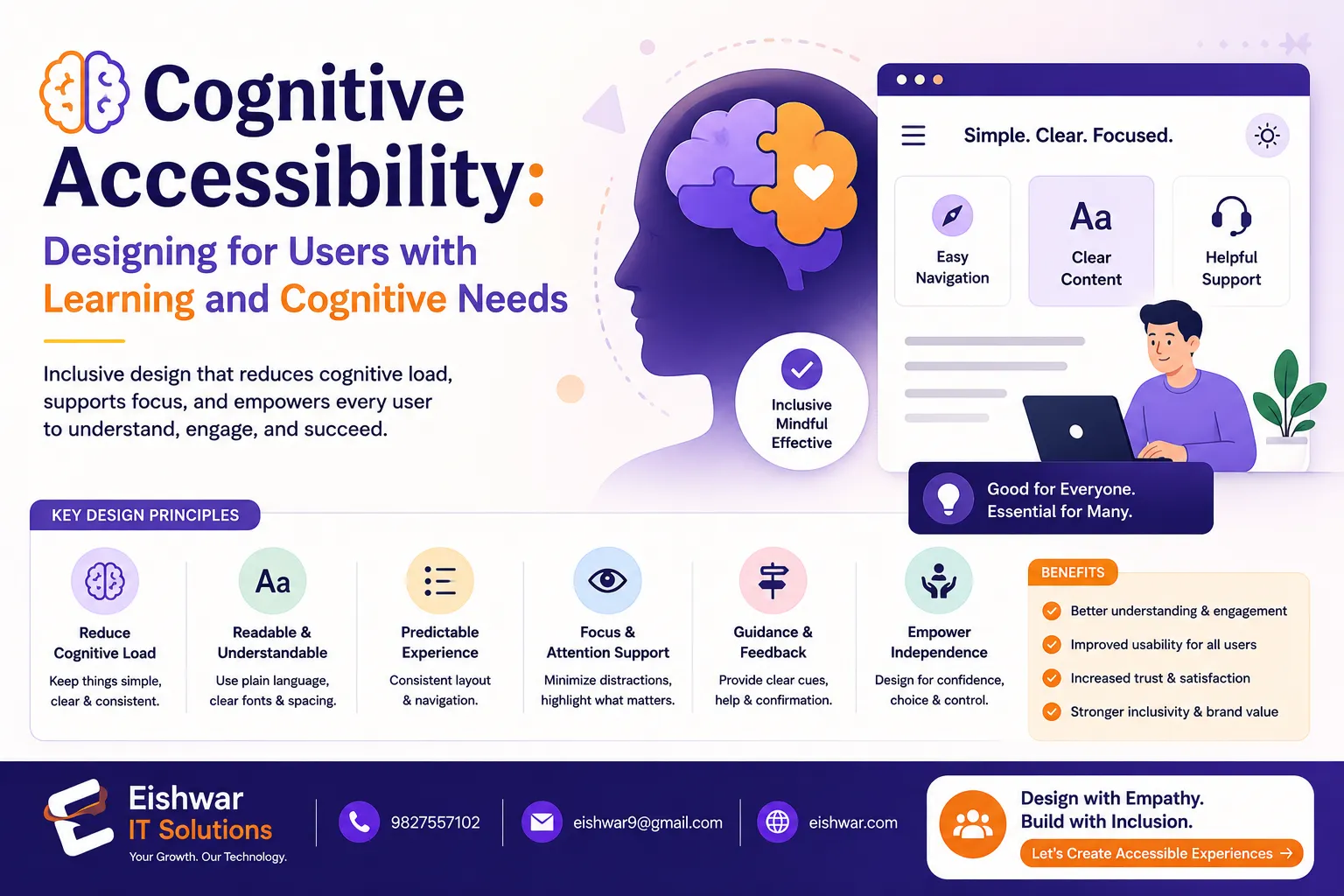
Cognitive Accessibility: Designing for Users with Learning and Cogniti
Published on: 16 Jun 2026
Cognitive Accessibility: Designing for Users with Learning and Cognitive Disabilities
Introduction
When we talk about web accessibility, most people immediately think of visual impairments—screen readers, alt text, high contrast. But what about the millions of users who live with cognitive or learning disabilities? Dyslexia, ADHD, autism, memory impairments, and other cognitive conditions affect how people process information, focus, and navigate digital spaces. Yet, cognitive accessibility is often the most overlooked aspect of inclusive design.
Learn more about our Website services
At EishwarITSolution, we believe that true inclusivity means designing for every mind. Whether you're a business owner in Mumbai or a marketer in Bangalore, making your website cognitively accessible isn't just ethical—it's smart business. Users who struggle with cognitive load will leave your site frustrated, hurting your bounce rate and conversions. In this guide, we'll walk you through practical, human-friendly ways to design for cognitive accessibility, with real-world examples and expert insights.
Consider this: a user with ADHD visits your e-commerce site to buy a gift. The page is cluttered with pop-ups, auto-playing videos, and flashing banners. Within seconds, they feel overwhelmed and leave. That lost sale could have been avoided with a cleaner, more focused design. Cognitive accessibility isn't just about compliance; it's about creating a frictionless experience for everyone.
Main Section 1: Understanding Cognitive Disabilities in the Digital Context
Cognitive disabilities cover a wide spectrum. They include learning disorders like dyslexia (difficulty reading), attention-related conditions like ADHD, memory issues, autism spectrum disorders, and even temporary impairments caused by stress, fatigue, or medication. The key is to recognize that cognitive load—the mental effort required to use a website—affects everyone differently.
For example, a user with dyslexia might struggle with long blocks of text or unusual fonts. Someone with ADHD may lose focus if a page is cluttered with animations or distracting elements. A person with short-term memory issues could forget steps in a multi-form checkout process. By designing with these challenges in mind, you create a smoother experience for all users.
Let's look at a practical example: a banking website that requires users to remember a 12-digit account number and a password to log in. For someone with memory impairments, this is a barrier. A better approach would be to offer biometric login options or allow users to save their account number securely. Similarly, a government portal with dense, jargon-filled text can alienate users with dyslexia or language processing difficulties. Simplifying the language and using bullet points can make a world of difference.
Actionable Tip: Start by auditing your site for cognitive barriers. Use tools like the WAVE evaluation tool, but also conduct simple user testing with people who have cognitive disabilities. Listen to their feedback—it's priceless. For instance, you might discover that your checkout process has too many steps, or that your font size is too small for comfortable reading.
Main Section 2: Core Principles of Cognitive Accessibility Design
To make your website cognitively accessible, focus on these core principles:
- Simplicity and Consistency: Keep layouts clean and predictable. Use the same navigation structure across all pages. Avoid sudden changes in design or behavior. For example, if your 'Contact Us' button is always in the top right corner, don't move it to the bottom on a different page.
- Clear Language: Write in plain English. Use short sentences, active voice, and familiar words. Avoid jargon, idioms, or complex metaphors. For instance, instead of saying 'Leverage our synergistic solutions,' say 'Use our tools to work better together.'
- Visual Clarity: Use ample white space, readable font sizes (at least 16px), and high contrast. Break content into short paragraphs with descriptive headings. A good rule of thumb is to keep paragraphs under 50 words and use headings that clearly indicate what the next section is about.
- Error Prevention and Recovery: Provide clear instructions and helpful error messages. Allow users to undo actions easily. For example, if a user accidentally deletes an item from their cart, offer an 'Undo' button rather than forcing them to start over.
- Support for Focus and Attention: Minimize distractions like auto-playing videos or flashing ads. Offer a 'focus mode' or 'readable view' option. Many news websites now have a 'reader mode' that strips away ads and sidebars, making it easier to concentrate on the content.
For instance, the Indian government's Accessible India Campaign website uses simple language, clear headings, and a consistent layout—great examples of cognitive-friendly design. Another example is the BBC website, which uses a clean, grid-based layout with high contrast and straightforward navigation.
👉 Don't wait for the perfect moment; turn your vision into reality today.
Free ConsultationMain Section 3: Practical Implementation Strategies for Your Website
Let's get hands-on. Here are actionable steps you can implement today:
- Simplify Forms: Break long forms into smaller steps with progress indicators. Label each field clearly and use placeholder text sparingly. For example, a multi-step checkout form could show 'Step 1 of 3: Shipping Address' at the top, so users know how much is left.
- Use Icons and Visual Cues: Pair text with icons for buttons and navigation. For example, a shopping cart icon next to 'Cart' helps users with reading difficulties. Similarly, a magnifying glass icon for search is universally understood.
- Provide Multiple Ways to Find Content: Offer a site map, search bar, and breadcrumb navigation. This helps users with memory or attention issues who might forget how they arrived at a page. Breadcrumbs like 'Home > Products > Laptops' provide context and a way back.
- Offer Readable Fonts: Use sans-serif fonts like Arial or Verdana. Avoid decorative fonts. Allow users to adjust text size without breaking the layout. A 'text size' toggle in the header can be a simple addition.
- Test with Real Users: Use tools like UserTesting or partner with organizations like the National Institute for the Empowerment of Persons with Intellectual Disabilities (NIEPID) in India. Real feedback will reveal issues automated tools might miss.
Internal linking suggestion: Check out our Accessible Navigation: Designing Menus That Work for Everyone for more on simplifying site structure.
Expert Tips
We spoke with Dr. Anjali Mehta, a neurodiversity consultant based in Delhi. She emphasizes: 'Designing for cognitive accessibility isn't about dumbing down content—it's about removing unnecessary complexity. Every user benefits from clarity.' Here are her top three tips:
👉 Free Website Audit
Get Free Audit- Use 'chunking': Break information into small, digestible chunks. This helps users with memory or attention difficulties. For example, instead of a long paragraph about product features, use a bulleted list with icons.
- Provide summaries: At the top of long articles, offer a one-paragraph summary. This is helpful for users who need quick understanding. Think of it as an 'executive summary' for every page.
- Limit choices: Too many options can overwhelm. Use progressive disclosure—show only the most important options first. For instance, on a product page, show the top three features initially, with a 'Learn more' link for additional details.
Dr. Mehta also recommends using 'plain language' checklists, such as the one from the Plain Language Association International (PLAIN), to ensure your content is accessible.
Common Mistakes
Even well-meaning designers make these errors. Avoid them:
- Overusing carousels and sliders: They move automatically and can be disorienting. If you must use them, provide pause and manual controls. For example, add a 'Pause' button and allow users to click through slides at their own pace.
- Ignoring reading order: Screen readers follow DOM order. Ensure your visual layout matches logical reading order. A common mistake is using CSS to visually rearrange elements, which can confuse screen reader users.
- Using only color to convey information: Users with color vision deficiency or cognitive issues may miss cues. Always add text or icons. For example, instead of just a red 'Error' message, include an exclamation icon and the text 'Please check your input.'
- Neglecting mobile responsiveness: Cognitive accessibility is even more critical on small screens. Test on mobile devices. A cluttered mobile layout can be particularly overwhelming for users with attention difficulties.
Future Trends
The future of cognitive accessibility is exciting. AI-powered tools can now adapt interfaces in real-time based on user behavior—simplifying layouts for users who need less clutter. For example, a website might detect that a user is spending too much time on a form and offer a simplified version. Voice interfaces and conversational UIs are also reducing cognitive load, as users can speak naturally instead of navigating complex menus. We're moving toward 'adaptive accessibility,' where websites learn and adjust to individual needs. India's Digital India initiative is pushing for more inclusive e-governance, so expect stricter guidelines soon. Additionally, virtual reality (VR) and augmented reality (AR) are emerging fields where cognitive accessibility will be crucial, as these environments can be even more disorienting than traditional web pages.
FAQs
1. What is cognitive accessibility in web design?
2. How does cognitive accessibility differ from general accessibility?
3. What are some quick wins for cognitive accessibility?
4. Can cognitive accessibility improve SEO?
5. Are there any legal requirements for cognitive accessibility in India?
6. How do I test for cognitive accessibility?
7. What is the role of AI in cognitive accessibility?
Conclusion
Cognitive accessibility is not a niche concern—it's a fundamental aspect of inclusive design. By simplifying your interface, using clear language, and minimizing cognitive load, you create a website that works for everyone, including people with learning and cognitive disabilities. At EishwarITSolution, we're committed to helping Indian businesses build truly accessible digital experiences. Start small, test often, and remember: every user deserves a seamless experience.
👉 Free Homepage Demo
Book DemoCTA
Ready to make your website cognitively accessible? Contact EishwarITSolution for a free accessibility audit. Let's build a web that works for every mind.