
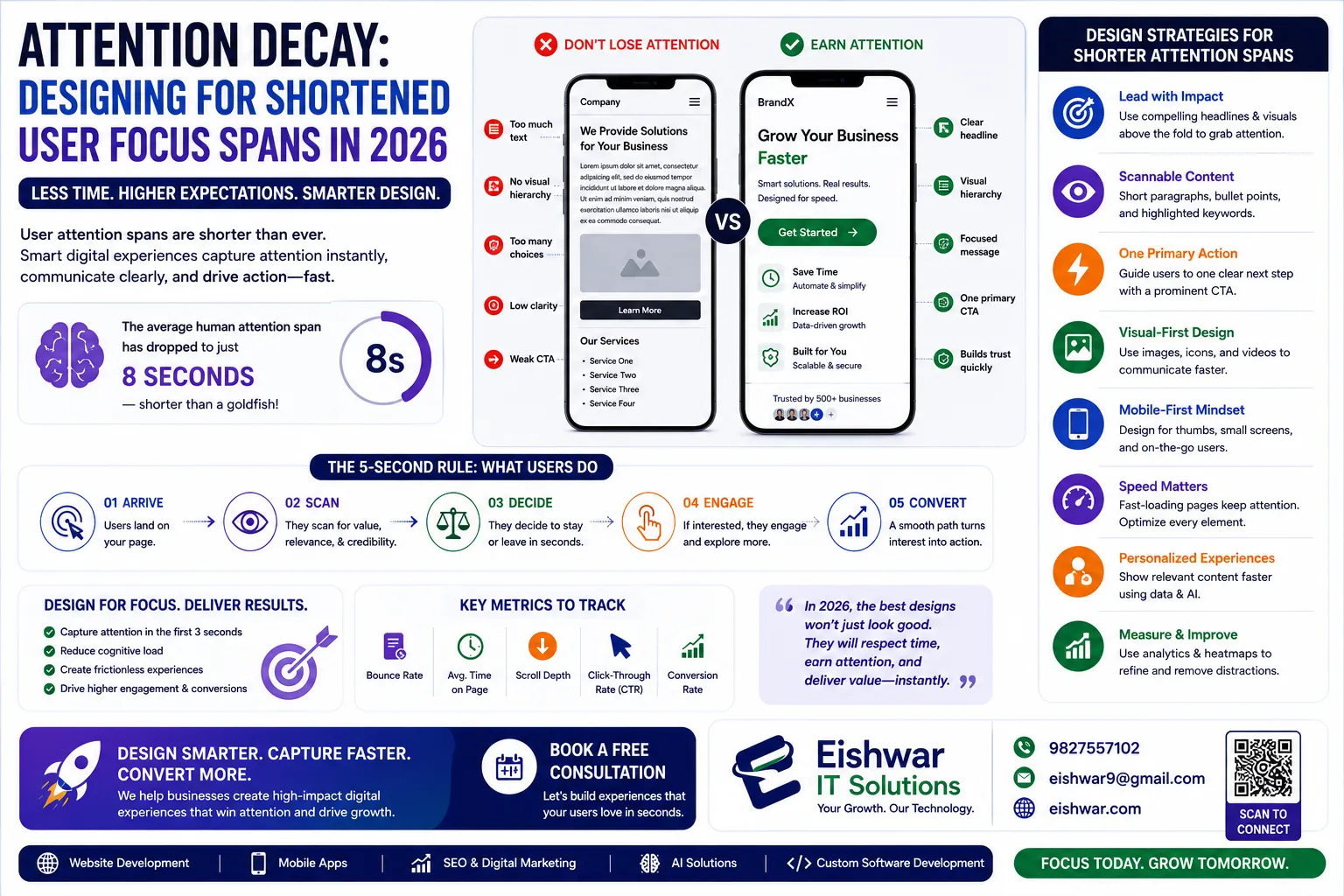
Attention Decay: Designing for Shortened User Focus Spans in 2026
Published on: 17 Jun 2026
Attention Decay: Designing for Shortened User Focus Spans in 2026
Introduction
In 2026, the average human attention span has dropped below 7 seconds—shorter than a goldfish’s. For business owners, marketers, and professionals in India, this means your website has less than a blink to make an impression. Attention decay isn’t just a buzzword; it’s a critical design challenge. At EishwarITSolution, we see this daily: users scroll past, bounce, and never convert. But here’s the good news: with smart UX/UI design and user behaviour analytics, you can reclaim that fleeting focus. This guide dives into practical strategies to design for shortened attention spans, backed by data and real-world examples. Let’s turn distraction into engagement.
Learn more about our Website services
Main Section 1: Understanding Attention Decay in Digital UX
Attention decay refers to the rapid decline in user focus when interacting with digital interfaces. In 2026, factors like information overload, constant notifications, and fast-paced content consumption have shrunk focus spans dramatically. For Indian audiences—who often juggle multiple devices—this is especially acute. Consider a typical user in Mumbai: they might check your site while commuting, with notifications from WhatsApp, Instagram, and email vying for their attention. Every second your interface fails to engage, you lose them.
Why does this matter? Every second counts. Research shows that 53% of mobile users abandon a site that takes longer than three seconds to load. But it’s not just speed; it’s about cognitive load. Too many choices, cluttered layouts, or irrelevant content push users away. Behaviour analytics tools like heatmaps and session recordings reveal exactly where attention drops. For example, a heatmap might show that users skip your hero banner entirely—a sign of banner blindness caused by overused design patterns. In one case, a Delhi-based e-commerce site discovered that 60% of users never saw their main promotion because it was buried in a carousel. By moving it to a static hero section, they boosted click-through rates by 35%.
To combat attention decay, you must first measure it. Set up analytics to track scroll depth, click-through rates, and time on page. Use A/B testing to see what holds focus. Remember: attention is a limited resource. Design to conserve it, not waste it. A practical tip: start with a “five-second test” where you show your homepage to a colleague for five seconds and ask what they remember. If they can’t recall your value proposition, you have work to do.
Main Section 2: Design Strategies to Counter Attention Decay
Designing for shortened focus spans requires a shift from “more is better” to “less is more.” Here are actionable strategies:
- Above-the-fold clarity: In 2026, users decide within 2 seconds whether to stay. Your hero section must communicate value instantly. Use a clear headline, a single CTA, and minimal text. Example: a fintech app we redesigned for a Mumbai startup saw a 40% increase in sign-ups by reducing hero copy from 50 words to 12. The headline went from “Comprehensive Financial Solutions for Modern Professionals” to “Save More in 2 Minutes.”
- Progressive disclosure: Show only essential information first, then reveal details on demand. For instance, use accordion menus or “Learn more” links. This reduces cognitive load and keeps users engaged. A Bangalore-based SaaS company used this technique on their pricing page, hiding advanced features behind expandable sections. Result: a 20% increase in trial sign-ups because users weren’t overwhelmed.
- Micro-interactions with purpose: Small animations (like a button colour change on hover) provide instant feedback, satisfying users’ need for quick gratification. But avoid overdoing it—every micro-interaction should guide the user toward a goal. For example, a subtle pulse on the CTA button when the page loads can draw the eye without being intrusive. Test with tools like LottieFiles to ensure animations don’t slow load times.
- Scannable content: Break text into short paragraphs, bullet points, and subheadings. Use bold for key phrases. Indian users, often reading on mobile, appreciate this. Data from our client’s e-commerce site showed a 25% increase in time on page after reformatting product descriptions. Instead of a dense paragraph, we used: “Material: Cotton | Fit: Slim | Color: Navy” with icons for each attribute.
- Personalised experiences: Use behaviour analytics to tailor content. If a user frequently visits pricing pages, show a discount pop-up. Personalisation signals relevance, which grabs attention. A travel booking site in India used browsing history to show “Popular Destinations Near You” on the homepage, reducing bounce rate by 18%.
Main Section 3: Leveraging Behaviour Analytics to Optimise Focus
Behaviour analytics is your secret weapon against attention decay. Tools like Hotjar, Crazy Egg, or Google Analytics 4 (GA4) provide insights into user behaviour. Here’s how to use them:
👉 Don't wait for the perfect moment; turn your vision into reality today.
Free Consultation- Session recordings: Watch how users navigate your site. Look for “rage clicks” (repeated clicks on non-clickable elements) or dead zones where users hover but don’t act. Fix these pain points to reduce frustration and keep attention. For instance, a Chennai-based education portal saw users repeatedly clicking a static image, expecting it to be a link. Adding a clickable button reduced bounce rate by 12%.
- Heatmaps: Identify which areas get the most (and least) attention. For example, if your CTA button is below the fold and rarely clicked, move it up. A heatmap analysis for a Delhi-based SaaS company revealed that 70% of users never scrolled past the first screen—so we redesigned the layout to put key offerings above the fold, resulting in a 30% increase in demo requests.
- Scroll maps: See where users drop off. If 80% leave after the first paragraph, your intro needs to be more compelling. Use this data to refine content hierarchy. A health blog in India used scroll maps to discover that users skipped long paragraphs but engaged with bullet-pointed tips. They restructured articles accordingly, boosting average reading time by 40%.
- Form analytics: If users abandon a form, check field-by-field drop-off rates. Simplify long forms or add auto-fill options. One Indian real estate portal reduced form abandonment by 30% by removing two unnecessary fields (like “Occupation” and “Annual Income”) and adding a progress bar.
Integrate these tools with your design process. Create hypotheses based on data, then test. For instance, if analytics show users ignore your navigation menu, try a sticky header with only key links. Remember: data without action is just noise. Set a weekly review of analytics to catch trends early.
👉 Free Website Audit
Get Free AuditExpert Tips
We asked top UX designers in India for their advice on designing for attention decay:
- Ravi Sharma, UX Lead at a Bangalore-based startup: “Use the ‘one-second rule’—every element on the page should communicate its purpose within one second. If it doesn’t, remove it. We applied this to our dashboard and saw a 15% increase in user retention.”
- Priya Mehta, Behavioural Design Consultant: “Leverage scarcity and urgency ethically. For example, ‘Only 2 left in stock’ works because it triggers FOMO, but don’t fake it—trust is fragile. A client used real-time inventory counts and saw a 22% boost in conversions.”
- Anil Kumar, EishwarITSolution Senior Designer: “Test with real users, not just analytics. A five-minute usability test can reveal attention gaps that data misses. I once found that users were confused by a navigation label that tested well in analytics but failed in person.”
- Neha Gupta, Digital Marketing Expert: “Combine UX with content strategy. If your copy isn’t skimmable, even the best design won’t hold attention. Use tools like Hemingway App to simplify language—aim for Grade 6 reading level for Indian audiences.”
Actionable takeaway: Run a “focus audit” on your homepage. Time how long it takes to understand your value proposition. If it’s more than 3 seconds, simplify. Use a stopwatch and ask a friend to try it.
Common Mistakes
Even experienced designers fall into traps when trying to combat attention decay. Avoid these:
- Overloading above the fold: Cramming everything into the visible area backfires. Users feel overwhelmed and leave. Instead, prioritise one primary message and CTA. A travel site in India reduced hero elements from 5 to 2 and saw a 10% drop in bounce rate.
- Ignoring mobile-first: In India, over 70% of web traffic is mobile. Designing for desktop first often leads to tiny tap targets and slow load times on phones. Always design for mobile first, then scale up. Use tools like Figma’s mobile frame to start.
- Using too many animations: While micro-interactions help, excessive animations (like parallax scrolling or auto-playing videos) distract and slow down page load. Use sparingly. A fashion retailer removed a full-screen video background and replaced it with a static hero image, cutting load time by 2 seconds and increasing engagement by 15%.
- Neglecting accessibility: Low-contrast text or small fonts force users to strain, causing faster attention drop. Follow WCAG guidelines—use at least 4.5:1 contrast ratio and 16px minimum font size. An Indian government portal improved user completion rates by 25% after increasing font size and contrast.
- Copying competitors blindly: Just because a competitor uses a certain layout doesn’t mean it works for your audience. Use your own analytics to decide. A fintech startup copied a global app’s minimal design but found Indian users preferred more visual cues—adding icons improved clarity by 30%.
Future Trends
Looking ahead, attention decay will only intensify. Here’s what to expect in 2027 and beyond:
👉 Free Homepage Demo
Book Demo- AI-driven personalisation: AI will dynamically adjust UI elements in real-time based on user behaviour. For example, a site might automatically simplify navigation for a user who tends to browse quickly. Start exploring tools like Dynamic Yield or Google Optimize for real-time testing.
- Voice-first interfaces: With the rise of voice search in India, designing for voice interactions (where attention is purely auditory) will become crucial. Expect more conversational UIs. Optimise your content for voice queries by using natural language and FAQ schemas.
- Neuro-design principles: Using neuroscience to design interfaces that align with how the brain processes information. For instance, placing CTAs in the upper-left visual hierarchy (where Indian users naturally look first) can improve click rates. Research shows that the left-to-right reading pattern applies even in digital.
- Attention metrics as KPIs: Businesses will start tracking “attention minutes” instead of just page views. Tools like eye-tracking and dwell time will become standard. Platforms like Hotjar already offer attention heatmaps—start using them now.
- Ethical attention design: As users become more aware of manipulative patterns, ethical design that respects user attention will be a competitive advantage. Avoid dark patterns like hidden unsubscribe buttons or forced sign-ups. Transparency builds trust and long-term engagement.
Start preparing now by building a culture of continuous testing and learning. Attend webinars on neuromarketing or follow thought leaders like Nir Eyal to stay ahead.
FAQs
- What is attention decay in UX? Attention decay is the gradual loss of user focus when interacting with a digital interface, often caused by information overload, slow load times, or poor design. It leads to higher bounce rates and lower conversions. In 2026, it’s a primary challenge for designers.
- How can behaviour analytics help combat attention decay? Behaviour analytics tools like heatmaps, session recordings, and scroll maps show exactly where users lose focus. You can then redesign those elements to retain attention, such as moving CTAs higher or simplifying content. For example, a heatmap might reveal that users ignore a sidebar—so you remove it.
- What is the ideal page load time for Indian users in 2026? Ideally, under 2 seconds. Indian users often use older devices and slower networks, so optimise images, use CDNs, and minimise code. Google’s Core Web Vitals should be your benchmark. Tools like PageSpeed Insights can help you audit.
- Should I use pop-ups to grab attention? Use sparingly. Intrusive pop-ups can annoy users and increase bounce rate. If you must use them, trigger them based on exit intent or after a user has spent at least 30 seconds on the page. A/B test pop-up designs to find the least disruptive option.
- How do I test if my design holds attention? Run A/B tests comparing different layouts, use session recordings to watch user behaviour, and conduct five-second tests where users view a page for 5 seconds and then recall what they saw. This reveals what stands out. Combine these methods for robust insights.
- Is attention decay worse on mobile? Yes. Smaller screens, distractions, and touch-based interactions make mobile users more prone to attention decay. Design for thumb-friendly navigation and minimal text. Use larger touch targets (at least 48x48 pixels) to reduce errors.
- What role does content play in attention decay? Huge. Even the best design can’t save bad content. Use short sentences, active voice, and subheadings. Include visuals like icons and images to break up text. For Indian audiences, consider local language options or bilingual content to improve comprehension.
- Can personalisation reduce attention decay? Absolutely. When users see content tailored to their interests (e.g., “Welcome back, Ravi! Here are new deals”), they’re more likely to stay. Use cookies and behaviour data to personalise without being creepy. Start with simple personalisation like location-based offers.
- What is the one-second rule in UX? The one-second rule states that every element on a page should communicate its purpose within one second. If a user can’t understand what a button or image does in that time, it’s likely to be ignored. Apply this to CTAs, icons, and headlines.
- How do I start designing for attention decay? Begin with a focus audit: identify your top landing page, measure current bounce rate and time on page, then apply one strategy like above-the-fold clarity. Track changes over a week. Iterate based on data.
Conclusion
Attention decay is not a problem you can ignore. It’s the new reality of digital design in 2026. But by understanding how users behave, simplifying your interfaces, and using data to guide decisions, you can create experiences that captivate—even in those precious few seconds. At EishwarITSolution, we help Indian businesses turn attention into action. Start small: audit one page today, apply one strategy, and measure the impact. Your users are waiting. Remember, every second counts, and with the right approach, you can turn fleeting glances into lasting engagement.
CTA
Ready to design for attention, not distraction? Contact EishwarITSolution for a free UX audit. Let’s build interfaces that hold focus and drive growth in 2026. Our team will analyse your site’s attention metrics and provide actionable recommendations within 48 hours.