
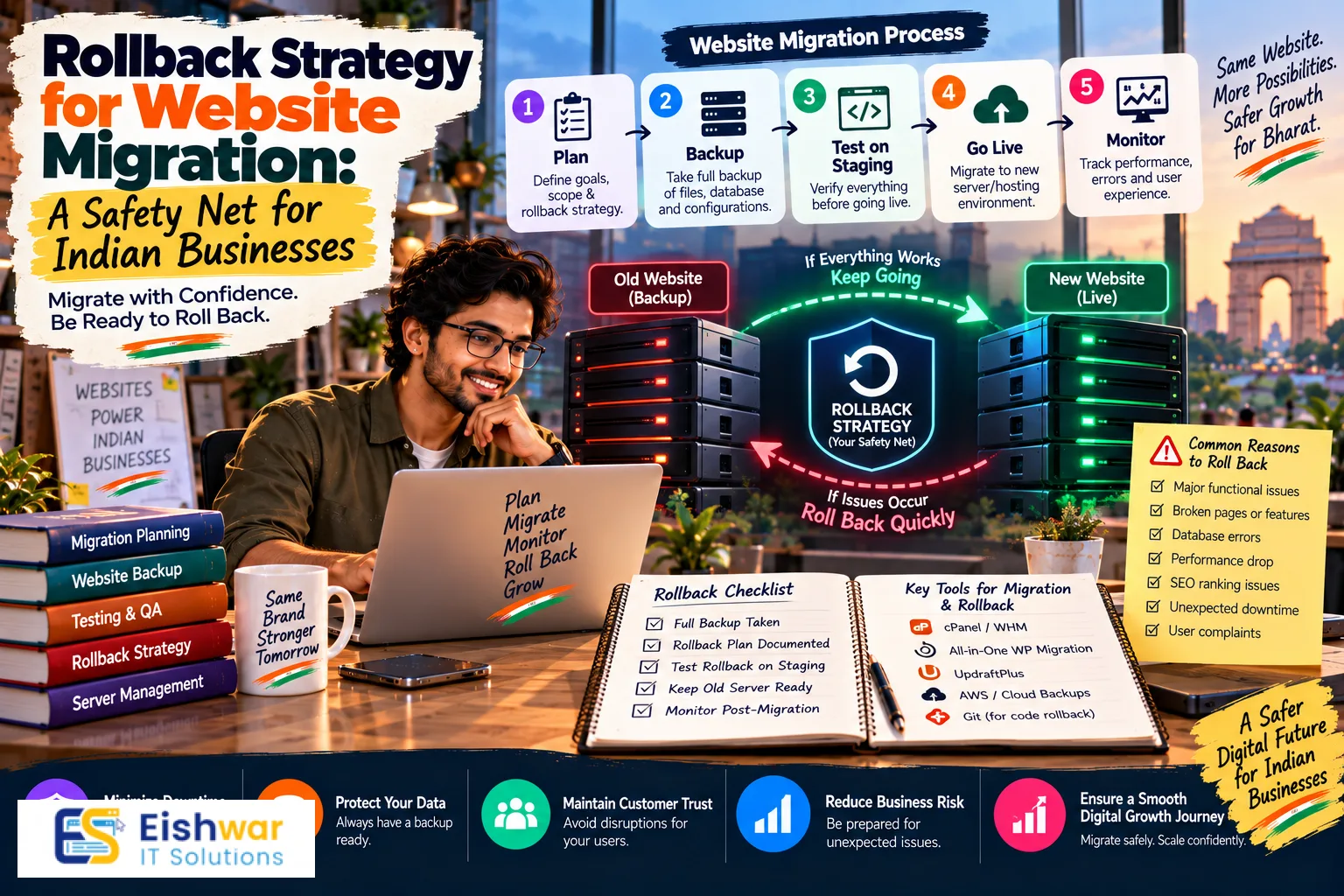
Rollback Strategy for Website Migration: A Safety Net for Indian Busin
Published on: 13 Aug 2026
Rollback Strategy for Website Migration: A Safety Net for Indian Businesses
Introduction
Imagine this: you’ve just launched your new website after months of planning. The design is sleek, the content is fresh, and your team is excited. But then, within hours, you notice a critical bug—the checkout process fails, or your SEO rankings plummet. Panic sets in. What do you do?
Learn more about our Website services
This is where a rollback strategy saves the day. A rollback strategy is your pre-planned escape route—a way to revert your website to its previous, stable version if the migration goes wrong. For Indian businesses, where even a few hours of downtime can mean lost revenue and customer trust, having a solid rollback plan is not optional—it’s essential.
In this guide, we’ll walk you through everything you need to know about building a rollback strategy for your website migration. From creating backups to testing your rollback, we’ll cover practical steps that keep your business safe. Let’s dive in!
Main Section 1: Why a Rollback Strategy Matters for Your Business
The High Stakes of Website Migration in India
India’s digital economy is booming. With over 800 million internet users, your website is often your most valuable salesperson. A migration gone wrong can lead to:
- Revenue loss: If your e-commerce site is down during Diwali sales, you could lose lakhs of rupees. For example, a popular Indian fashion retailer experienced a 40% drop in sales during a festive weekend because their migration caused the site to crash for six hours. A rollback would have restored service in minutes.
- SEO damage: A botched migration can tank your rankings, making it harder for customers to find you. Google’s algorithm penalizes sites with broken links, slow load times, or duplicate content. If your migration changes URL structures without proper redirects, you could lose years of SEO equity.
- Data loss: Losing customer data or order history can destroy trust and invite legal issues under India’s Data Protection Act. For instance, a healthcare portal that lost patient records during a migration faced legal action and a hefty fine.
- Reputation damage: A broken website reflects poorly on your brand. In a market where word-of-mouth and online reviews are powerful, a single bad experience can deter hundreds of potential customers.
A rollback strategy minimizes these risks by giving you a safety net. It’s like having an insurance policy—you hope you never need it, but if you do, you’re covered.
Real-World Example: A Cautionary Tale
Consider a mid-sized Indian e-commerce company that migrated to a new CMS without a rollback plan. The migration caused a 404 error on all product pages. They spent 48 hours fixing the issue, but by then, their organic traffic had dropped by 70%. They lost thousands of customers to competitors. Had they had a rollback strategy, they could have reverted to the old site in minutes and fixed the issues offline. This example underscores the importance of being prepared for the unexpected.
Main Section 2: Building Your Rollback Plan – Step-by-Step
Step 1: Pre-Migration Audit
Before you even start migrating, you need a complete inventory of your current website. This includes:
👉 Don't wait for the perfect moment; turn your vision into reality today.
Free Consultation- Files: All HTML, CSS, JavaScript, images, and videos. Don’t forget any custom scripts or plugins that might be critical to functionality.
- Database: All content, user data, orders, and configurations. This is often the most complex part to restore, so ensure you have a clear map of your database schema.
- Configurations: Server settings, DNS records, and third-party integrations. For example, if you use a payment gateway like Razorpay or PayU, note the API keys and endpoints.
Document everything. This audit will be your reference point for the rollback. Create a detailed checklist that your team can follow, and store it in a shared location like Google Drive or Confluence.
Step 2: Create Comprehensive Backups
Your backup is your lifeline. Make sure you have:
- Full backup: A complete snapshot of your old website, including files and database. Use tools like cPanel’s backup feature or command-line utilities like
mysqldumpfor databases. - Offsite backup: Store your backup in a separate location (e.g., cloud storage) to protect against server failures. For Indian businesses, using local cloud providers like AWS India (Mumbai region) or Google Cloud’s Mumbai region can reduce latency and ensure data sovereignty.
- Versioned backups: Keep multiple versions so you can roll back to any point in time. For instance, if you make changes during the migration, you might want to revert to a backup from before those changes.
Automate your backups where possible. For WordPress sites, plugins like UpdraftPlus or VaultPress can schedule daily backups and store them in cloud services. For custom applications, consider using cron jobs to run backup scripts.
Step 3: Document Your Rollback Procedures
Write down exactly how to revert to the old version. This should include:
- Restore files: How to upload the old files to your server. This might involve using FTP, SSH, or a control panel like Plesk.
- Restore database: How to import the old database. Be careful to overwrite the new database completely, not just merge.
- DNS changes: How to switch back to the old domain or server. If you changed your DNS records, you’ll need to revert them, keeping in mind that DNS propagation can take time.
- Testing: How to verify that the rollback was successful. Create a checklist of critical functions to test, such as login, search, and checkout.
Your team should have this document accessible at all times, and it should be tested regularly. Consider creating a runbook that includes screenshots and command examples to make it easy for any team member to follow.
Step 4: Test Your Rollback
A rollback plan that has never been tested is useless. Schedule a dry run before the actual migration. This will help you:
- Identify any flaws in your procedures.
- Familiarize your team with the process.
- Estimate how long it takes to roll back. For example, if your site has 10,000 products, restoring the database might take 30 minutes. Knowing this helps you set expectations.
During the test, simulate a failure scenario. For instance, intentionally break a critical feature and then execute the rollback. This will give you confidence that your plan works under pressure.
👉 Free Website Audit
Get Free AuditStep 5: Communicate with Stakeholders
Let your team, and if necessary, your customers, know that you have a rollback plan. This builds confidence and ensures that everyone knows their role in case of an emergency. For example, your customer support team should be briefed on how to respond to queries during a rollback. If you have a large user base, consider sending a proactive communication about the migration and the contingency plan.
Main Section 3: Executing a Rollback – When and How to Pull the Plug
Signs You Need to Roll Back
Not every issue requires a rollback. But if you notice any of the following, it’s time to consider it:
- Critical functionality broken: Checkout, login, or other essential features are not working. For an e-commerce site, if customers can’t complete a purchase, that’s a red flag.
- Security breaches: Your new site is vulnerable to attacks. For example, if you discover that the new CMS has a known vulnerability that hasn’t been patched, it’s safer to roll back.
- Data loss: You’re losing data or cannot access your database. If user data is being corrupted or deleted, immediate rollback is necessary.
- SEO disaster: Your rankings are dropping rapidly, and you can’t fix it quickly. If you see a significant drop in organic traffic within 24 hours, it’s better to revert and address the issues later.
Step-by-Step Rollback Execution
- Alert your team: Notify your team immediately so they can assist. Use a communication tool like Slack or WhatsApp to coordinate.
- Take the new site offline: Temporarily redirect your domain to a maintenance page. This prevents further damage and gives you a clean slate to work with.
- Restore files: Upload the old files to your server. Ensure that you overwrite all files, including hidden ones like .htaccess.
- Restore database: Import the old database. Make sure to drop the new database first to avoid conflicts.
- Switch DNS: If you changed DNS, revert to the old settings. Remember that DNS propagation can take up to 48 hours, so plan accordingly.
- Test: Verify that the old site is fully functional. Check all critical pages, forms, and integrations.
- Monitor: Keep a close eye on the site for the next few days. Use tools like Google Analytics and UptimeRobot to track performance and uptime.
Post-Rollback Analysis
Once you’ve rolled back, don’t just move on. Investigate what went wrong and why. Use this information to fix the issues before attempting the migration again. For example, if the problem was a plugin incompatibility, find an alternative plugin or update the existing one. Document your findings in a post-mortem report to share with your team.
Expert Tips
- Keep a “golden copy”: Always have a pristine copy of your old site that hasn’t been modified during the migration. This ensures you have a clean baseline to roll back to.
- Use a staging environment: Test your new site on a staging server before going live. This reduces the need for rollbacks by catching issues early.
- Automate backups: Use tools like UpdraftPlus or VaultPress to schedule automatic backups. For custom sites, consider using scripts that run nightly.
- Have a communication plan: Inform your team and customers about the migration and the rollback plan. Transparency builds trust.
- Set up monitoring: Use tools like Google Analytics and UptimeRobot to detect issues early. Set up alerts for unusual traffic patterns or error rates.
Common Mistakes
- Skipping the backup: Many businesses think they won’t need a backup. Big mistake! Always have a backup, even for minor migrations.
- Not testing the rollback: A rollback plan that isn’t tested is just a piece of paper. Test it regularly to ensure it works.
- Ignoring SEO: If you roll back, you need to ensure your old URLs and redirects are restored to avoid losing rankings. Use tools like Screaming Frog to check for broken links.
- Waiting too long: If you see a critical issue, don’t hesitate. A quick rollback can save you hours of downtime. Set a threshold—for example, if the issue isn’t resolved within 2 hours, roll back.
Future Trends
- AI-powered rollback: In the future, AI may automatically detect migration issues and trigger a rollback without human intervention. For example, machine learning algorithms could analyze user behavior and detect anomalies in real-time.
- Cloud-native rollback: As more Indian businesses move to the cloud, rollback strategies will become more automated and seamless. Cloud platforms like AWS and Azure offer built-in snapshot and restore features.
- Integration with DevOps: Rollback will be an integral part of the CI/CD pipeline, making it a standard practice. Tools like Jenkins and GitLab CI/CD already support automated rollbacks on failed deployments.
FAQs
1. What is a rollback strategy in website migration?
A rollback strategy is a predefined plan to revert your website to its previous version if the migration fails. It includes backups, procedures, and testing to ensure you can quickly restore normal operations.
👉 Free Homepage Demo
Book Demo2. How long does it take to roll back a website?
The time depends on the size of your site and your preparation. With a well-tested plan, you can roll back in minutes. Without one, it could take hours or even days. For example, a small blog with a few pages can be restored in 10 minutes, while a large e-commerce site with thousands of products might take an hour.
3. Can I roll back my website without losing SEO rankings?
If you restore your old URLs and redirects, you can minimize SEO damage. However, any downtime or changes to your site structure can affect rankings temporarily. Use 301 redirects to point old URLs to the new ones, and monitor your rankings closely after the rollback.
4. What should I include in my rollback backup?
Your backup should include all files, databases, configurations, and any custom code. It’s best to have a full snapshot of your entire website. This includes your CMS files, plugins, themes, and any uploaded media.
5. How often should I test my rollback plan?
You should test your rollback plan before every major migration, and ideally, at least once a year, to ensure it still works with your current setup. If you make significant changes to your site, such as adding new features or changing servers, test again.
6. What are the common causes of migration failures?
Common causes include incompatible plugins, incorrect database configurations, missing files, and DNS issues. For example, a plugin that worked on the old CMS might not be compatible with the new one, causing errors. Always test your site thoroughly in a staging environment before going live.
7. How can I minimize the risk of needing a rollback?
To minimize risk, use a staging environment, conduct thorough testing, and ensure your team is trained. Also, consider using a migration service or tool that automates the process and includes rollback features. For instance, some managed hosting providers offer one-click restore options.
Conclusion
A rollback strategy is your safety net in the high-stakes game of website migration. It’s not about expecting failure; it’s about being prepared for the unexpected. For Indian businesses, where online presence is crucial, a rollback plan can save you from costly downtime, data loss, and SEO setbacks. Remember, the key is to plan ahead, back up everything, test your procedures, and act quickly if things go wrong. By doing so, you can migrate with confidence, knowing that you have a solid backup plan.
If you’re planning a website migration and need expert help, don’t hesitate to reach out. We’re here to help you succeed.
CTA
Ready to migrate your website without the fear of failure? Contact EishwarITSolution today for a free consultation. Our experts will help you create a bulletproof rollback strategy and ensure a smooth, successful migration. Call us now or visit our website to get started!