
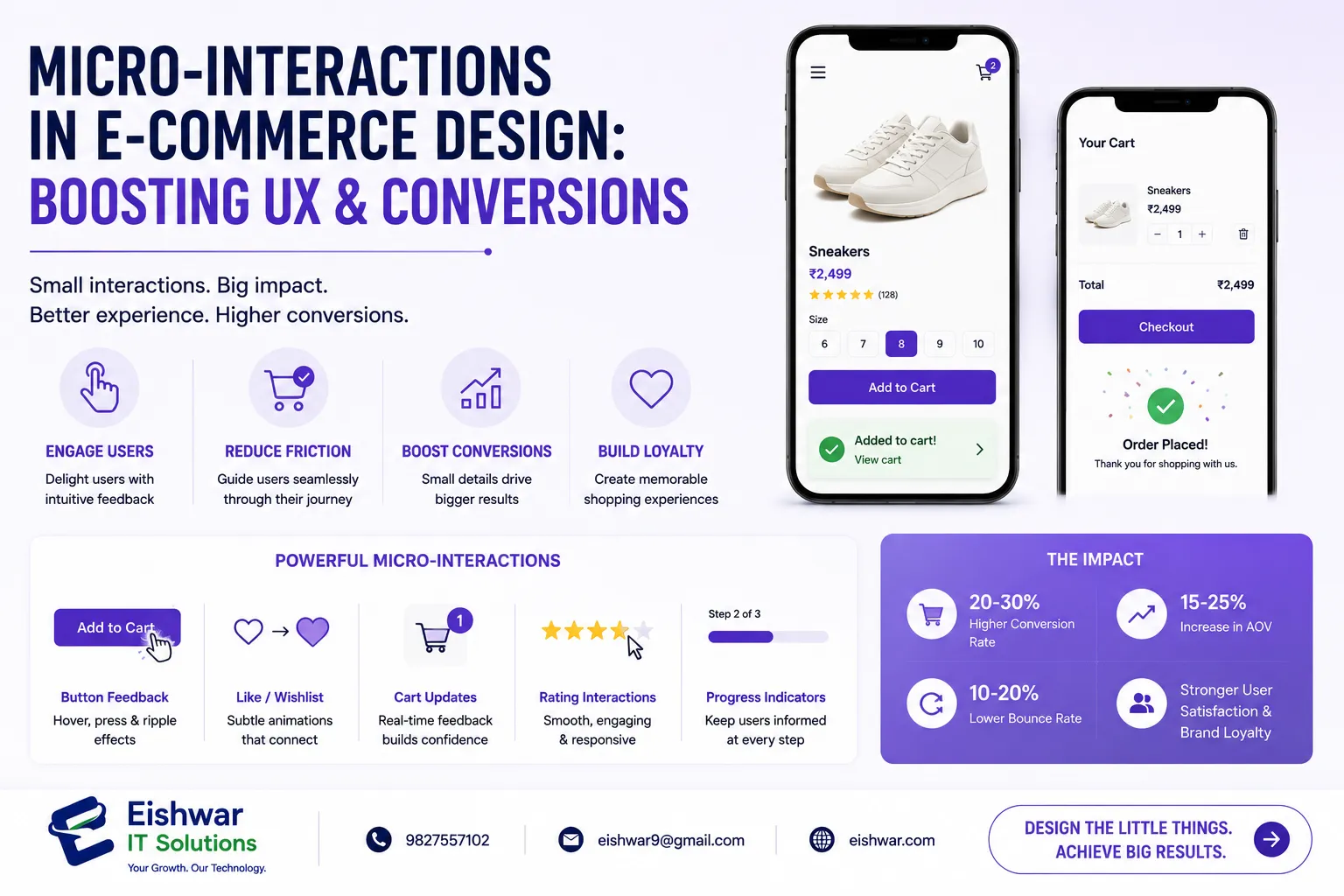
Micro-Interactions in E-commerce Design: Boosting UX & Conversions
Published on: 17 Jun 2026
Micro-Interactions in E-commerce Design: Boosting UX & Conversions
Introduction
In the fiercely competitive world of e-commerce, every detail matters. While grand design elements like layout and color scheme grab attention, it's the tiny, often overlooked interactions that can make or break the user experience. These are called micro-interactions—small, purposeful moments where the user and the website communicate. Think of the satisfying 'ding' when an item is added to the cart, the subtle animation of a button being pressed, or the gentle shake of a form field when an error occurs.
Learn more about our Website services
For Indian businesses like EishwarITSolution, mastering micro-interactions can be a game-changer. They not only make the browsing experience delightful but also guide users toward desired actions—like making a purchase or signing up for a newsletter. In this blog, we'll explore the role of micro-interactions in e-commerce website design, how they enhance UX and conversions, and provide actionable tips for implementation.
Main Section 1: What Are Micro-Interactions and Why Do They Matter?
Micro-interactions are single-purpose, event-driven moments that focus on one task. They consist of four parts: trigger, rules, feedback, and loops/modes. For example, when a user clicks a 'Like' button (trigger), the heart icon fills with color (feedback) and the count increases (rules). The loop is the user's ability to click again to undo.
Why do they matter? Because they make the user feel in control, provide instant feedback, and create emotional connections. A study by Google found that 53% of mobile users abandon sites that take longer than three seconds to load. Micro-interactions can make wait times feel shorter by engaging users. For e-commerce, they reduce friction, clarify actions, and build trust.
For instance, when a customer adds a product to the cart, a smooth animation confirming the action reassures them. Without it, users might wonder if the click registered, leading to frustration or repeated clicks. In India, where mobile-first browsing is dominant, these small touches are critical for retaining users. A practical example: a leading Indian fashion retailer saw a 12% increase in add-to-cart conversions after implementing a subtle 'item added' animation that lasted just 300 milliseconds.
Main Section 2: Key Micro-Interactions for E-commerce Success
Let's dive into specific micro-interactions that can transform your e-commerce site. Each one is designed to address a common user pain point or enhance delight:
- Add to Cart Animation: When a user clicks 'Add to Cart', show a brief animation of the item flying into the cart icon. This provides clear feedback and a sense of progress. For example, a home decor site could animate a cushion floating into a cart, making the action feel tangible.
- Form Field Validation: As users fill in checkout forms, highlight fields in green when correct and red with a tooltip when wrong. This reduces errors and speeds up completion. A practical tip: use inline validation that checks as the user types, rather than after submission, to prevent frustration.
- Loading Indicators: Instead of a static spinner, use a progress bar or a playful animation (e.g., a bouncing box) to keep users engaged during page loads. For instance, a grocery delivery site could show a rotating vegetable icon while the product list loads, making the wait feel shorter.
- Hover Effects on Product Images: When hovering over a product, show a zoom effect or a quick 360-degree spin. This mimics the in-store experience of examining an item. A jewelry store could use a subtle sparkle animation on hover to highlight diamond details.
- Price Drop Alerts: If a user has wishlisted an item, a subtle notification with a sound or badge can re-engage them. For example, a travel booking site could send a gentle 'ping' when flight prices drop, prompting immediate action.
- Checkout Progress Bar: Show a multi-step progress indicator that updates smoothly as the user moves through checkout. This reduces anxiety and drop-offs. A best practice is to include a 'back' button that animates the bar in reverse, giving users confidence to correct mistakes.
Each of these interactions serves a dual purpose: they enhance usability and subtly nudge the user toward conversion. For instance, a well-placed hover effect on a 'Buy Now' button can increase click-through rates by up to 15%.
👉 Don't wait for the perfect moment; turn your vision into reality today.
Free ConsultationMain Section 3: How Micro-Interactions Drive Conversions
Micro-interactions directly impact conversion rates by reducing friction and building confidence. For example, a well-designed 'Add to Cart' button that changes color and shows a count increase can increase click-through rates by up to 20%. Similarly, a progress bar that updates in real-time can reduce checkout abandonment by 15%.
Consider an Indian fashion e-commerce store. When a user selects a size, a micro-interaction could display a 'Size Guide' pop-up with a smooth animation. This small addition can prevent returns and boost trust. Another example: when a coupon code is applied, a subtle green checkmark and a price update animation confirm success, encouraging users to complete the purchase. A real-world case: an electronics retailer implemented a 'stock low' badge that pulsed gently when only a few items remained, leading to a 25% increase in urgency-driven purchases.
Moreover, micro-interactions can personalize the experience. For instance, a welcome back animation for returning users or a birthday discount pop-up with confetti creates a memorable moment. These emotional connections lead to higher customer lifetime value. A practical tip: use user data to trigger interactions—like a 'rainy day' animation for users in a specific city, offering a discount on umbrellas.
Expert Tips
Here are actionable tips from industry experts for implementing micro-interactions effectively:
- Keep it subtle: Micro-interactions should enhance, not distract. Avoid over-animating—stick to 200-500ms duration. For example, a button click should feel instantaneous, not sluggish.
- Test with real users: Use A/B testing to see which interactions improve metrics. For example, test a simple vs. animated 'Add to Cart' button. A/B test results from a home goods site showed that a bounce animation increased conversions by 8%.
- Prioritize mobile: In India, over 70% of e-commerce traffic comes from mobile. Ensure micro-interactions are touch-friendly and don't increase load time. Use touch events like 'tap' instead of 'hover' for mobile-first design.
- Use sound sparingly: Sound can be annoying. Use it only for critical actions like payment success or error alerts, and always provide a mute option. A good example is a soft 'click' sound for a checkout button, but never for every page navigation.
- Align with brand personality: A playful brand can use whimsical animations, while a luxury brand should use elegant, minimal feedback. For instance, a children's toy store might use a confetti burst on add-to-cart, while a watch retailer uses a subtle shimmer.
Common Mistakes
Avoid these pitfalls when designing micro-interactions to ensure they enhance rather than hinder the user experience:
👉 Free Website Audit
Get Free Audit- Overcomplicating: Too many animations can slow down the site and overwhelm users. Stick to 3-5 key interactions per page. For example, avoid animating every single link—focus on high-impact actions like add-to-cart and checkout.
- Ignoring accessibility: Some users may have motion sensitivity. Provide a 'reduce motion' option in settings. Use the prefers-reduced-motion CSS media query to automatically disable animations for those users.
- Inconsistent feedback: If a button changes color on hover but not on click, users get confused. Maintain uniformity across the site. For instance, all buttons should have the same hover and click states.
- Neglecting error states: Always design for errors—like a failed payment—with clear, reassuring feedback instead of a generic error message. A good practice is to show a gentle shake animation on the form field with a specific message like 'Invalid card number, please try again.'
- Forgetting performance: Heavy animations can increase page load time. Use CSS animations instead of JavaScript where possible, and optimize assets. For example, use SVG for icons instead of GIFs to reduce file size.
Future Trends
The future of micro-interactions in e-commerce is exciting. Here's what to watch for and how to prepare:
- Voice and Gesture-Based Interactions: With smart speakers and AR/VR growing, micro-interactions will extend beyond clicks to voice confirmations and hand gestures. For example, a user could say 'add to cart' and hear a confirmation sound, or swipe to remove an item.
- AI-Powered Personalization: Micro-interactions will adapt based on user behavior—e.g., a returning customer sees a personalized welcome animation. AI can analyze past purchases to trigger relevant interactions, like a 'restock alert' animation for a previously bought item.
- Haptic Feedback: On mobile devices, subtle vibrations can confirm actions like a successful payment, adding a tactile layer. For instance, a short buzz when a coupon is applied can reinforce the action without visual clutter.
- Dark Mode Adaptations: Micro-interactions will automatically adjust colors and animations for dark mode users. Ensure your animations have sufficient contrast and don't cause eye strain in low-light conditions.
- Micro-Interactions as Data Points: Every interaction can be tracked to understand user intent, helping businesses refine their design further. For example, analyzing how many users hover over a 'size guide' can indicate if sizing information is clear.
To stay ahead, start experimenting with these trends now. For example, implement a simple voice search confirmation sound or a dark mode toggle animation. A practical step: use tools like Google's Lighthouse to test performance impact before rolling out new interactions.
👉 Free Homepage Demo
Book DemoFAQs
1. What are micro-interactions in e-commerce design?
Micro-interactions are small, single-purpose animations or feedback events that occur when a user performs an action, like clicking a button or filling a form. They provide instant feedback, guide users, and enhance the overall experience. Examples include a button color change on click or a progress bar update during checkout.
2. How do micro-interactions improve conversion rates?
By reducing friction and providing clear feedback, micro-interactions build user confidence and reduce anxiety. For example, a smooth checkout progress bar can decrease abandonment rates by 15%, and a well-timed 'add to cart' animation can increase click-through rates by up to 20%.
3. Can micro-interactions slow down my website?
If poorly implemented, yes. Use lightweight CSS animations, keep durations under 500ms, and test on mobile devices to ensure performance isn't compromised. Avoid heavy JavaScript libraries and optimize assets like SVGs.
4. What are some examples of micro-interactions for Indian e-commerce sites?
Examples include a festive Diwali-themed add-to-cart animation with diya icons, a Hindi language toggle with a smooth transition, or a payment success sound that mimics a cash register. For regional appeal, use local festival colors and motifs in animations.
5. How can I start adding micro-interactions to my site?
Begin by identifying key user actions (add to cart, login, checkout). Use tools like LottieFiles for animations or CSS transitions. Test with a small audience before rolling out site-wide. Start with one high-impact interaction, like a checkout progress bar, and iterate based on user feedback.
6. Are micro-interactions accessible for all users?
Not automatically. Provide a 'reduce motion' option for users with vestibular disorders, ensure color contrast meets WCAG standards, and use sound with caution. Use the prefers-reduced-motion media query to disable animations for sensitive users.
7. What is the ideal duration for a micro-interaction?
The ideal duration is between 200 and 500 milliseconds. Shorter than 200ms may feel too fast to notice, while longer than 500ms can feel sluggish. For example, a button click animation should complete in 300ms to feel responsive.
Conclusion
Micro-interactions are the secret ingredient that can elevate your e-commerce website from functional to delightful. They build trust, reduce friction, and ultimately drive conversions. For Indian businesses targeting a mobile-first audience, these small touches are no longer optional—they're essential. By carefully designing each interaction to be subtle, purposeful, and aligned with your brand, you can create a seamless user journey that turns visitors into loyal customers.
At EishwarITSolution, we specialize in crafting e-commerce designs that blend aesthetics with functionality. By incorporating thoughtful micro-interactions, you can create a seamless user journey that turns visitors into loyal customers. Start small, test often, and watch your conversion rates grow.
CTA
Ready to transform your e-commerce site with micro-interactions? Contact EishwarITSolution today for a free consultation. Let's design an online store that your customers will love. Our team of experts will help you identify the right interactions for your audience and implement them without compromising performance.